
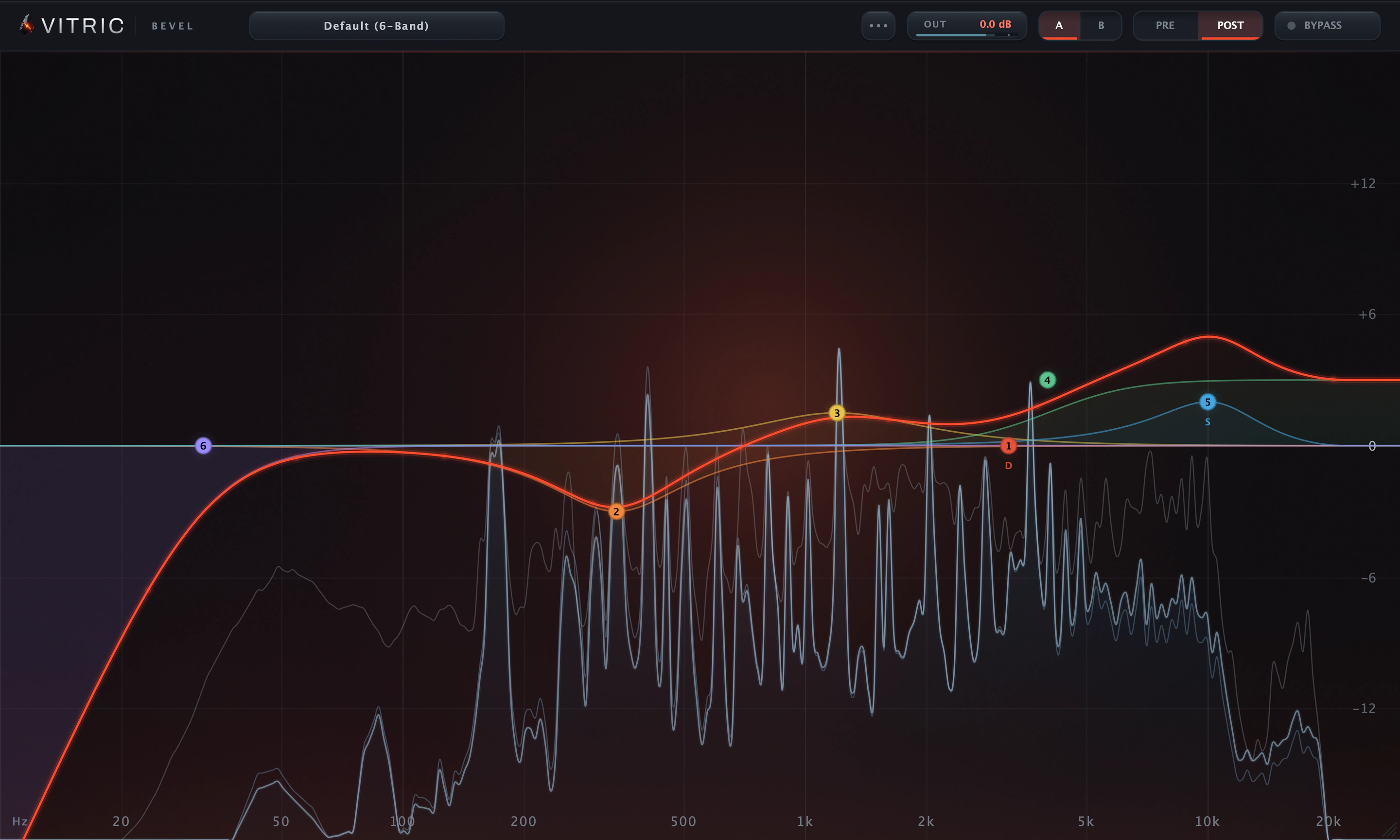
Twenty-four slots can take bell, shelf, notch, high-pass or low-pass shapes.
Bevel EQ Dynamic EQ plugin
Tame resonances and make room for the vocal.
- 24 bands: bell, shelf, notch, high-pass, low-pass
- Dynamic bands for resonances that come and go
- Each band in stereo, left, right, mid or side
Runs on Mac and Windows: VST3, AU and AAX.
Sale price
One-time purchase. 14-day money-back guarantee.
Mac and Windows: VST3, AU and AAX.
Pay by card, PayPal, Apple Pay or Google Pay.
US and Canadian sales tax is added at checkout.
By buying, you agree to the EULA and Terms of Service.
Listen to Bevel EQ
The same take with and without Bevel EQ. Loudness matched.
Resonance cut and air: −6 dB at 960 Hz, −2.5 dB at 630 Hz, +4.5 dB high shelf at 7 kHz, +1.5 dB low shelf at 90 Hz.
About this demo
Rendered through Bevel EQ 1.3.0 on macOS. Input and processed excerpts are matched in loudness. Switching keeps your place.
Open input audio ↗Open processed audio ↗Bevel EQ features
A 24-band dynamic EQ plugin for resonances that come and go, broad tone moves and stereo cleanup. Set each band as a bell EQ, a shelf, a notch or a pass filter, place it in stereo, left, right, mid or side, and work directly on the spectrum.
Clean up the problem. Keep the character.
Cut rumble, isolate a resonance or add a broad shelf on the same curve. When a harsh frequency comes and goes, use a dynamic bell or shelf instead of a constant cut. Each band can work on the full stereo signal, one channel, the mid or the sides.
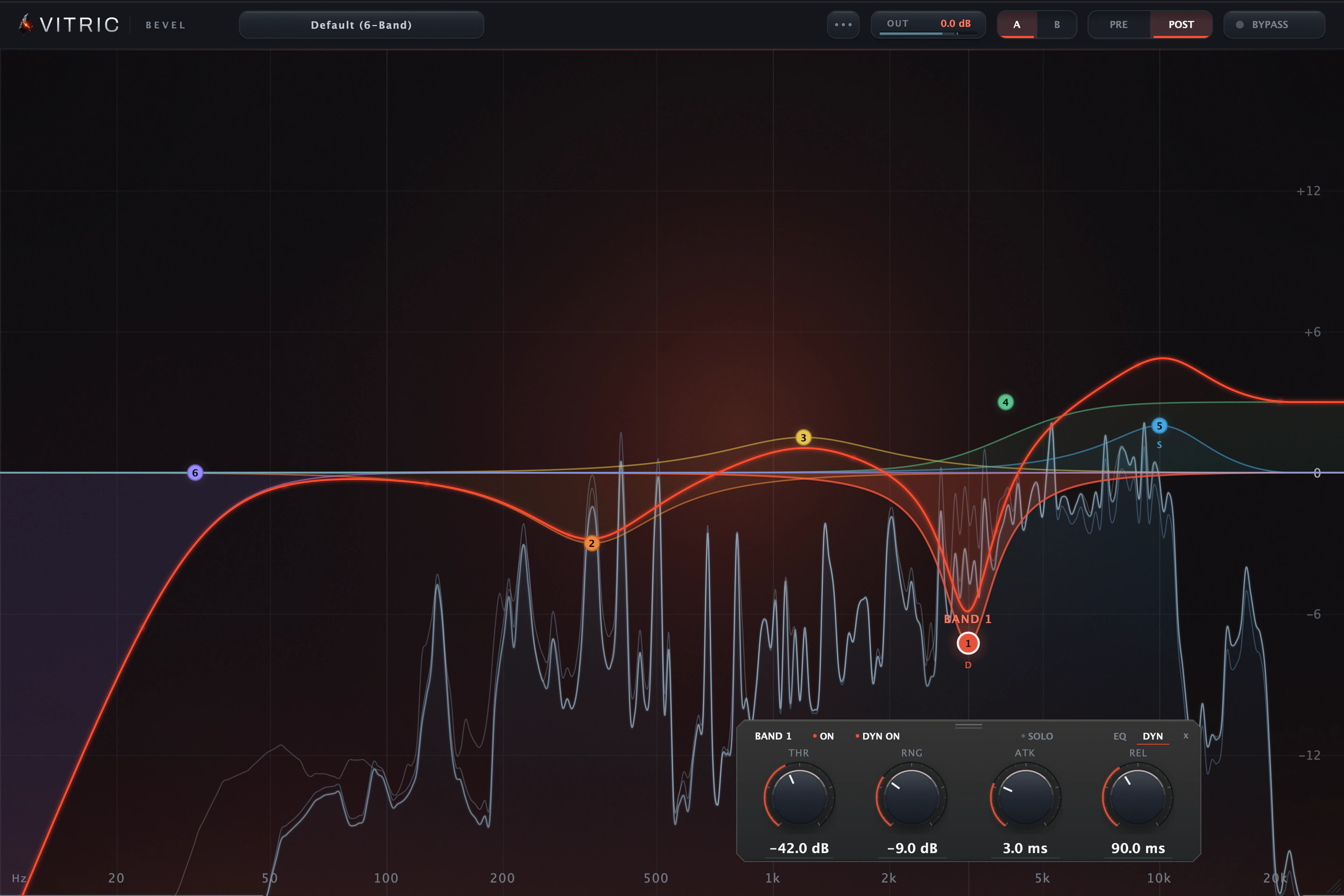
Tame harsh peaks as they hit
Bell and shelf bands have threshold, signed range, attack and release on the DYN page. Let a dynamic bell reduce an aggressive frequency when it crosses threshold, with signed range and timing you control.
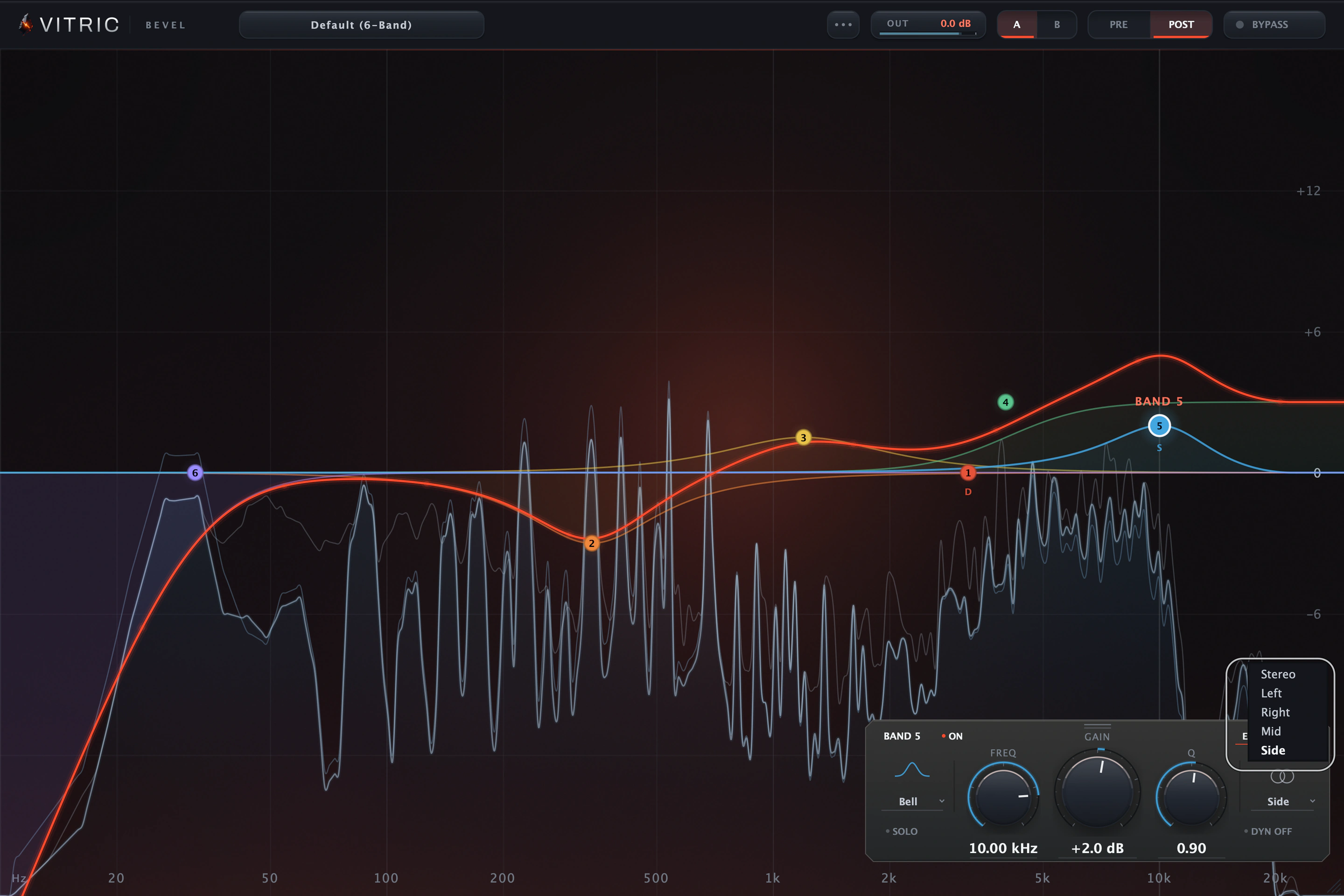
EQ the middle or sides alone
Each band carries its own placement. Place a shelf or corrective cut in the mid or sides without building separate EQ chains.
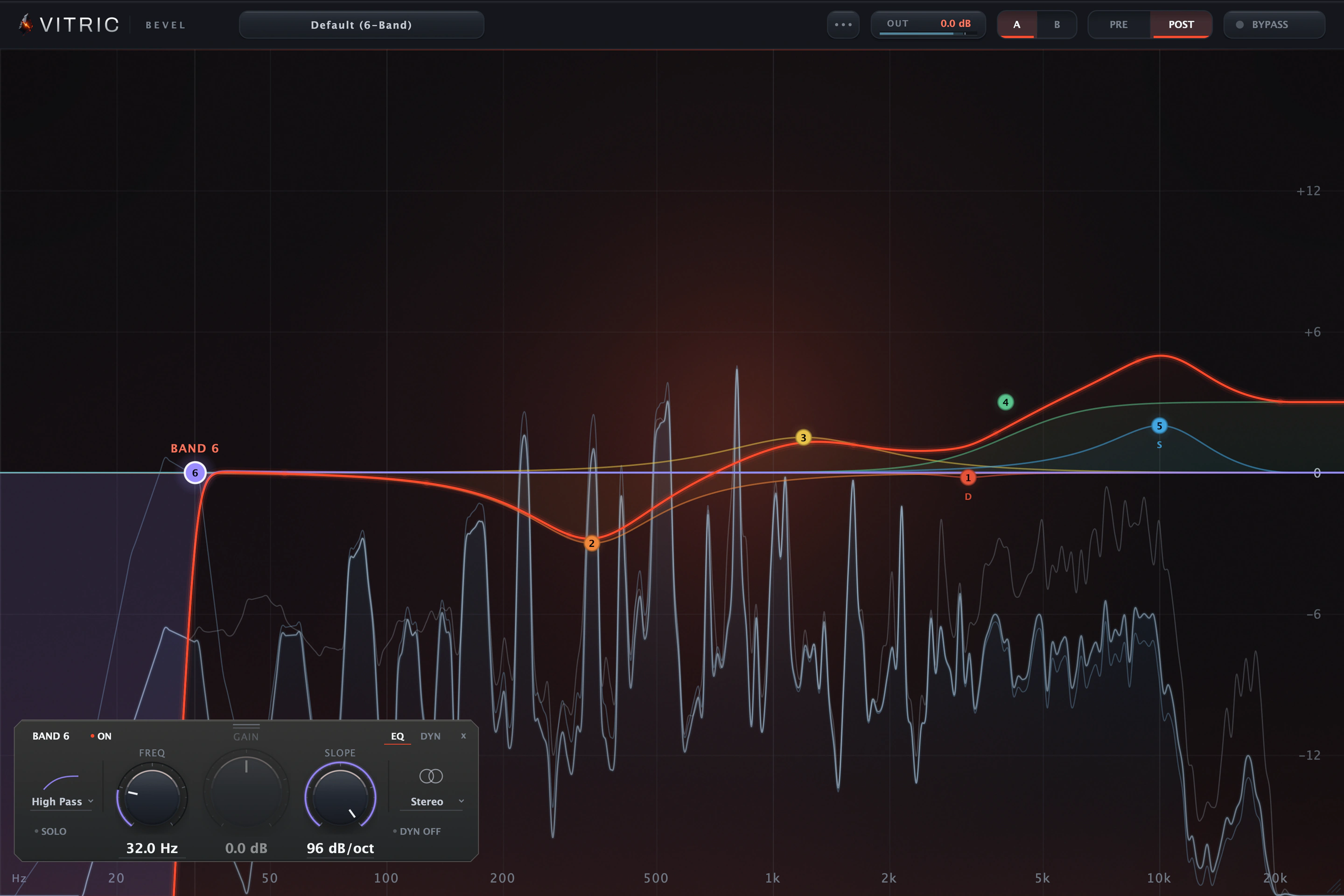
Clean up lows with steep cuts
High-pass and low-pass slopes run from 12 to 96 dB/oct. Twenty-four slots can take bell, shelf, notch, high-pass or low-pass shapes.
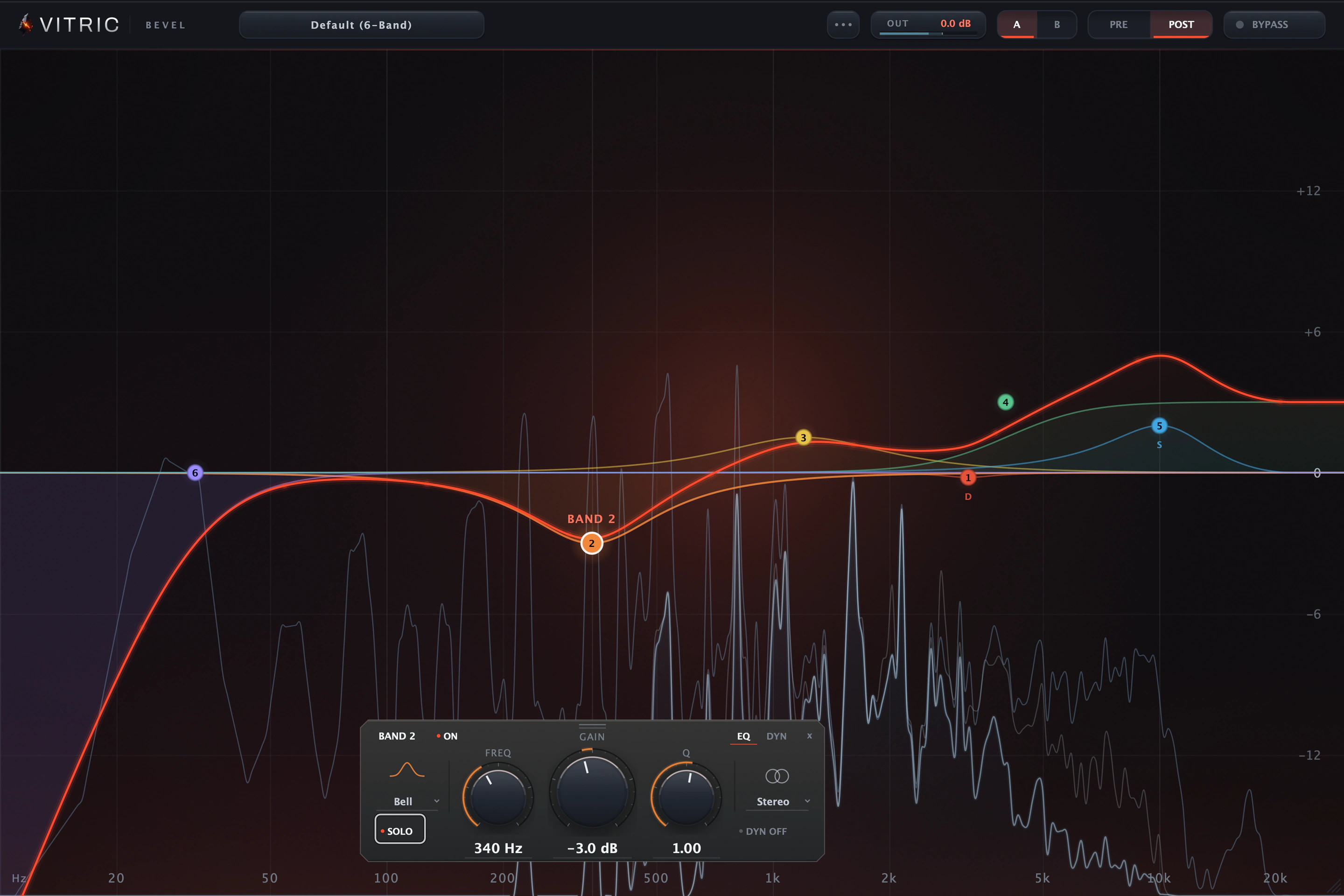
Solo a band to hear your cut
SOLO on the band plate auditions the band's own frequency region, filtered to the band's shape.
Every control is in the Bevel EQ manual.
Band types
| Band type | What it does | Reach for it on |
|---|---|---|
| Bell | Boost or cut around a centre, Q from broad to surgical | Resonances, presence, body |
| Shelf | Lift or lower everything past a corner | Air, warmth, mud |
| Notch | Remove a single frequency | Hum, whistles, ringing |
| High pass | 12 to 96 dB/oct floor control | Rumble, stage noise, low mud |
| Low pass | 12 to 96 dB/oct ceiling control | Hiss, harsh cymbals, lo-fi moves |
All features and controls
- 24 freeform bell, shelf, notch, high-pass and low-pass bands
- Stereo, left, right, mid and side placement per band
- Dynamic bell/shelf processing with threshold, signed range and timing
- EQ and DYN pages with separate DYN ON/OFF
- 12–96 dB/oct high-pass and low-pass slopes
- Pre/post analysis, band solo and exact numeric entry
- Movable selected-band plate with remembered position
- A/B states, undo and redo
- Graph: Command-drag fine; Shift frequency-only; Alt+Shift gain-only (Mac modifiers)
Compare two EQ settings
A/B stores two full EQ states. Compare at similar levels. A/B does not adjust gain for you.
Freeform bands
Twenty-four slots can take bell, shelf, notch, high-pass or low-pass shapes, and the band plate sits inside the spectrum beside the band you select.
Filter slopes
High-pass and low-pass slopes run from 12 to 96 dB/oct. Band 6 here is a 96 dB/oct high-pass at 32 Hz, the near-brickwall, and its plate shows the slope.
Pre/post analyzer
Turn on Show pre and post together in Options to draw both traces under the summed response, from the program material the meter path actually sees.
Dynamic bands
Bell and shelf bands have threshold, signed range, attack and release on the DYN page. DYN ON/OFF enables processing separately; switching pages alone does not change the sound. In VST3 and AU hosts a dynamic band can also listen to an external sidechain: right-click the band, choose Dynamic source, External sidechain, and route a track to Bevel's sidechain input.
Stereo, mid or side, per band
Each band carries its own placement. Band 5 here lifts the sides only: its plate reads Side and the S tag sits under the node.
Per-band solo
SOLO on the band plate auditions the band's own frequency region, filtered to the band's shape.
Exact values, typed
Click a readout in the band plate and type the value in its own units. Return commits it, Escape cancels.
A/B states, on the bar
A/B stores two full EQ states. PRE/POST chooses the main analyzer trace; Options can show both together. Compare at similar levels. A/B does not adjust gain for you.
Edit on the node
Double-click a node and its value bubble opens on the curve: FREQ, GAIN and Q, each a field you can type into without leaving the display.
Bevel EQ in a session
Vocal cleanup
High-pass rumble, use band solo to locate a resonance, then shape the top with a shelf.
Kick and bass
Send the kick to Bevel EQ's sidechain input and let a dynamic low shelf on the bass dip only while the kick hits (VST3 and AU).
Fast tonal decisions
Compare pre/post spectra under the curve, type exact values and keep two settings in A/B.
Free tools for the same job: EQ Frequency Chart (ranges, bands, notes) and Loudness Meter (LUFS and true peak).
Bevel EQ in motion
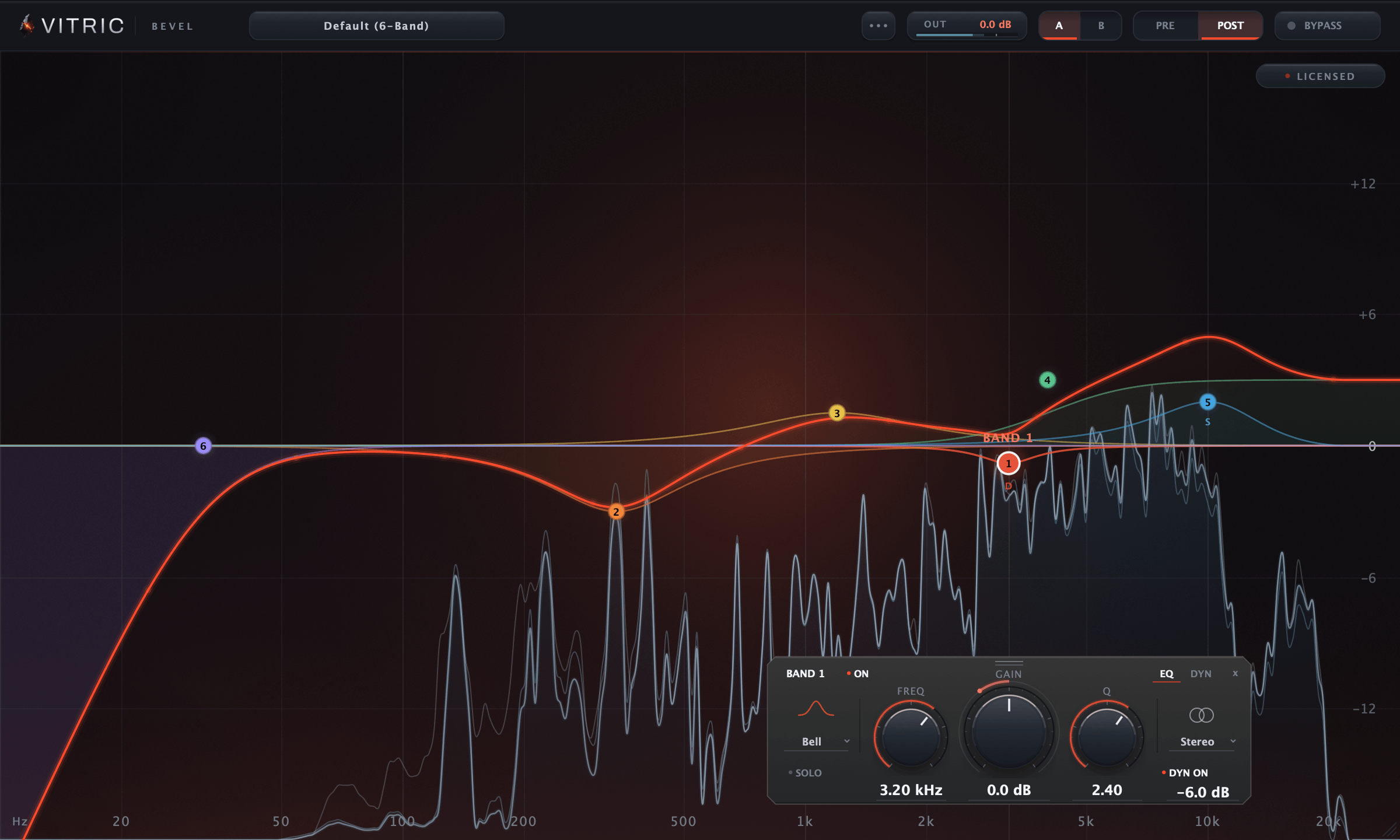
Bevel EQ, captured live from the plugin: the Bevel interface as it runs.
Bevel EQ specifications
- Bands
- 24, freeform
- Per band
- Stereo / L / R / Mid / Side · solo · dynamic on bells and shelves
- Dynamics
- Threshold -72 to 0 dB · signed range ±24 dB
- Filter slopes
- 12 to 96 dB/oct
- Analyzer
- Pre and post, together via Options; 4096 to 16384-pt FFT
- Oversampling
- Zero Latency / 2x / 4x, host-compensated
- Mono-maker
- 24 dB/oct; corner 20 to 500 Hz, set in Options
- Platforms
- macOS 10.15 or later on Intel; macOS 11 or later on Apple Silicon. AU, VST3, AAX. Windows 10 or later, 64-bit. VST3, AAX, Standalone.
- Made in
- USA
- Hosts
- A 64-bit host supporting your platform’s plugin format. Your DAW may require a newer operating system. Use it in Pro Tools, Logic Pro, Ableton Live, Cubase, Studio One, FL Studio, REAPER, Bitwig Studio, and other compatible hosts. Find the right format for your DAW
- Included in
- Vitric Bundle, Mix Bundle, Vitric Access and Vitric Pro
Version 1.3.0. Instant download: your license key arrives by email right after payment.
Read the Bevel EQ manual Manual (PDF)
Questions about Bevel EQ
Which bands can be dynamic?
Bell, low-shelf and high-shelf bands. Use DYN ON/OFF to enable dynamics; the DYN page only reveals its controls. Notch and pass shapes retain those settings while they are inactive.
Can bands use different stereo placements?
Yes. Each band can work in stereo, left, right, mid or side.
Can I see the input and output together?
Yes. Enable Show pre and post together in Options. PRE/POST chooses which tap is the main trace.
Can I move the band controls out of the way?
Yes. Drag the plate’s grip or empty area to reposition it inside the graph. Double-click the grip to restore its automatic position.
Own Bevel EQ? Leave a verified review from your account.
What KVR users say about Bevel EQ
3 user reviews on KVR Audio, an independent plugin database. Average 5.0 out of 5. Newest first, never filtered by rating. All three were written in September 2026, while Bevel EQ was free during the launch sale.
ABednarskiSep 30, 2026Version 1.0 on Windows
★★★★★I have just download it last week, and make some tests. A really nice product for FREE ! Thanks .
benz560secSep 15, 2026Version 1 on Windows
★★★★★very nice equalizer. i like using it so far. only issue for me is i dont see a sidechain option. it kinda resembles the fabfilter eq.
jaredcasteloSep 8, 2026Version 1 on Windows
★★★★★Excelente eq cuando buscas una alternativa buena y gratuita, lo descargué para probarlo y se ha quedado en mi lista de herramientas gratuitas y Pro.
Translated from SpanishExcellent EQ when you're looking for a good, free alternative. I downloaded it to try it and it has stayed on my list of free and Pro tools.
As of October 1, 2026. Rate Bevel EQ on KVR.
Guides for Bevel EQ
- What is a parametric EQ? Frequency, gain and Q explained
- EQ settings: where to start on vocals, kick, 808, snare and the mix bus
- A Pro-Q 4 alternative? Bevel EQ vs FabFilter Pro-Q 4
More guides for Bevel EQ
- FabFilter Pro-Q alternatives: free and paid EQs compared
- How to read a spectrum analyzer, pre vs post
- Dynamic EQ vs multiband compression: which should you use?
- How to tune an 808 to your song, with a frequency chart
- What is sibilance? Why esses turn harsh, and how to tame them
- How to add plugins to FL Studio: install and scan VST3 plugins
- How to install AU plugins in Logic Pro
- How to EQ vocals: the frequencies that matter, and a starting chain
- Human hearing range: 20 Hz to 20 kHz, and what it means for a mix
- Low-pass, high-pass and band-pass filters, explained
- How to mix a song: a step-by-step order for your first mixes
- Mono vs stereo: what each means, and why you check a mix in mono
- What is music production, and what does a music producer do?
- How to master a song at home: the chain, the targets, the checks
- Mixing vs mastering: what each step does, and where one ends
- What is a Pultec EQ? The EQP-1A and the low-end trick
- How to EQ drums: kick, snare, toms and hi-hats, frequency by frequency
- What is a VST plugin? VST, VST3, AU and AAX explained, and which one your DAW uses
- How to use FL Studio: a beginner's guide to the Channel Rack, Piano roll, Playlist and Mixer
- Room correction and room EQ: what it can fix, what it can't, and how to measure
- How to install VST3, AU and AAX plugins on Windows and Mac: FL Studio, Ableton, Logic, Pro Tools and more
- Music production for beginners: what you need and where to start
- How to make house music: BPM, the four-on-the-floor beat, bass, chords and deep house
- How to EQ bass: low end, mud and definition
- Mixing with headphones: how to make headphone mixes translate
- Best DAW for beginners: free DAWs and trials compared
- How to EQ guitar and piano in a mix: acoustic, electric and piano, frequency by frequency
Related plugins
All plugins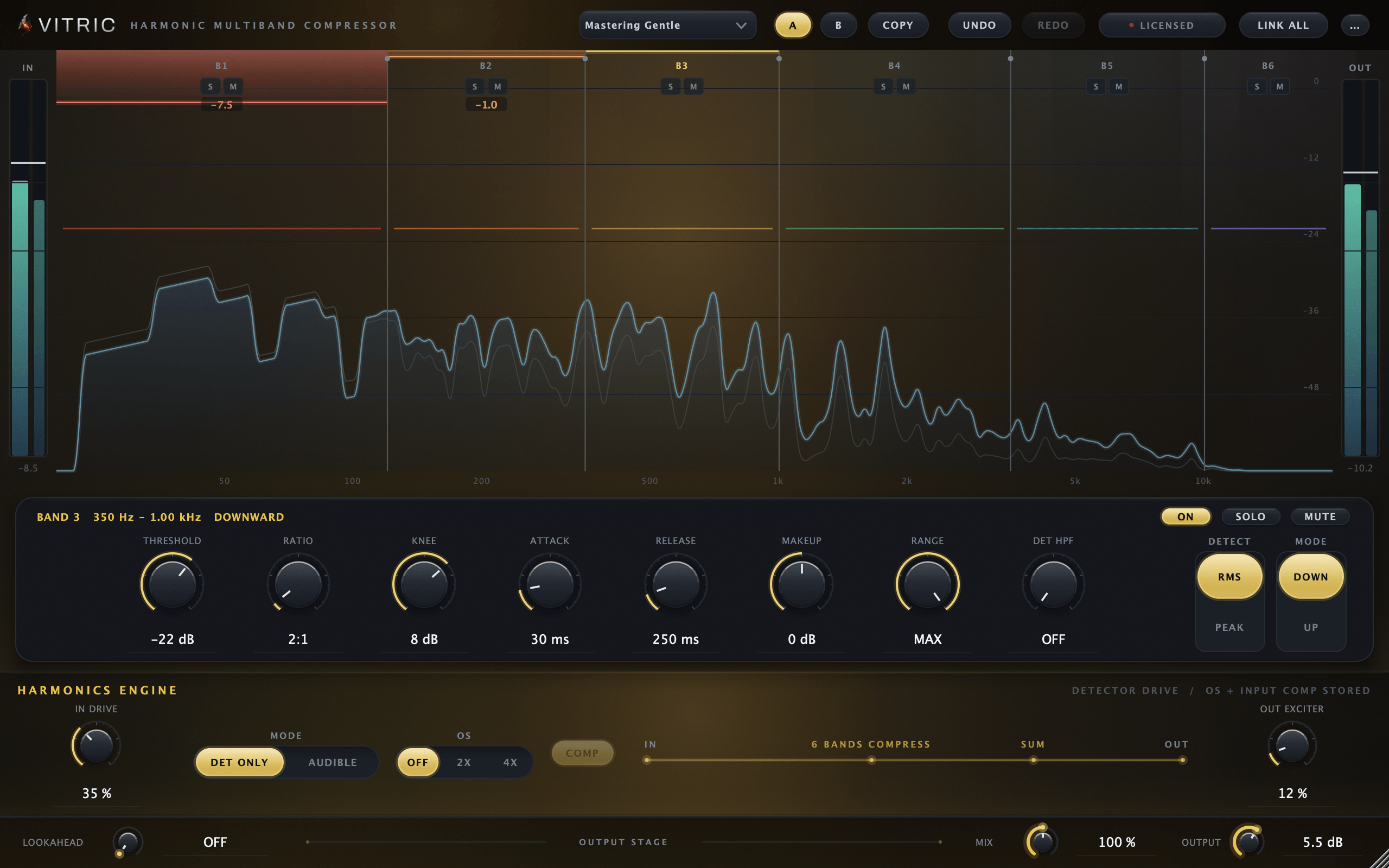
Harmonic Multiband Compressor
$59Regular price $100
Multiband Dynamics
Six bands of compression on one display, and drive that can color the audio or only the detector.
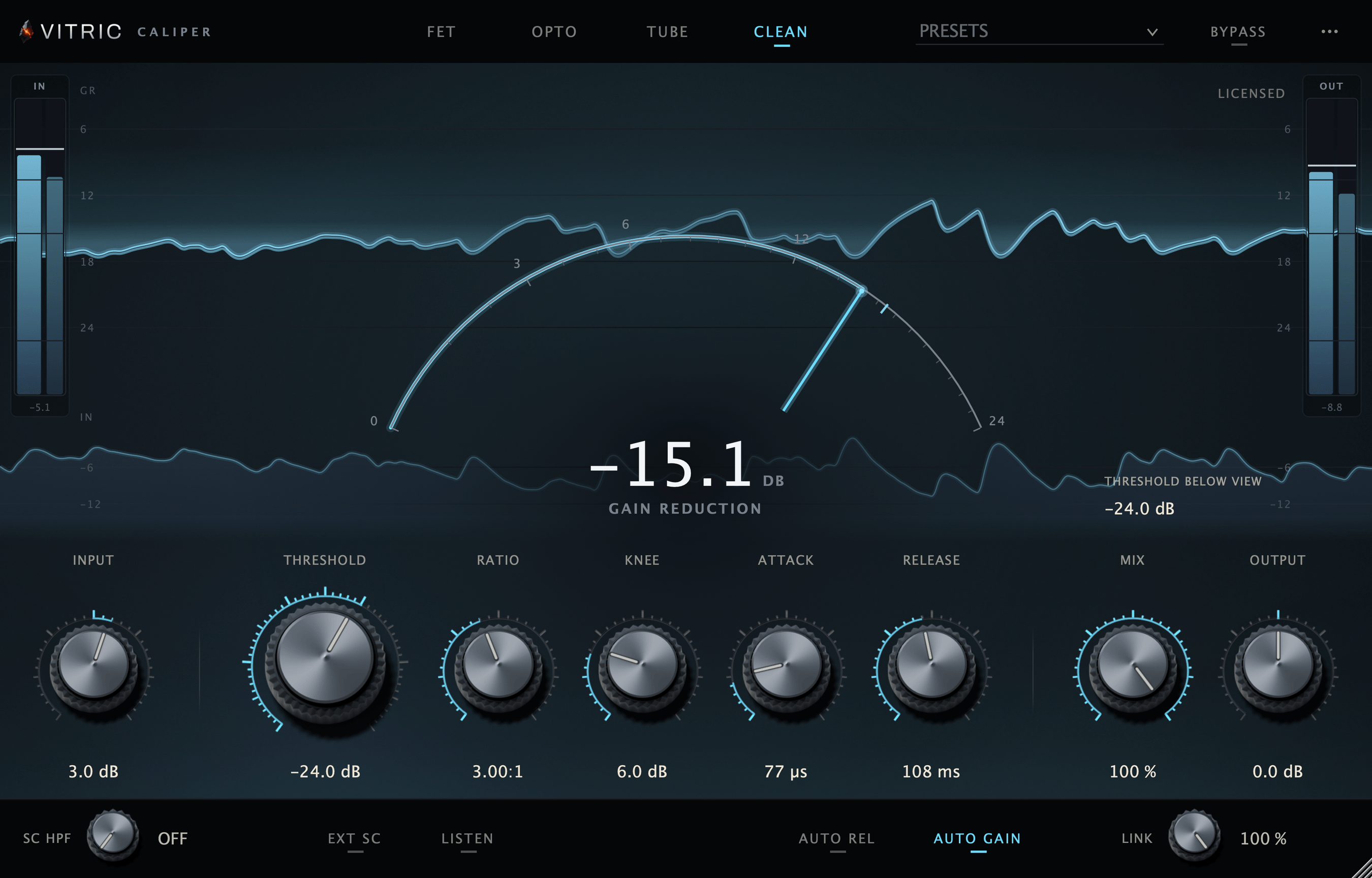
Caliper Compressor
$39Regular price $80
Character Compressor
FET, Opto, Tube and Clean compression in one window, with parallel mix and a sidechain.
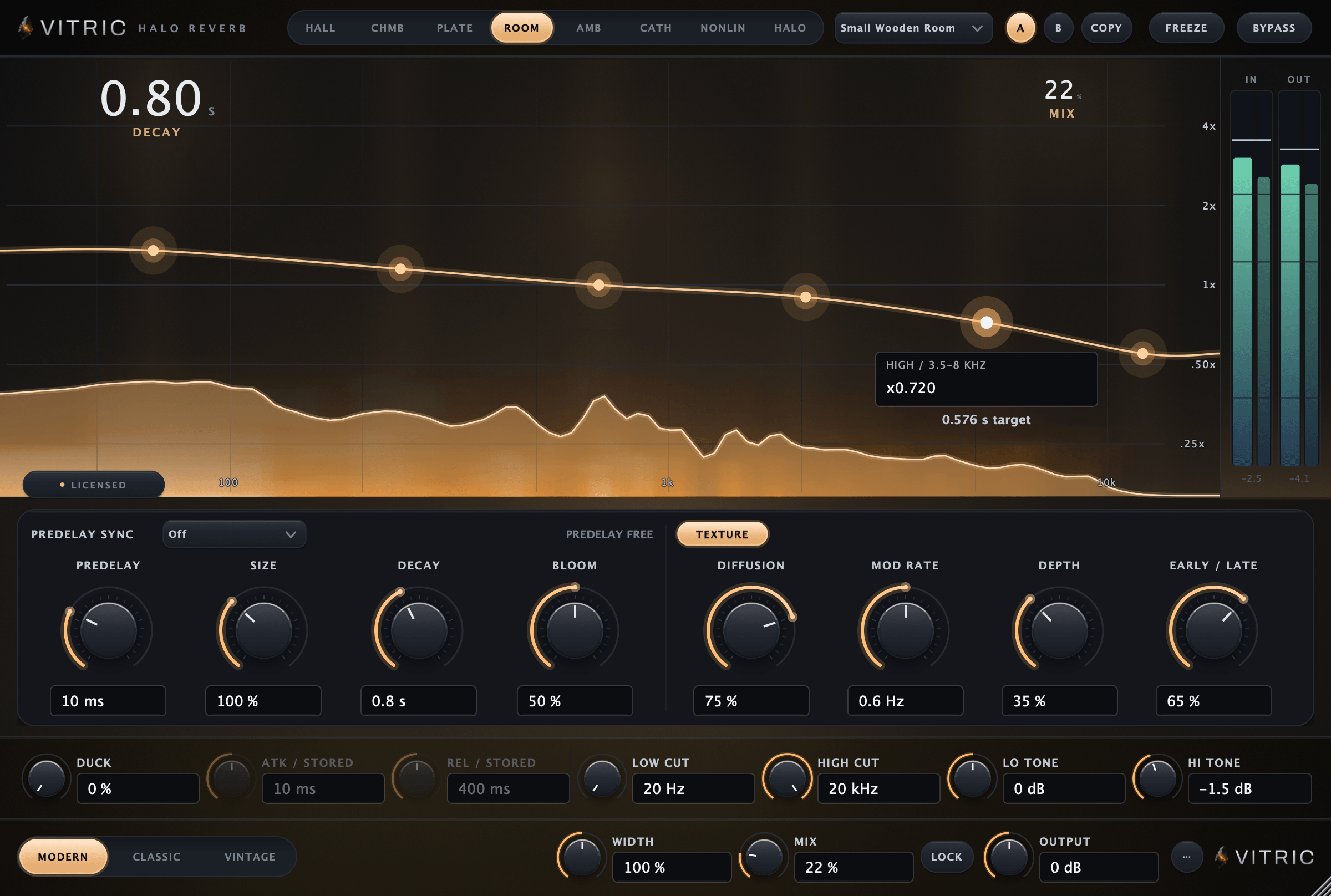
Halo Reverb
$29Regular price $45
Algorithmic Reverb
Eight spaces around your sound, from close rooms to long pitched tails, with decay set across six bands.