

Halo Reverb
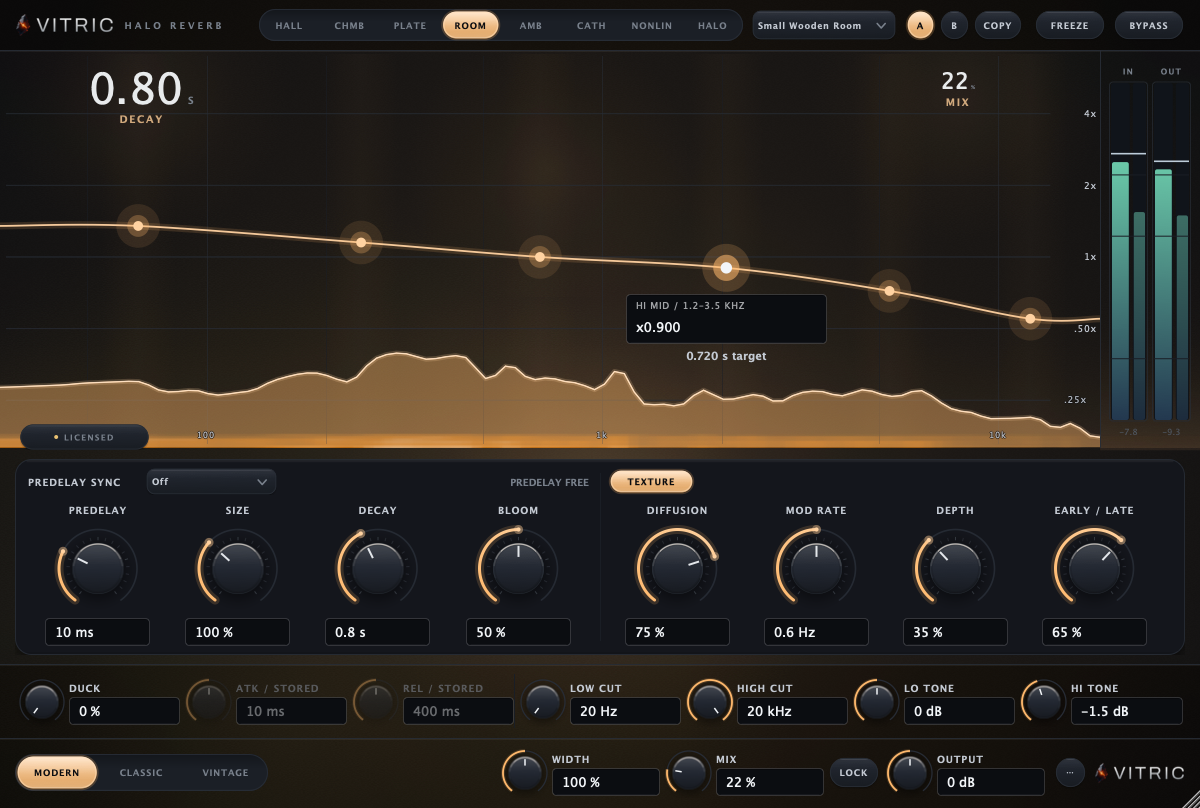
Halo Reverb is an algorithmic reverb with eight spaces: HALL, CHMB (Chamber), PLATE, ROOM, AMB (Ambience), CATH (Cathedral), NONLIN (gated and reverse) and HALO (shimmer). You shape how long each part of the spectrum rings by drawing a curve over the tail itself. The HALO space feeds a pitch-shifted copy of the tail back into it, from tuned air to a climbing shimmer. It is for anyone who wants a reverb that is quick to set and shows what the tail is doing.
This manual covers Halo Reverb 1.1.11 on macOS and Windows, in VST3, AU and AAX.
Quick start
- Insert Halo Reverb on a track, or on an effects send (then set MIX to 100 % and turn on LOCK). If the chip in the display reads LOCKED, Halo stays silent until you activate it or start a trial (see Installation and activation).
- Pick a space in the top bar. PLATE for vocals and snare, ROOM for a real-sounding kit, HALL for width and length.
- Set DECAY for how long the tail lasts and PREDELAY for the gap before it starts. On a vocal, 1.5 to 2.5 s and 20 to 30 ms are good starting points.
- Drag the dots on the curve in the display: lower the left dots so the lows die away sooner and the low end stays tight; lower the right dots to darken the tail.
- Set MIX to taste, and compare with BYPASS.
For ready-made starting points, open the preset menu: 43 presets in six banks.
What's new in 1.1.11
What changed since 1.1.0:
- Your own presets. Save, recall, rename and delete presets from the preset menu. With LOCK on, recalling one leaves MIX where it is.
- FREEZE holds in the HALO space.
- A mono output carries both sides of the reverb.
- NONLIN's WINDOW spans 0.1 to 1.2 seconds, and the readout says so.
- Pro Tools lists Halo Reverb under its reverb category.
- Update notice. The license chip tells you when a new version is out (see Updates).
- Sessions always reopen as saved, after every update and under every license state.
- Subscriptions renew by themselves in the plugin.
- Fixes: a crash on macOS 10.15 and 11, a possible crash when the DAW saved the session while you switched A/B, and Windows user names with accented characters.
The window
Halo has a top bar, the light field (the display), a control bar with the main and texture controls, the tail strip, and the output strip. Drag the corner to resize it, from 922 x 620 up to 1650 x 1110 pixels; it keeps its shape. It opens at 1100 x 740.
The top bar

- Space selector. The eight spaces.
- Preset menu. Factory presets and your own.
- A and B. Two setups to compare.
- COPY. Copies the active slot into the other.
- FREEZE. Holds the tail.
- BYPASS. Compare with the dry sound.
| Control | What it does | Range | Default |
|---|---|---|---|
| HALL · CHMB · PLATE · ROOM · AMB · CATH · NONLIN · HALO | The space. Each one is its own reverb design with its own light. Switching while audio plays crossfades the tail over about 120 ms. | 8 spaces | HALL |
| Preset menu | Factory presets in six banks, and your own presets. It reads Default until you load one. | 43 factory presets plus yours | Default |
| A · B | Two complete setups to compare. Press A to switch. | A or B | A |
| COPY | Copies the active slot into the other one. | ||
| FREEZE | Holds the tail: new input fades out of the late tail while early reflections stay live. Press F. | On or off | Off |
| BYPASS | Bypasses Halo with a short crossfade, so it never clicks. Press B. | On or off | Off |
The display
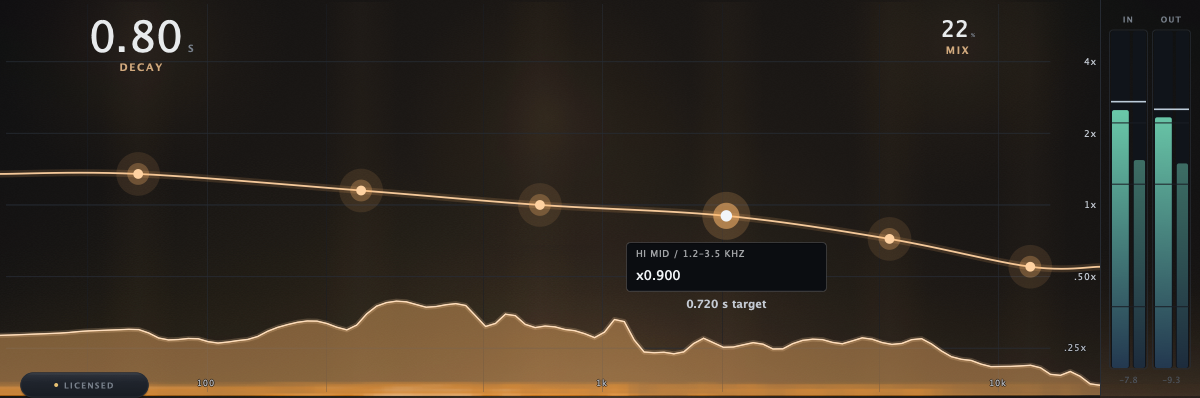
- DECAY readout. The master decay time.
- MIX readout. The dry and wet balance.
- Contour dot. The selected region (HI MID here).
- Ratio card. The region, its ratio and its time in seconds.
- The tail. The wet sound drawn as light across frequency.
- Ratio scale. 0.25x to 4x.
- Frequency scale. 20 Hz to 20 kHz.
- IN and OUT meters.
- License chip. LICENSED, TRIAL or LOCKED (UPDATE when a new version is out); click it for the license card.
The display (the light field) draws the wet tail as light across frequency, with the decay contour on top as a curve you can edit. FREEZE visibly holds the light; ducking visibly dims it.
The decay contour. Six dots, one per fixed frequency region: LOW (below 150 Hz), LOW MID (150 to 400 Hz), MID (400 to 1200 Hz), HI MID (1.2 to 3.5 kHz), HIGH (3.5 to 8 kHz) and AIR (above 8 kHz). Each dot sets how long its region rings compared with DECAY, from 0.25x (a quarter as long) to 4x (four times as long). Select a dot to see its region and its time in seconds. The dots move up and down only; the regions are fixed.
- Drag a dot up or down to set its region's ratio, from 0.25x to 4x (Shift for fine moves). Every dot starts at 1.00x.
- Mouse wheel over a region steps its ratio by 10 % (Shift: 2 %).
- Double-click a dot, or Cmd + click it (Ctrl on Windows), to reset it to 1.00x.
- Click the selected dot's value on its card to type an exact ratio; Return applies, Esc cancels.
- Arrow keys: after you click a dot, ← → select the next region and ↑ ↓ step its ratio (Shift for fine).
In NONLIN the contour is kept but not used, because NONLIN has no feedback tail.
The spaces
| Space | Sound | Reach for it on |
|---|---|---|
| HALL | Wide and blooming | Vocals, strings, pads, score |
| CHMB (Chamber) | Dense and clear | Vocals, snare, keys |
| PLATE | Fast and bright | Vocals, snare, anything that should shine |
| ROOM | Tight, with strong early reflections | Drums, guitars, a real-room feel |
| AMB (Ambience) | Mostly early reflections, little tail | Mix glue, dry tracks that need a space |
| CATH (Cathedral) | Vast and dark | Pads, choirs, long throws |
| NONLIN | Gated and reverse tails, no feedback loop | Drums, 80s moves |
| HALO | A hall with pitched regeneration in the tail | Shimmer, tuned air, sound design |
Some controls change name with the space: in PLATE, SIZE reads ER SIZE (early-reflection size) and sets the early reflections; in NONLIN, DECAY reads WINDOW and BLOOM reads SLOPE.
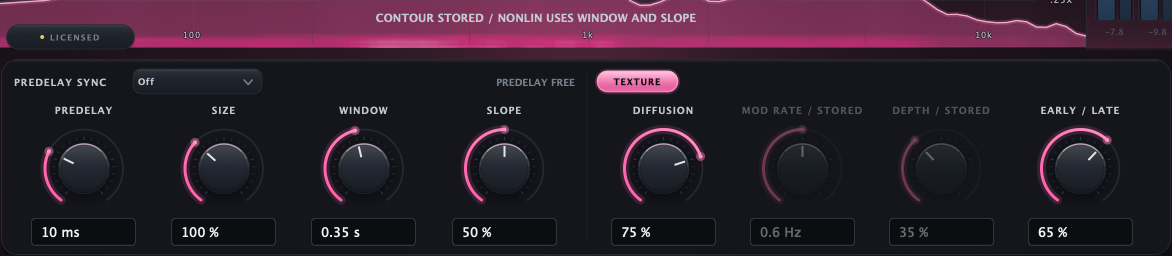
- Display note. The contour is stored; NONLIN uses WINDOW and SLOPE.
- WINDOW. The length of the gate or reverse window.
- SLOPE. Reverse, through gated, to decaying.
- STORED. A control this space does not use keeps its value.
The control bar

- PREDELAY SYNC. Predelay in note values.
- PREDELAY. The gap before the tail.
- SIZE. The space's size.
- DECAY. How long the tail lasts.
- BLOOM. How fast it builds.
- DIFFUSION. How fast it smears.
- MOD RATE. Speed of the movement.
- DEPTH. Depth of the movement.
- EARLY / LATE. Reflections and tail balance.
The main controls sit on the left. TEXTURE shows the current space's texture controls on the right; in the HALO space a second page, HALO, holds the regeneration controls. Choosing the HALO space opens its HALO page; click TEXTURE to reach the texture controls. Changing pages only changes what you see. Click any value box to type an exact value; Return applies and Esc cancels.
| Control | What it does | Range | Default |
|---|---|---|---|
| PREDELAY SYNC | Locks PREDELAY to your DAW's tempo as a note value (T is triplet, D is dotted). While synced, the knob reads PREDELAY / STORED and keeps its free value for later. | Off, 1/32, 1/16T, 1/16, 1/8T, 1/16D, 1/8, 1/8D, 1/4 | Off |
| PREDELAY | The gap before the tail starts. It keeps consonants and attacks ahead of the reverb. A synced predelay is capped at 500 ms. | 0 to 500 ms | 20 ms |
| SIZE | The space's internal size. A short DECAY can limit how big it gets. Reads ER SIZE in PLATE, where it sets the early reflections. | 50 to 200 % | 100 % |
| DECAY | How long the tail lasts; the contour scales it per region. Reads WINDOW in NONLIN: the length of the gate or reverse window, 0.1 to 1.2 seconds, scaled 0.5x to 2x by SIZE. | 0.1 to 60 s | 2.0 s |
| BLOOM | How fast the tail builds density, from instant to the slow swell of a big hall. Reads SLOPE in NONLIN: reverse, through gated, to decaying. Not used by PLATE. | 0 to 100 % | 50 % |
The predelay caption at the right of the bar reads PREDELAY FREE when sync is off, and the synced time (for example 125.0 ms SYNC) when it is on. If your DAW sends no tempo, it reads NO TEMPO / MANUAL and the free PREDELAY stays in use.
TEXTURE
| Control | What it does | Range | Default |
|---|---|---|---|
| DIFFUSION | How quickly the reverb smears into a smooth tail. | 0 to 100 % | 75 % |
| MOD RATE | Speed of the tail's movement. Not used in NONLIN. | 0.1 to 5.0 Hz | 0.6 Hz |
| DEPTH | Depth of the tail's movement. Not used in NONLIN. | 0 to 100 % | 35 % |
| EARLY / LATE | Balance of early reflections and tail: 0 is early reflections only, 100 is tail only. | 0 to 100 % | 65 % |
HALO
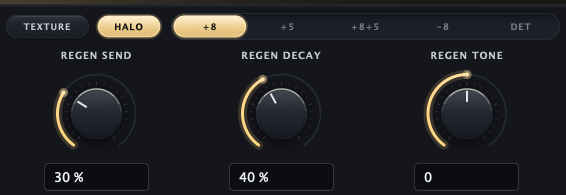
- TEXTURE and HALO. The two pages.
- Interval selector. The pitch of the regeneration.
- REGEN SEND. How much feeds the pitched layer.
- REGEN DECAY. How much it feeds itself.
- REGEN TONE. Darker or brighter.
| Control | What it does | Range | Default |
|---|---|---|---|
| REGEN SEND | How much of the tail goes into the pitched regeneration. Low settings read as tuned air; high settings as a climbing shimmer. | 0 to 100 % | 25 % |
| Interval selector | The pitch of the regeneration: +8 is an octave up, +5 a fifth up, +8+5 an octave plus a fifth, -8 an octave down, DET a slight detune. | +8, +5, +8+5, -8, DET | +8 |
| REGEN DECAY | How strongly the pitched layer feeds itself, so intervals stack up. | 0 to 100 % | 40 % |
| REGEN TONE | Tilt inside the regeneration: darker to the left, brighter to the right. | -100 to +100 | 0 |
The tail strip

- DUCK. Reverb down while you play.
- ATK. How fast it ducks.
- REL. How fast it returns.
- LOW CUT. High-pass on the reverb.
- HIGH CUT. Low-pass on the reverb.
- LO TONE. Low shelf.
- HI TONE. High shelf.
| Control | What it does | Range | Default |
|---|---|---|---|
| DUCK | Turns the reverb down while the dry signal plays, by up to 24 dB at 100 %. It swells back in the gaps. | 0 to 100 % | 0 % |
| ATK | How fast ducking clamps down. Reads ATK / STORED while DUCK is at 0. | 1 to 100 ms | 10 ms |
| REL | How fast the reverb comes back. Reads REL / STORED while DUCK is at 0. | 20 to 2000 ms | 400 ms |
| LOW CUT | Removes low end from the reverb only (a high-pass filter); the dry sound is untouched. | 20 to 1000 Hz | 20 Hz |
| HIGH CUT | Removes top end from the reverb only (a low-pass filter). | 1 to 20 kHz | 20 kHz |
| LO TONE | Low shelf at 150 Hz on the reverb. | -12 to +12 dB | 0 dB |
| HI TONE | High shelf at 6 kHz on the reverb. | -12 to +12 dB | 0 dB |
Cuts fence the tail in; shelves tilt what remains.
Freeze and ducking
FREEZE fades new input out of the late tail while early reflections stay live. The feedback spaces hold the tail; tone, width, ducking and mix still work on it. NONLIN has no feedback loop, so FREEZE stops new input reaching its tail without holding it forever. In the HALO space the pitched regeneration pauses while frozen, so the held tail keeps its level.
DUCK follows the dry signal, not another track: the reverb leans back while you sing or play and swells after. ATK and REL keep their values while DUCK is at 0.
The output strip

- Era. MODERN, CLASSIC or VINTAGE.
- WIDTH. Stereo width of the reverb.
- MIX. Dry and wet balance.
- LOCK. Holds MIX on preset loads.
- OUTPUT. Output level.
- ... (Options). Tooltips, updates, effects and shortcuts.
| Control | What it does | Range | Default |
|---|---|---|---|
| MODERN · CLASSIC · VINTAGE | The era. MODERN is clean, full bandwidth. CLASSIC caps the reverb at 15 kHz and makes the tail's movement less regular; VINTAGE caps it at 10 kHz, darker and less regular still. | 3 eras | MODERN |
| WIDTH | Stereo width of the reverb, mono-compatible at every setting. | 0 to 200 % | 100 % |
| MIX | Dry and wet balance. Use 100 % on an effects send. | 0 to 100 % | 25 % |
| LOCK | Keeps MIX where you set it when you load presets or switch A/B, so a send stays a send. | On or off | Off |
| OUTPUT | Output level. | -24 to +24 dB | 0 dB |
| ... (Options) | Opens a menu: Show tooltips, Check for updates, Reduce visual effects and the keyboard shortcut sheet. The first two apply to every Vitric plugin on this computer. |
PLATE and NONLIN take only the bandwidth cap of CLASSIC and VINTAGE.
Latency and CPU
- Halo adds no latency, so it works while tracking and anywhere in a chain.
- CPU use depends on the space and its settings.
- Reduce visual effects in Options lightens the display on a slow computer; the sound does not change.
Keyboard and mouse
Keys work when the Halo window has keyboard focus: click an empty part of the window once (click a contour dot first for the arrow keys). While you type in a value box, the box keeps the keys.
| Action | Mac | Windows |
|---|---|---|
| Switch A/B | A | A |
| FREEZE | F | F |
| Bypass | B | B |
| Show the shortcut sheet | ? | ? |
| Select a contour region | ← or → | ← or → |
| Step its ratio | ↑ or ↓ (Shift for fine) | ↑ or ↓ (Shift for fine) |
| Cancel a typed value, or clear the region selection | Esc | Esc |
| Fine drag (knobs and dots) | Shift + drag | Shift + drag |
| Reset a knob | Double-click, or Cmd + click | Double-click, or Ctrl + click |
| Step a knob (Shift for fine) | Mouse wheel over it, or click it and use the arrow keys | Mouse wheel over it, or click it and use the arrow keys |
| Reset a contour dot | Double-click it, or Cmd + click | Double-click it, or Ctrl + click |
| Type an exact value | Click the value box | Click the value box |
In Pro Tools, fine drag is Cmd + drag (Ctrl on Windows) and reset is Option + click (Alt on Windows).
Recipes
These are starting points. Every voice, mix and room is different, so adjust by ear and compare with BYPASS.
Put a plate on a lead vocal
A short, bright plate gives the voice a space without pushing it back.
| Setting | Value |
|---|---|
| Start from | The Lead Vocal Plate preset |
| Space | PLATE |
| DECAY | 1.5 s |
| PREDELAY | 25 ms, so the consonants stay ahead of the tail |
| LOW CUT | 140 Hz |
| DUCK | 20 to 40 % |
| Contour | The preset sets AIR to 0.8x to soften sibilance; also lower LOW and LOW MID under 1x so the tail stays clear of mud |
| MIX | 22 % on an insert, 100 % on a send |
Add tuned air behind a vocal (HALO)
| Setting | Value |
|---|---|
| Start from | The Vocal Halo Sheen preset |
| Space | HALO |
| DECAY | 2.2 s |
| REGEN SEND | 5 to 10 % |
| Interval | +8 (octave up) |
| LOW CUT | 200 Hz |
| MIX | 20 % |
At low REGEN SEND you hear air behind the voice, not an obvious shimmer.
Build a tight drum room
A short room makes a dry kit sound recorded in one space: the snare blooms, the kick stays tight.
| Setting | Value |
|---|---|
| Start from | The Drum Room 1.0 preset |
| Space | ROOM |
| DECAY | 1.0 s |
| Contour | LOW under 1x so the kick stays tight; HI MID above 1x so the snare blooms |
| MIX | 24 % |
Gate a snare (NONLIN)
A big tail that stops dead. Set WINDOW so it ends before the next snare.
| Setting | Value |
|---|---|
| Start from | The Gated Snare 80s preset |
| Space | NONLIN |
| WINDOW | 0.35 s (0.3 to 0.5 s to taste) |
| SLOPE | 50 % for a gate; turn it down for a reverse swell |
| Era | CLASSIC |
| MIX | 32 % |
Make an endless pad (HALO and FREEZE)
A sustained, climbing bed that holds the chord while you play over it.
| Setting | Value |
|---|---|
| Start from | The Endless Choir preset |
| Space | HALO |
| DECAY | 8 s |
| REGEN SEND | 70 % |
| Interval | +8+5 (octave plus a fifth) |
| REGEN DECAY | 85 % |
| FREEZE | On while the chord sounds, then play over it |
| MIX | 45 % |
Glue a mix bus
A little ambience makes separate tracks sound like one room. You should miss it when you bypass it rather than hear it as reverb.
| Setting | Value |
|---|---|
| Start from | The Mix Glue preset (AMB, 0.6 s) |
| MIX | Low: 8 to 12 % |
| Era | MODERN for full bandwidth, CLASSIC or VINTAGE to sit the tail behind the mix |
Presets
43 factory presets in six banks. Default is the entry shown before you pick a preset; choosing it does not reset anything.
| Bank | Presets |
|---|---|
| Vocals | Lead Vocal Plate, Ballad Plate, Filtered Long Vocal, Bright Vox Chamber, Whisper Air, Vocal Halo Sheen, Dark Ballad Hall, Ducked Vocal Hall |
| Drums | Drum Room 1.0, Snare Plate 1.2, Snare Chamber, Kick Chamber, Gated Snare 80s, Reverse Tom Sweep, Percussion Air, Big Room Toms |
| Guitars | Guitar Plate, Small Wooden Room, Ambient Wash, Shimmer Lead, Twang Chamber, Acoustic Air, Nashville Plate |
| Keys & Synths | Piano Hall, Rhodes Chamber, Pad Cathedral, Synth Dream 70s, Organ Stone, Detune Ensemble, Fifth Cloud |
| Mix Bus | Mix Glue, Scoring Stage 2.2, Master Depth, Wide Hall Send, Drum Bus Room |
| FX & Sound Design | Endless Choir, Infinite Cavern, Gate Slam, Reverse Riser, Octave Down Deep, Worn 70s Room, Duck Pump, Tape Wobble Hall |
A factory preset sets every sound control except OUTPUT (and MIX while LOCK is on), and turns FREEZE and PREDELAY SYNC off.
Your own presets
- Open the preset menu and choose Save preset..., then type a name.
- Your presets appear under User at the end of the same menu.
- Rename preset and Delete preset manage the list; Show preset folder opens the folder on disk.
A saved preset holds the sound settings, FREEZE included. BYPASS, LOCK and the A/B slots stay with the session. The files are in ~/Library/Application Support/Vitric Audio/Presets/Halo Reverb on macOS and %APPDATA%\Vitric Audio\Presets\Halo Reverb on Windows. Saving and loading your own presets needs an active license or trial; factory presets always work.
Specifications
- Spaces: 8, on four designs (feedback network, plate, NONLIN taps, HALO regeneration).
- Decay: 0.1 to 60 s; contour of 6 regions, 0.25x to 4x.
- Predelay: 0 to 500 ms, or synced from 1/32 to 1/4 (capped at 500 ms).
- HALO intervals: octave up, fifth up, octave plus fifth, octave down, detune.
- Ducking: up to 24 dB, attack 1 to 100 ms, release 20 to 2000 ms, from the dry signal.
- Tail shaping: low cut 20 to 1000 Hz, high cut 1 to 20 kHz, shelves at 150 Hz and 6 kHz (±12 dB).
- Eras: MODERN (full bandwidth), CLASSIC (15 kHz), VINTAGE (10 kHz).
- Latency: none.
- Channels: mono to mono, mono to stereo, stereo to stereo.
- Window: 922 x 620 to 1650 x 1110, fixed shape.
- Formats: VST3 and AAX on macOS and Windows; AU on macOS; an optional standalone app on Windows.
- Systems: macOS 10.15 or later on Intel, macOS 11 or later on Apple Silicon; Windows 10 or later, 64-bit.
Not included
- No surround or Atmos formats.
- No external sidechain: DUCK follows Halo's own input.
- No oversampling or lookahead modes; Halo always runs at zero latency.
Installation and activation
Install
- Download the installer from vitricaudio.com/downloads or your account at vitricaudio.com/account.
- Save your work and quit your DAW.
- Run the
.pkg(Mac) or.exe(Windows). - Open your DAW. If Halo Reverb is not listed, rescan plugins.
Use AU in Logic Pro, AAX in Pro Tools and VST3 in other DAWs. The Mac installer puts the plugins in the standard folders:
- AU:
/Library/Audio/Plug-Ins/Components - VST3:
/Library/Audio/Plug-Ins/VST3 - AAX:
/Library/Application Support/Avid/Audio/Plug-Ins
On Windows:
- VST3:
C:\Program Files\Common Files\VST3 - AAX:
C:\Program Files\Common Files\Avid\Audio\Plug-Ins - Standalone app (optional in the installer):
C:\Program Files\Vitric Audio\Halo Reverb
Activate your license
Until you activate a license or start a trial, Halo passes no sound, the chip reads LOCKED and a large LOCKED mark sits over the window. The license card opens by itself once each time you open the window.
- Click the license chip at the bottom left of the display to open the license card.
- Paste the
VT-...key from your purchase email or account page. Lost it? vitricaudio.com/license can resend your keys. - Click Apply license. The chip changes to LICENSED.
A full license works offline after activation and runs on up to three computers at a time.
Activate a computer that is offline
- On the offline computer, open the license card and click Copy code to copy its machine code (it starts with
VTM1-). - On any computer that is online, open vitricaudio.com/license, enter your key and the machine code, and download the license file.
- Copy the file to the offline computer, open the license card and click Load file.
Try it free for 72 hours
- Open the license card and click Start free trial. The trial page opens with the product and machine code filled in.
- Sign in with the emailed link and click Start my 72-hour trial.
- Click Copy trial key, paste it into the license card and click Apply license. Or click Download license file and use Load file. A backup copy is emailed to you.
The trial has every feature, runs 72 hours from issue and needs an internet connection while you use it. There is one trial per product, person and computer, and no payment details are needed. When it ends, Halo goes silent but keeps every setting in your projects.
Updates
Halo asks vitricaudio.com once a day, while its window is open, whether a newer version exists, and sends only the product, your version and your platform. When one is out, the license chip reads UPDATE and the new version number.
- Click the chip. The license card shows UPDATE AVAILABLE with the new version and yours.
- Click Download (the button shows the new version number) to open the product page and get the installer. Or click Later: the chip goes back to its license text until the next version, and the card keeps the notice.
- Quit your DAW and run the new installer over the old one. Your sessions reopen as saved.
Turn off Check for updates in Options to stop the checks.
Troubleshooting
Halo does not appear in my DAW
Rescan plugins and restart the DAW. In Logic Pro, use Logic Pro > Settings > Plug-in Manager and Reset & Rescan Selection. On Windows, make sure your DAW scans C:\Program Files\Common Files\VST3.
There is no reverb
- The license chip reads LOCKED: Halo has not been activated, the trial ended, or the license needs attention. Click it. A trial needs an internet connection while you use it.
- BYPASS is lit: click it or press B.
- MIX is at 0 %, or DUCK is high and the track never stops playing.
- FREEZE is on: new input does not reach the tail. Turn it off.
Presets keep changing my send level
Turn on LOCK next to MIX.
A control seems to do nothing
- BLOOM does nothing in PLATE.
- MOD RATE, DEPTH and the contour do nothing in NONLIN.
- ATK and REL do nothing while DUCK is at 0 (they read STORED).
- PREDELAY does nothing while PREDELAY SYNC is locked to a tempo (it reads STORED).
The reverb muddies or dulls the mix
For mud, raise LOW CUT to 150 to 300 Hz or lower the LOW and LOW MID dots under 1x. For a dull tail, check that the era is MODERN, HIGH CUT is at 20 kHz and the HIGH and AIR dots are not pulled down. On a vocal, add DUCK.
Shortcuts do nothing
Click an empty part of the Halo window once so it has keyboard focus. Some DAWs keep certain keys for themselves; use the mouse for those.
The preset menu says "User (unlock to use)"
Your own presets need an active license or trial. Activate Halo, and the menu items come back.
I lost my license key
Enter your email at vitricaudio.com/license to have your keys sent again, or find them in your account at vitricaudio.com/account.
Support
Write to support@vitricaudio.com with your Halo version, operating system, DAW and version, plugin format and the exact error if there is one.
Every purchase comes with a 14-day refund, no questions asked.