
Clearwall Limiter Mastering limiter plugin
Push the master loud while the true-peak ceiling holds.
Plugin for Mac & Windows.
Try it free on your computer.
Hear the demo. Loudness matched.
About this demo
Punch style at its defaults: Drive 7.6 dB to reach -8 LUFS, ceiling -1.0 dBTP, Master quality. The limited master is turned down to the input's loudness, so you hear tone, not level.
Rendered offline on macOS by the Clearwall Limiter 1.0.1 engine, which prints bit-identically to the plugin. Input and processed excerpts are matched in loudness. Switching keeps your place.
Open input audio ↗Open processed audio ↗A true-peak mastering limiter in three styles: Clear, Punch and Dense. Set a loudness target and Learn Drive sets the Drive to meet it. Then judge the result at matched loudness with Unity, or hear exactly what the limiter removes with Delta.
Launch price through October 31
Pay by card, PayPal, Apple Pay or Google Pay.
By buying, you agree to the EULA and Terms of Service.
Try free for 3 daysOne-time purchase · 3 computers at a time · 14-day money-back guarantee
Instant download: your license key arrives by email right after payment.
Or get all 12 with Vitric Access, $9.99 a month
Secure checkout by Paddle. No card required for the trial.
Mac & Windows · VST3, AU and AAX · version 1.0.1
Prices in US dollars. Checkout charges in your local currency where available. US and Canadian sales tax is added at checkout. In the EU, UK, Japan and Australia, tax is already included.
The trial uses the full plugin. Install it in your DAW, then start the 3-day trial from its license screen. No card required.
Read the Clearwall manualTHE LISTENING ROOM
Listen to Clearwall.
One performance. Two perspectives. Loudness matched.
Punch style at its defaults: Drive 7.6 dB to reach -8 LUFS, ceiling -1.0 dBTP, Master quality. The limited master is turned down to the input's loudness, so you hear tone, not level.
About this demo
Rendered offline on macOS by the Clearwall Limiter 1.0.1 engine, which prints bit-identically to the plugin. Input and processed excerpts are matched in loudness. Switching keeps your place.
Open input audio ↗Open processed audio ↗IN YOUR SESSION
Get loud. Keep the low end.
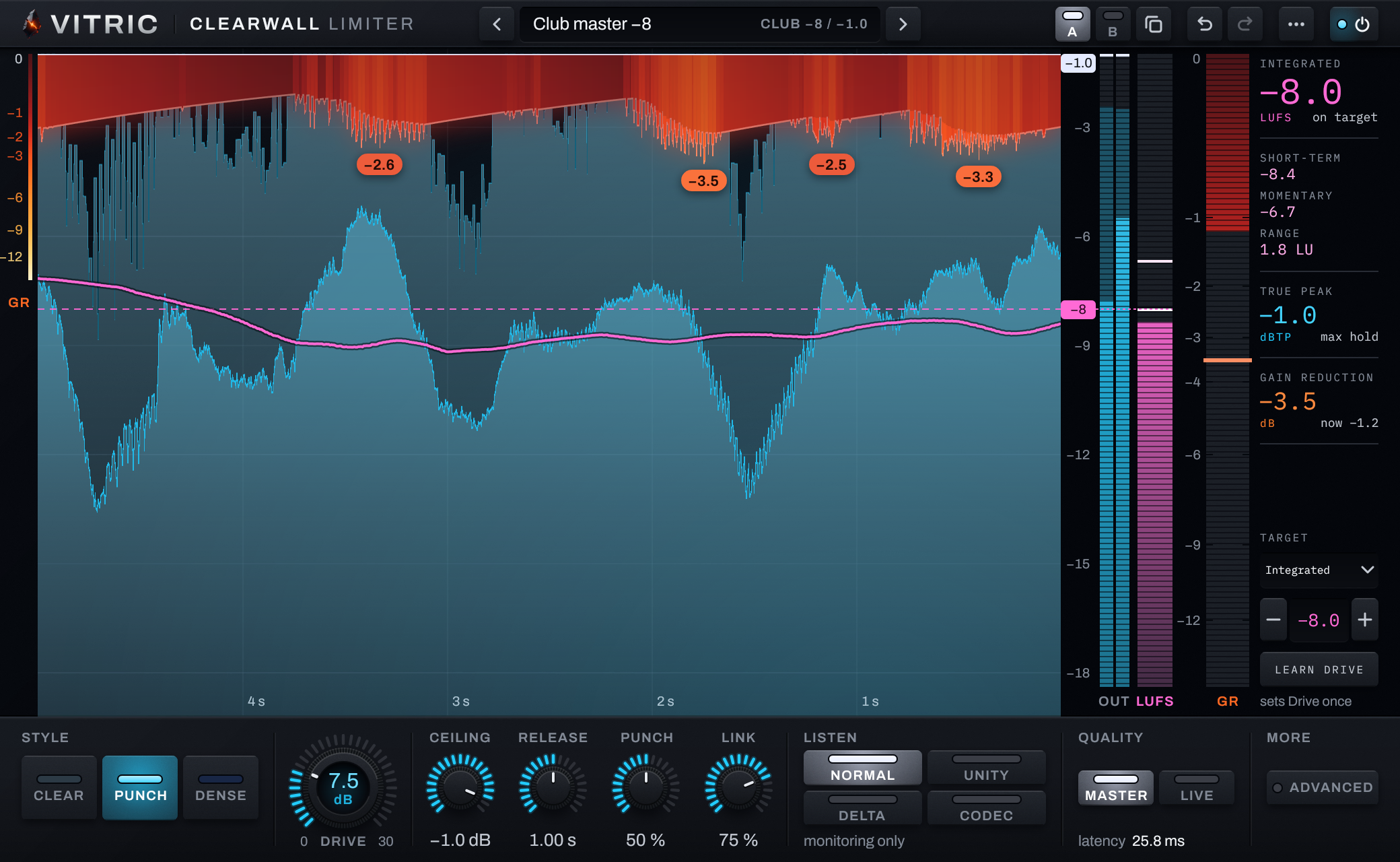
Drive into Clearwall and it holds the true-peak ceiling you set, then shows its work: the gain reduction hangs over the music as an orange curtain, and the pink line traces the short-term loudness against your dashed target. In Clear and Punch the hit clip shaves only the first milliseconds of drums that rise out of the mix, never a held note. The bass gets its own clip, set higher and backing off as you push, and while the bass leads, the gain holds across each cycle instead of chopping it. Pushed to -5 LUFS, the low end moved half a decibel (median of 16 test mixes).
A CLOSER LOOK
Inside Clearwall.
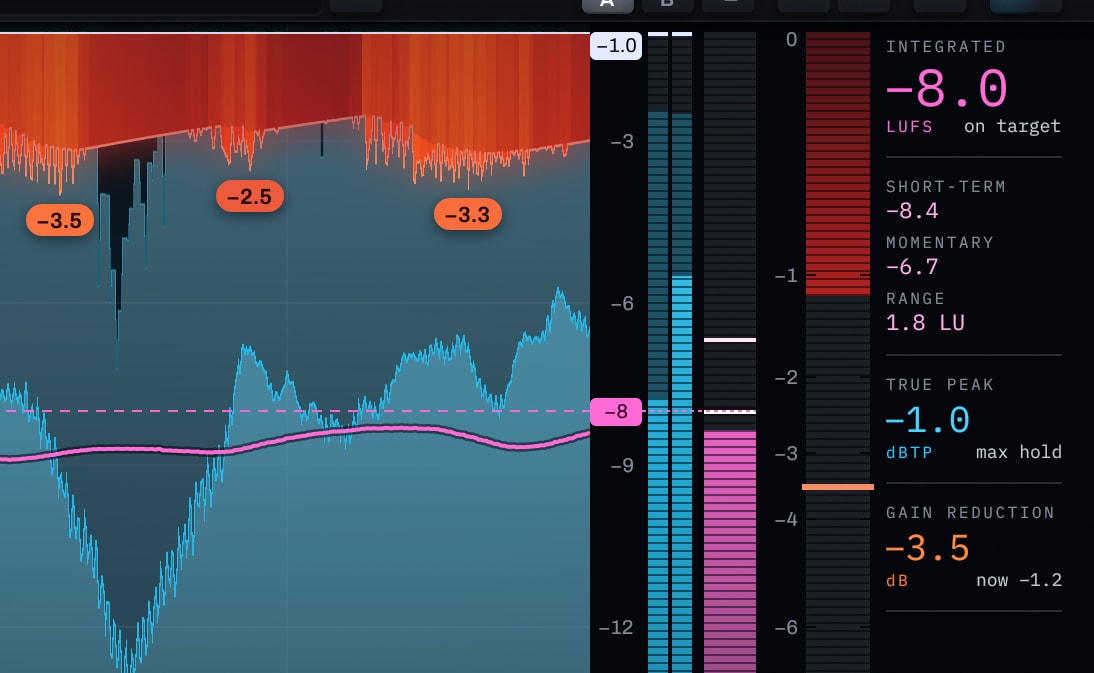
The true-peak ceiling
Set the ceiling from -12 to 0 dBTP. An 8x oversampled detector and a final verify stage hold it on the inter-sample peak. On 16 test mixes at -8 LUFS, the worst overshoot measured at 32x was 0.0012 dB in Master; across every rate from 44.1 to 192 kHz it was 0.0003 dB.
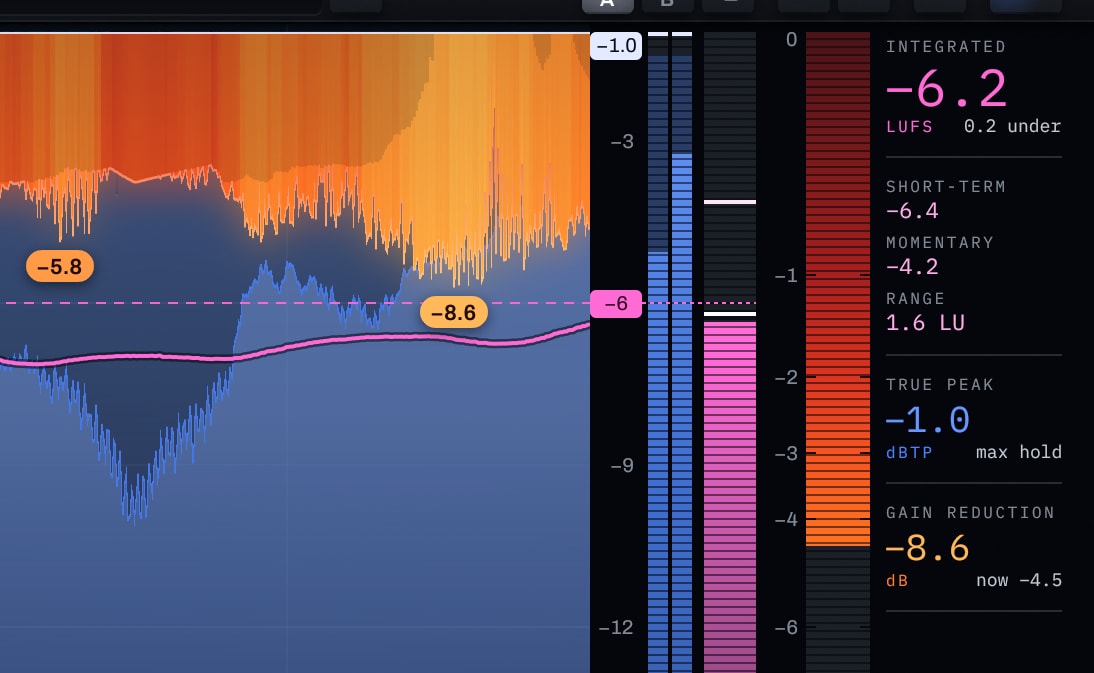
Clear, Punch and Dense
Three styles share one structure and one latency, so switching never shifts your timing. Clear clips only the tips of hits. Punch clips the first milliseconds of each drum hit, where the snap lives, and leaves the rest to the gain. Dense hands more of the work to the clipper as you push.
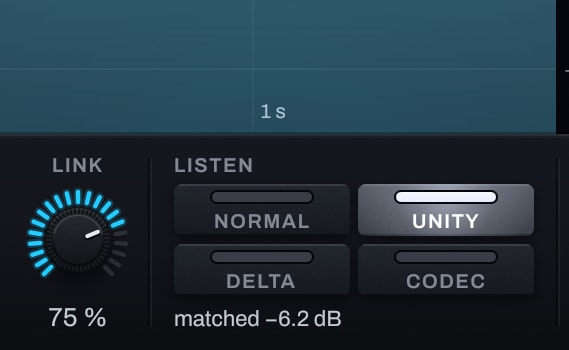
Judge tone, not level
Unity turns the output down to the input's loudness, so a louder setting cannot win just by being louder. Listen modes are for monitoring: an offline bounce always prints the normal output.
All features & controls
- Three styles, Clear, Punch and Dense, with one shared latency
- Ceiling from -12 to 0 dBTP, held on the true peak with 8x oversampled detection and a final verify stage
- Drive 0 to 30 dB; Release 316 ms to 3.16 s; Attack 0.1 to 10 ms (capped at 1 ms in Live)
- Punch moves the hit-clip threshold 2 dB either side of the style's value
- Link sets how much the two channels share their fast gain reduction
- Curve: Converter (default) or Smooth clip knee
- Contain: a linear-phase band-limit at about 20 kHz before the final true-peak stage (Master), on by default
- Codec margin, off by default: the ceiling held 1 dB lower while the master's short-term loudness is above -14 LUFS (fading in from -16)
- Target in integrated LUFS, short-term maximum or PLR, with Learn Drive
- Listen: Normal, Unity (matched loudness), Delta and Codec (AAC 256, macOS); monitoring only
- Quality: Master, 25.8 ms at 48 kHz, or Live, under 10 ms from 44.1 kHz
- Dither off, 24 or 16 bit, with noise shaping at 16 bit (44.1 and 48 kHz)
- Loudness metering to ITU-R BS.1770, checked against the EBU Tech 3341 and 3342 test signals: integrated, short-term, momentary, true peak and range
- 15 presets by genre and loudness target; loading one never moves Drive
- A and B settings with Copy, plus undo and redo
- Bypass plays the input delayed by the latency, with a 10 ms crossfade
- Purchased licenses work offline; trials require an internet connection
- AU, VST3 and AAX on macOS; VST3, AAX and Standalone on Windows
Hear what it removes
Delta plays only what the limiter takes away: silence means it is taking nothing. Codec plays the output through an AAC 256 kbps encode and decode, 0.15 to 0.2 seconds late, on macOS.
Master or Live
Master is the full Clearwall at 25.8 ms at 48 kHz, reported to your host. Live stays under 10 ms at every rate from 44.1 kHz, 8.5 ms at 48 kHz, for playing and recording through the master bus, and holds the ceiling 0.05 dB lower.
A target, and Learn Drive
Set a target in integrated LUFS, short-term maximum or PLR. Learn Drive listens to the loudest part in 4-second windows, sets Drive once and stops: it never rides the gain. If the target is out of reach, it keeps the closest Drive it measured and says so.
The Advanced panel
Attack from 0.1 to 10 ms, the clip Curve (Converter or Smooth), Contain at about 20 kHz, Codec margin (off by default) and Dither at 24 or 16 bit, with noise shaping at 16 bit (44.1 and 48 kHz).
Bypass that keeps your timing
Bypassed, Clearwall plays the input delayed by its latency with a 10 ms crossfade, and the meters keep reading. Your host's bypass is the same switch.
Measured on music
| Claim | Measured |
|---|---|
| The ceiling holds, Master | Worst true-peak overshoot 0.0012 dB at 32x, 16 mixes at -8 LUFS |
| The ceiling holds, Live | Worst overshoot 0.0000 dB on the same 16 mixes |
| Six rates, 44.1 to 192 kHz | Worst overshoot 0.0003 dB from 44.1 to 192 kHz; loudness within 0.035 LU of 48 kHz at the same Drive |
| Loud masters | -6 and -5 LUFS integrated on 16 of 16 mixes, in every style |
| Bass at loud levels (Dense) | Bass share (20 to 120 Hz) changed by -0.41 dB at -6 LUFS and -0.51 dB at -5 LUFS, median of 16 mixes |
| Latency, Master and Live | 25.8 and 8.5 ms at 48 kHz; 26.9 and 9.0 ms at 44.1 kHz; 21.1 and 4.6 ms at 192 kHz |
| Mac and Windows | 630 test renders bit-identical on macOS and Windows |
Put it to work.
Streaming masters
Clear is the style behind the Streaming -14, Acoustic -12, Lo-fi -11 and Transparent -10 presets: it clips only the tips of hits and leaves the rest to a smooth gain. For a streaming release, try Codec margin and hear the AAC 256 result with Codec listen on macOS.
Trap and 808s
Trap master -7 (Punch) and Trap master -6 (Dense) start you there. The 808 gets its own clip, set above the drums' and backing off as you push, so the low end keeps its weight: half a decibel of bass share at -5 LUFS (Dense, median of 16 test mixes).
Club and EDM masters
Once its steady gain reduction passes 3 dB, Dense hands more of the work to the clipper and keeps that extra clipping off the bass. EDM master -6 and -5 start you there; all 16 test mixes reached -5 LUFS in every style.
Tracking through the master bus
Switch Quality to Live to play or record through the master at 8.5 ms at 48 kHz, then switch back to Master for the bounce.
THE DETAILS
Fits your setup.
- Styles
- Clear, Punch, Dense; one structure, one latency
- Ceiling
- -12 to 0 dBTP on the true peak, 8x oversampled detection
- Drive
- 0 to 30 dB, with a loudness target and Learn Drive
- Latency
- Master 25.8 ms, Live 8.5 ms at 48 kHz; fixed and reported
- Listen
- Normal, Unity, Delta, Codec (AAC 256, macOS); monitoring only
- Metering
- ITU-R BS.1770; checked against EBU Tech 3341/3342; LUFS, dBTP, LU
- Dither
- Off, 24 or 16 bit; noise shaping at 16 bit (44.1/48 kHz)
- Sample rates
- 44.1 to 192 kHz
- Formats
- macOS (Apple silicon and Intel): AU, VST3 and AAX. Windows 10+ 64-bit: VST3, AAX and Standalone
- Windows
- Windows 10 or later, 64-bit. VST3, AAX, Standalone.
- macOS
- macOS 10.15 or later on Intel; macOS 11 or later on Apple Silicon. AU, VST3, AAX.
- Hosts
- A 64-bit host supporting your platform’s plugin format. Your DAW may require a newer operating system.
Use it in Pro Tools, Logic Pro, Ableton Live, Cubase, Studio One, FL Studio, REAPER, Bitwig Studio, and other compatible hosts.
Find the right format for your DAW →Questions about Clearwall.
Can a codec push my master over the ceiling?
Yes. Lossy codecs add peaks when they decode a loud master. Codec margin, off by default, holds the ceiling 1 dB lower while the master is louder than -14 LUFS (short-term), at the cost of 1 dB more limiting. Measured at -8 LUFS, decoded peaks land around your ceiling on AAC 256 and MP3 320, and much nearer it, but not always under it, on low-bitrate codecs. Codec listen plays the AAC result on macOS.
How much latency does it add?
Master: 25.8 ms at 48 kHz (26.9 ms at 44.1 kHz), fixed and reported to your host for delay compensation. Live: under 10 ms at every rate from 44.1 kHz, 8.5 ms at 48 kHz. All three styles share the same latency.
Does Learn Drive master the song for me?
No. Learn Drive measures the loudest part of your song in 4-second windows and sets Drive once to meet your target. It never rides the gain. Drive can't turn a mix down, so a loudness target is reachable only when the mix starts quieter than it; if it can't get there, it keeps the closest Drive it measured and says so.
What happens without a license?
Clearwall is silent without a license or an active trial. It shows LOCKED over the analyzer and opens the license card, where you can start the 3-day trial or apply a key. Saved sessions still reopen with their settings. The trial checks in with vitricaudio.com every few minutes, so keep the computer online; a purchased license works offline.
Which formats and platforms?
macOS (Apple silicon and Intel): AU, VST3 and AAX. Windows 10 or later, 64-bit: VST3, AAX and a standalone app.
Is Clearwall in the bundles?
Yes, in The Vitric Bundle, with the other eleven Vitric plugins. The Mix, Vocal and Low End bundles don't include it. Vitric Complete includes it too.
Is there a free trial?
Yes. Every released Vitric plugin has a free 3 day trial with every feature available during the trial window. Trials need a live internet connection; the plugin checks in every few minutes. Purchased perpetual licenses work offline. Get the installer from the downloads page and request your machine-bound trial license on the trial page. At the signed expiry the plugin’s output goes silent until you install a purchased license or a valid subscription grant. The plugin can still load, so projects and saved settings are not deleted.
Own Clearwall Limiter? Leave a verified review from your account.
FREE STUDIO TOOLS
Work out the next move.
Measure a mix or find a starting point. These tools run in your browser, with no account required.
GUIDES & JOURNAL
The technique behind Clearwall.
Practical explanations, build stories and examples to try in your own session.
- What does a limiter do? Limiter vs compressor, and how to set one on a master
- True peak vs sample peak: what dBTP means, and why masters stop at -1 dBTP
- Limiter vs clipper: what each does to your master, and when to use both
- How Clearwall Limiter works: one structure, three styles and a true-peak ceiling that holds
PART OF THE COLLECTION
Clearwall, in a bundle.
Clearwall is included in these bundles. Compare their contents and current offers.
Find its next partner.
Explore all plugins →
Hear it in your own session.
Clearwall. $49, or try it free for 3 days.
By buying, you agree to the EULA and Terms of Service.
Try free for 3 daysOne-time purchase · 3 computers at a time · 14-day money-back guarantee
Instant download: your license key arrives by email right after payment.
Or get all 12 with Vitric Access, $9.99 a month