Iron Summing: the manual
The manual for Iron Summing: installation and activation, setting up the Channel and Bus console, Tone and the 32 voicings, Push and Flood, Width, Space, the Bus EQ, and the FAQ. Covers version 1.3.
Iron Summing is an analog-console summing system in one plugin. You insert it as a Channel on every track and switch one instance on your master to Bus. The instances find each other automatically and form one console: every window shows the whole group as live lanes, the Bus window mixes Channel trims remotely, and one All Saturation control on the Bus scales the colour of every track at once. Iron is engineer slang for transformer colour, and that is the sound modeled here: the transformer-coupled summing path of a large-format British console.
This manual covers Iron Summing 1.3: installation, activation, the interface, session workflows and the reference controls. It was updated on 1 October 2026. For more techniques, visit the guides index.
Overview: the honest paragraph
Audio never flows between instances. Each Channel processes only its own track, and the Bus processes the real summed audio your DAW hands it. What the instances share is control data: meters, names, solo state, trims and the All Saturation scale, through an in-process registry with no cross-instance locks on the audio thread. That is why Iron Summing runs at exactly zero samples of latency on every track, why nothing smears when your session has 100 instances, and why a Channel keeps working normally even if your host isolates plugins into separate processes: the group view then shows only what it can see, and says so.
CPU use varies with the number of instances, host, hardware, buffer size and visible editors. Channel and Bus processing both add zero samples of latency. The shared registry carries control data, not audio.
Installation and activation
Get the current Iron Summing installer for your computer. Save your session and close your DAW, run the Windows .exe or macOS .pkg, then reopen the DAW. Rescan plugins if necessary.
Insert Iron Summing on an audio track or bus. Use AU in Logic Pro, AAX in Pro Tools, or VST3 in a compatible host. AU is available on macOS; both platforms include VST3 and AAX.
Windows builds require Windows 10 or later, 64-bit. Mac builds require macOS 10.15 or later on Intel, or macOS 11 or later on Apple Silicon. Your DAW may require a newer operating system.
Start a three-day trial
- Open the plugin’s license panel and choose Start free trial. This opens the trial page for Iron Summing with your product and machine code filled in.
- Sign in using the link sent to your email. Check the product and machine code, then choose Email my trial.
- Save the attached license file from your email. On the same computer, choose Load file in the plugin’s license panel.
Install first: the three days begin when the trial license is issued. Every feature is available during that window. Keep the computer connected for periodic internet verification. There is one trial per product, person and machine, with no payment details or automatic charge. At expiry, processing locks while the plugin keeps its saved project settings.
Activate a full perpetual license
Paste the VT-... key from your purchase email or account into the license panel and choose Apply license. Full perpetual licenses work offline after activation.
For an offline studio computer, use the license portal on an online device. Enter your key and the studio computer’s VTM1-... machine code, download the bound file, transfer it to the studio computer and choose Load file. The portal can also resend your active full-license keys.
A full license runs on up to three computers at a time. Deactivating does not open a slot on its own, because permanent offline files cannot be remotely erased, so when you replace a computer, contact support and we move the license to the new one for free. A trial is bound to its issuing computer.
Find the plugin after installation
Open the plugin from your DAW’s plugin browser. Check that its supported format was installed, restart the DAW, and inspect its rescan or failed-plugin list if the plugin is missing. The Mac package installs plugins, not a standalone application. Windows may also offer a standalone app under C:\Program Files\Vitric Audio.
Standard installation folders
| Format | macOS | Windows |
|---|---|---|
| AU | /Library/Audio/Plug-Ins/Components | Not available |
| VST3 | /Library/Audio/Plug-Ins/VST3 | C:\Program Files\Common Files\VST3 |
| AAX | /Library/Application Support/Avid/Audio/Plug-Ins | C:\Program Files\Common Files\Avid\Audio\Plug-Ins |
If installation or activation still fails, send support the product version, operating system, DAW version, plugin format and exact error.
Setting up the console
Insert Channel instances on the tracks you want in the console. Route them through your DAW to the bus or master carrying a Bus instance, then choose the same Iron group for those instances. Use one Bus per group. Iron shares controls and meters; audio still follows your DAW's normal routing.
- Groups 1 to 8. The group chip assigns an instance to one of eight consoles, so a drum bus console and a mix bus console run side by side in one session. Two groups are fully isolated and tested.
- Names and colours. Lanes follow your DAW's track names and colours where the host reports them (Cubase, Nuendo, REAPER, Ableton Live). Labels are user editable everywhere: double-click the lane name in the Bus TRACKS view to rename it.
- Remote trims. Drag a lane's trim from the Bus window and the Channel's trim moves, gestured so your DAW's automation sees a normal parameter move.
- Solo. Session-level shared state across the group, like a monitor section button, and the room visibly darkens around the soloed lane. It is deliberately not automatable and not saved.
Exact controls and the Bus TRACKS view
Click a value beneath any of the three Channel or ten Bus controls to enter an exact native-unit value. Return applies and Escape cancels. In TRACKS, Up/Down selects a lane and Left/Right adjusts its trim; hold Shift for fine movement. Enter opens exact trim entry, F2 renames the selected lane, and Space toggles its group solo.
Double-click a lane name to rename it, or double-click its trim to reset the trim to 0 dB. Group solo is temporary monitoring state, not saved automation. The shared registry supports 128 registered instances across eight groups. An instance beyond that capacity keeps its own processing and local display but is not remotely controllable.
Remote controls see only instances sharing the same loaded module and process. Separate plugin formats or host-isolated processes may have separate group registries. Each Channel still processes its own track, and audio continues to follow the DAW's routing.
The Channel window
The compact per-track view: the group's lanes with this track highlighted, and the strip of controls that feed the iron.
- Tone, 0 to 100 percent. Transformer-style saturation as parallel harmonic injection: the direct path stays untouched, with zero phase shift at any setting. Even-order harmonics dominate at nominal level and odd-order arrives as you push. Low frequencies saturate first, because drive follows B equals V over f, exactly like a transformer core. At Tone 100, a -18 dBFS tone at 50 Hz measures its second harmonic near -55 dB and its third near -65 dB; the same level at 1 kHz measures about -102 dB on the default voicing (the test limit is -80 dB). At Tone 0 the Channel is bit-transparent apart from your trim.
- Comp, 0 to 100 percent. Gentle 1.5 to 1 compression into the iron: fixed ratio, RMS detection, 30 ms attack, 120 ms release, and gain reduction can never exceed 6 dB. At 0 the stage is bypassed bit-exactly.
- Trim. Plus or minus 12 dB, also drivable remotely from the Bus window.
- The voicing. Every Channel is assigned one of 32 fixed console voicings: a drive bias, an even/odd blend, a core corner between 45 and 70 Hz and a character tilt of at most 0.25 dB inside the saturation path. The table is compiled into the plugin, so voicing 12 sounds identical on every machine, in every session, forever, and assignments save with your session. A new Channel takes the voicing least used in its group, in any of the eight groups; a reopened session keeps the voicings it saved.
The Bus window
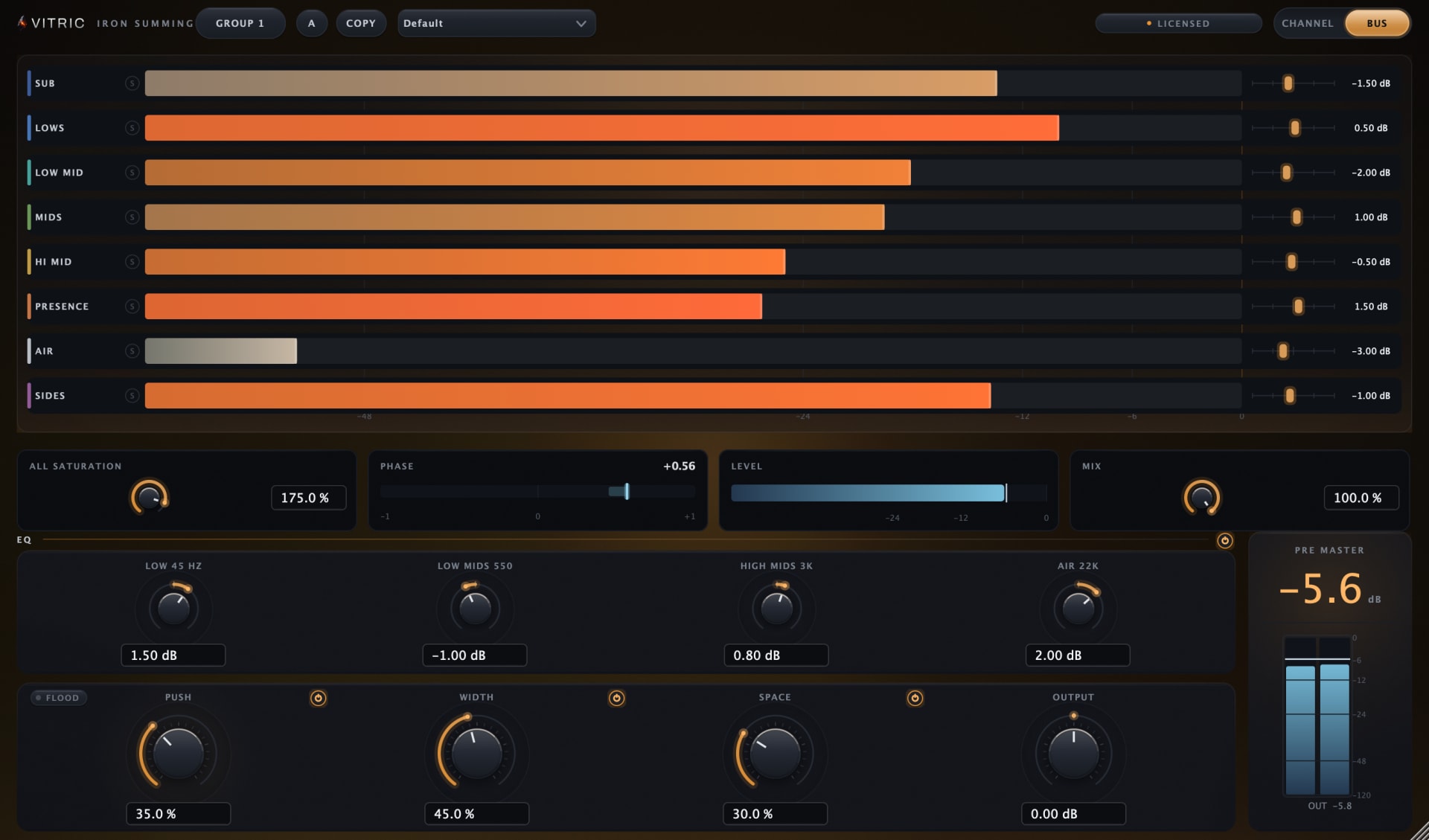
The Bus processes the real summed audio the DAW delivers to the master. Its window carries the full lane view, the All Saturation control, the console EQ and the master row: Push with its Flood switch, Width, Space and Output, each dynamic module with its own power switch.
All Saturation
One knob, 0 to 200 percent, scaling the colour of every Channel in the group at once. It multiplies against each Channel's own Tone, so the balance you set per track is preserved while the whole console drives harder or cleaner. At 0 the saturation stage passes audio unchanged.
The console EQ
Four wide console curves: a low shelf at 45 Hz, proportional-Q bells at 550 Hz and 3 kHz, and an air shelf voiced at 22 kHz (lower at 44.1 and 48 kHz). Each band runs plus or minus 6 dB, and the curves are accurate to the documented targets within 0.3 dB at 44.1, 48, 96 and 192 kHz.
Push, the glue
Opto-style glue compression with a hard mathematical cap. The threshold is fixed; the knob drives the detector like a peak-reduction control. Gain reduction cannot exceed 3.0 dB on any material, because the curve approaches the cap asymptotically, so there is no wall. The attack is slow and program dependent, 60 ms nominal, so the front of a hit passes before the glue leans in: measured 10 ms into a burst, the gain reduction is about 5 percent of its settled value. The release is fast and program dependent: about 89 percent recovered 300 ms after a burst ends. A small transient enhancement of at most 1.2 dB restores attack edges; measured, the first 5 ms of a hit leaves the plugin at full level or louder. At 0 the stage is bypassed exactly.
Flood, the glue mirrored
The switch above the Push knob flips the glue into an upward expander: same detector, same threshold, same taper, same ballistics, mirrored. Loud passages bloom upward instead of being glued down. The expander's lift cannot exceed 3.0 dB on any material (measured 2.999 dB worst case) and mirrors the cut to 0.01 dB; the transient enhancement of up to 1.2 dB rides on top of it, so a front edge can rise up to about 4.2 dB. Flipping the switch while audio runs is click free: the direction glides through zero in about a tenth of a second. Factory presets always recall with Flood off.
Width
Mid/side depth ahead of the Space harmonic stage. The mid channel is never processed and side content below 130 Hz is never widened, so your low end stays mono. Above 130 Hz, four expander bands split at 550 Hz, 2 kHz and 8 kHz add at most 2 dB each, RMS detected at a 2 to 1 expansion ratio, over a static side gain that never exceeds 130 percent. Each band's threshold follows the material's own long-term level, so the effect self-calibrates at any gain staging. The dedicated on/off switch gives an exact bypass for mono-compatibility checks.
Space
Split-band harmonic generation on the sum: even-order products from content below 500 Hz, odd-order products from content above 1 kHz, and sources at 550, 700 and 850 Hz produce nothing above -95 dB at full knob and -12 dBFS. The amounts are seeded per instance, stored in your session and identical on recall.
Module power and metering
EQ, Push, Width and Space each have their own power switch. Bypassing a module is click free and nulls exactly once its smoother settles. The metering is honest: a real stereo correlation coefficient from -1 to +1, the summed level arriving at the Bus before the master section, and a 0 to -120 dB output meter. The Bus output control trims plus or minus 12 dB.
Presets
Nine Bus presets named for jobs, setting Bus parameters only, so your per-Channel settings are never changed by a preset; each preset's All Saturation value does scale every Channel's Tone in the group. Presets recall with every module powered on and Flood off. The Clean Console Off preset is a null-test reference: load it and the Bus passes audio unchanged, and we invite the test.
Saving and recalling your own presets
User presets are in the Bus view, in the same PRESETS menu as the factory presets. The Channel view has no preset menu.
- In the Bus view, open PRESETS and choose Save preset..., then type a name.
- Your presets appear under User in the same menu, after the factory presets. Choose one to recall it.
- Rename preset and Delete preset manage the list, and Show preset folder opens the folder the files are saved in.
A saved preset holds the Bus controls: All Saturation, the four EQ gains, Push and Flood, Width, Space, Mix, output and the four module power switches, recalled as you saved them. Like the factory presets, it never changes a Channel's own settings or any instance's role, group or name, though its All Saturation value still scales every Channel's Tone in the group. Presets are available in any project. The files live in ~/Library/Application Support/Vitric Audio/Presets/Iron Summing on macOS and %APPDATA%\Vitric Audio\Presets\Iron Summing on Windows. Saving and loading your own presets needs an unlocked plugin (a purchase or an active trial).
Workflows
The whole mix
Use Channels across the session and one Bus on the master. Set per-track Tone for each source, then ride All Saturation from the Bus to scale the console's colour. Channel and Bus processing add zero latency; the CPU cost depends on the session and computer.
Drum bus
Give the kit its own console on a second group: Channels on the drum tracks, a Bus on the drum bus, group 2 on every instance. Push leans into the kit with the 3.0 dB cap keeping it honest, and because the attack is slow and program dependent, the front of each hit passes before the glue arrives. Space adds low even-order weight under the kick without touching the mids.
Choruses that lift
Flood on the loudest section turns the glue inside out: the same detector and ballistics, mirrored upward, so the chorus blooms up to 3.0 dB, plus the small transient enhancement, without a fader ride. The flip is click free while audio runs, so it can be performed at the transition.
Stems and print chains
Zero real latency and bit-transparency at Tone 0 mean Iron can live on every stem of a print chain without smear. Nothing is random between recalls: every per-instance variation, from console voicings to Space seeding, is stored with the session, so a mix reopened next year nulls against itself, bit for bit.
Reference
| Claim | The number | How it is held |
|---|---|---|
| Transformer harmonics | H2 near -55 dB at 50 Hz and about -102 dB at 1 kHz on the default voicing, at Tone 100 (test limit -80 dB) | Automated harmonic test in the plugin's test suite |
| Glue cap | GR can never exceed 3.0 dB; Flood lift mirrors to 0.01 dB | Asymptotic curve, measured worst case 2.999 dB |
| Transparency | Bit-exact at Tone 0; nothing random between recalls | Null-test reference preset ships in the box |
| Aliasing | Products below -80 dB at 44.1 kHz at full drive | Measured worst case, Space on an 8 kHz tone |
| Spec | Value |
|---|---|
| Modes | Channel on tracks, Bus on the master, one binary |
| Grouping | Groups 1 to 8; shared module/process; 128 registered instances |
| Channel Tone | 0 to 100 percent, parallel injection, direct path untouched |
| Voicings | 32 fixed console voicings, core corners 45 to 70 Hz, compiled in, saved with the session |
| Channel Comp | 1.5:1, RMS, 30 ms attack, 120 ms release, capped at 6 dB |
| All Saturation | 0 to 200 percent, scales every Channel from the Bus |
| Bus EQ | 45 Hz shelf, 550 Hz and 3 kHz bells, 22 kHz air, plus or minus 6 dB |
| Push / Flood | Opto glue down, capped at 3.0 dB, or upward bloom, capped at 3.0 dB plus up to 1.2 dB of transient enhancement |
| Width | Mid untouched, mono below 130 Hz, at most 2 dB per band, exact bypass |
| Space | Even-order from lows, odd-order from highs, seeded per instance |
| Metering | True correlation -1 to +1, pre-master level, 0 to -120 dB output |
| Latency | Zero samples, reported and real, both modes, all sample rates |
| CPU | Varies with instances, host, hardware, buffer size and visible editors |
| Sample rates | 44.1 to 192 kHz, mono or stereo Channels, stereo Bus |
| Presets | 9 Bus presets, including the Clean Console Off null reference; your own Bus presets, saved from the Bus view |
| Formats | VST3, AU, AAX |
| Platforms | Windows 10+ (64-bit); macOS 10.15+ Intel / 11+ Apple Silicon |
| Activations | 3 computers at a time per purchased perpetual license; moving to a new computer is free |
What it does not do
These are design decisions, and each is also a fact:
- No latency, ever. No oversampling, no lookahead, no linear-phase filters. Zero samples in both modes at all sample rates. Aliasing is controlled by design instead: products measure below -80 dB at 44.1 kHz at full drive, because the saturators are low order and drive-weighted toward low frequencies where products stay in band.
- No noise generator. Modern console noise floors measure below -80 dBu and add nothing we can defend, so we left it out.
- No crosstalk modeling. Real crosstalk is between channels; a plugin that fakes it inside one track is not modeling a console.
- Nothing random between recalls. All character variation is seeded and stored. A mix reopened next year nulls against itself.
FAQ
Does audio flow between the instances? No, and that is deliberate. Each Channel processes its own track and the Bus processes the real summed audio the DAW delivers to it. Instances share only control data: meters, names, solo, trims and the All Saturation scale. That is why every track has exactly zero samples of latency and why nothing smears at 100 instances.
What makes the saturation transformer-style? The drive law. Low frequencies saturate first because drive follows B equals V over f, the way flux builds in a core. The harmonics are measured: at Tone 100, a -18 dBFS tone at 50 Hz shows its second harmonic near -55 dB while the same level at 1 kHz measures about -102 dB on the default voicing. The injection is parallel, so the direct path carries zero phase shift at any setting.
Can the glue ever overcompress? No. Push approaches 3.0 dB of gain reduction asymptotically and can never exceed it, on any material. The attack is slow and program dependent, the release fast, and the first 5 ms of a hit leaves the plugin at full level or louder. Flood applies the identical contract upward: the expander's lift mirrors the cut to 0.01 dB, with the transient enhancement of up to 1.2 dB on top.
Will my mix recall identically? Yes, bit for bit. Every per-instance variation, from console voicings to Space seeding, is stored with the session. There is no random component between recalls, and at Tone 0 the Channel is bit-transparent. The Clean Console Off preset exists as a null-test reference.
What does a big session cost? CPU use depends on instance count, host, hardware, buffer size and visible editors. Channel and Bus processing both add zero samples of latency. Try the plugin in your own session to check its cost at your normal settings.
Why is solo not automatable? Solo is session-level shared state across the group, like a monitor section button: it exists to audition, not to mix. It is deliberately not a parameter, not saved and not automatable.
My host runs plugins in separate processes. Does the console break? No. A Channel keeps processing its own track normally. The group view can only show the instances in its own process, and it says so instead of pretending.
Do I need a license per instance? No. One valid license covers every instance of this product on its bound computer. A purchased perpetual license runs on up to three computers at a time; a trial is limited to its issuing computer. When you replace a computer, contact support and we move the license over for free.
What DAWs does it support? Use AU on macOS, VST3 in a compatible 64-bit host, or AAX in Pro Tools. Your DAW may require a newer OS than the plugin build minimum. Check the DAW's system requirements and supported plugin formats.
Can I try it before buying? Yes. Install the plugin, then choose Start free trial in its license panel or visit the trial page. The full-function trial lasts three days from license issuance and needs internet access for periodic verification. It is limited to one per product, per person and machine, with no automatic charge.
Support
Questions, activation trouble, or anything this manual does not cover: support@vitricaudio.com. Every purchase also carries a 14 day money back guarantee, no questions asked, so the real test is always your own sessions.