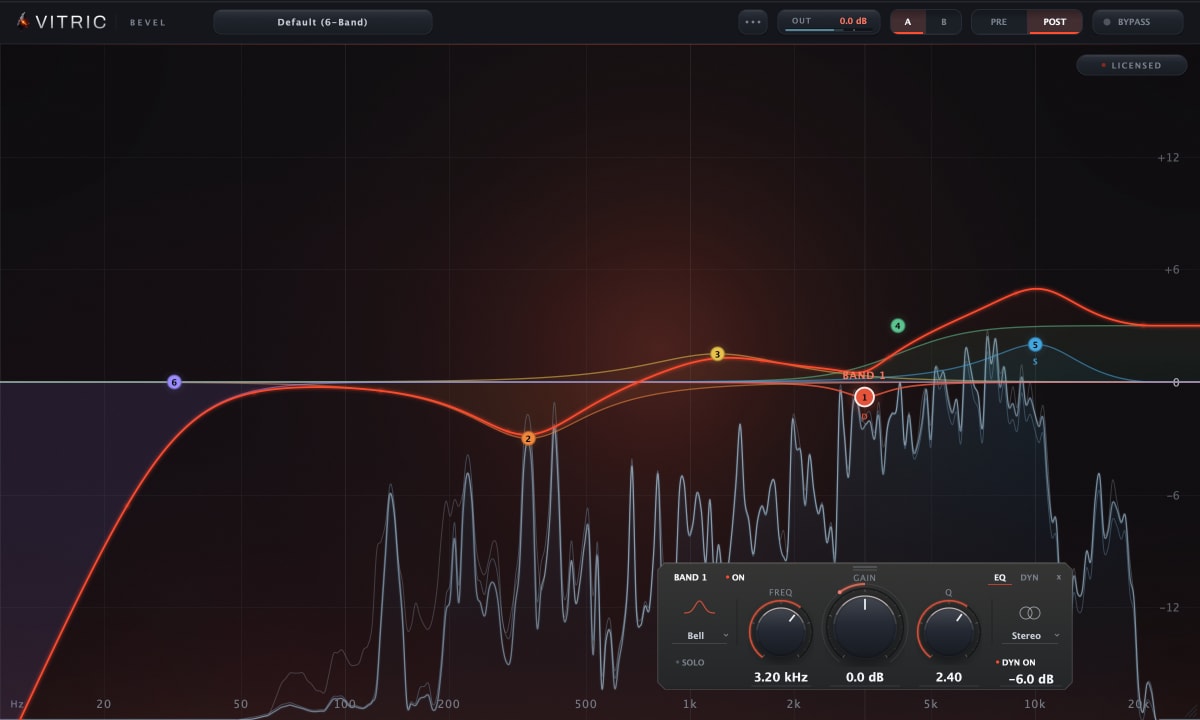
What is a parametric EQ? Frequency, gain and Q explained
A parametric EQ lets you choose the frequency, the amount and the width of every band. Here is what each control does, how Q maps to octaves, and how bells, shelves and filters differ.
A parametric EQ is an equalizer where every band has three controls you can set freely: the frequency it works on, the gain (how much it boosts or cuts) and the Q (how wide or narrow the change is). Those three parameters give it the name. With them you can make a broad, gentle tone move or reach into one ringing note and take only that out, which is why a parametric EQ is the default EQ in most mixes.
The three parameters
Frequency
The center of a bell, or the corner of a shelf or filter, in hertz. Sweeping it is how you find a problem: a narrow boost moved slowly through the spectrum makes a resonance jump out, and then the same band becomes a cut.
Gain
How far the band lifts or lowers the signal, in decibels. On a mix bus or a master, moves of 1 or 2 dB are already significant; on a single track, larger cuts are common.
Q (bandwidth)
Q sets how wide the band is. A low Q is broad and musical; a high Q is narrow and surgical. Many engineers think in octaves instead, so here is how the two line up for a bell centered at 1 kHz:
| Width | Q | Range at 1 kHz | Typical use |
|---|---|---|---|
| 2 octaves | 0.67 | 500 Hz to 2 kHz | Broad tone moves |
| 1 octave | 1.41 | 707 Hz to 1,414 Hz | General shaping |
| 1/2 octave | 2.87 | 841 Hz to 1,189 Hz | Focused cuts |
| 1/3 octave | 4.32 | 891 Hz to 1,122 Hz | Boxy or honky spots |
| 1/6 octave | 8.65 | 944 Hz to 1,059 Hz | Resonances |
| 1/12 octave | 17.3 | 972 Hz to 1,029 Hz | Ringing notes, hum |
The ranges are where a bell reaches half of its boost or cut in decibels, using the common constant-Q definition; we checked them against a standard digital bell filter. Plugins do not all define Q the same way, so treat the numbers as a map and let your ears and the curve on screen make the final call.
Band shapes: bell, shelf and filters
- Bell (peaking). Boosts or cuts around a center frequency, shaped by Q. The workhorse for both tone and repairs.
- Shelf. Lifts or lowers everything above (high shelf) or below (low shelf) a corner frequency by the same amount. Good for air, warmth or taking out low-mid weight across a whole region.
- Notch. A very deep, very narrow cut for a single frequency, such as hum or a whistle.
- High-pass and low-pass. Remove everything below or above a corner. The slope, in dB per octave, sets how steep the edge is: 12 dB/oct is gentle, 48 dB/oct and above is close to a wall.
Parametric vs graphic EQ
A graphic EQ has a fixed row of bands, often at one-third octave spacing, and each band only has a gain control; the frequencies and widths are set for you. It is quick to read and common in live sound. A parametric EQ lets you put each band exactly where the problem is and make it exactly as wide as it needs to be, which is why studio mixing and mastering lean on it. A semi-parametric EQ sits between them, usually with a fixed or limited Q.
Minimum phase vs linear phase
Every EQ that changes the level of some frequencies also shifts their timing slightly. A minimum-phase EQ, the normal kind and the way analog EQs behave, keeps that shift as small as possible and adds no latency. A linear-phase EQ delays all frequencies by the same amount instead, so the phase relationships inside the signal stay intact. The cost is latency and, on steep or narrow moves, a soft pre-echo before transients.
Linear phase earns its place when two related signals are EQed differently and then summed, such as a parallel chain or multi-miked drums, and in some mastering work. For most tracks a minimum-phase EQ is the right default.
How to use a parametric EQ
- Start with a high-pass on parts that have no useful low end, set just below where the sound starts to thin.
- Cut narrow, boost broad. Narrow boosts tend to sound peaky; narrow cuts remove problems without changing the character.
- Find problems by sweeping, then cut, and listen to the band soloed if the EQ can do it.
- Match the level when you compare before and after. A boost that makes the track louder will almost always sound better at first.
- Reach for a dynamic band when a frequency is only a problem some of the time. The trade-offs are covered in dynamic EQ vs multiband compression.
A parametric EQ in practice: Bevel EQ
Bevel EQ is a parametric EQ with 24 freeform bands. Each band can be a bell, shelf, notch, high-pass or low-pass, with high-pass and low-pass slopes from 12 to 96 dB/oct. Double-click a node to type its frequency, gain and Q, solo a band to hear its region, and place any band on the stereo signal, the left or right channel, the mid or the sides. Bell and shelf bands can also run dynamically, with their own threshold, range and timing. The spectrum analyzer guide explains how to read its pre and post traces while you work.