
Colonnade Delay Dual-engine delay plugin
Pair a close vocal repeat with a distant wash in one delay.
Plugin for Mac & Windows.
Try it free on your computer.
Hear the demo. Loudness matched.
About this demo
One tape echo on the quarter note at 85 bpm (706 ms), 12% feedback, low-passed at 6 kHz, 26% mix, ducked under the voice.
Rendered through Colonnade Delay 1.1.12 on macOS. Input and processed excerpts are matched in loudness. Switching keeps your place.
Open input audio ↗Open processed audio ↗A dual-engine delay plugin for a close vocal repeat and a distant wash in the same insert. Choose Studio, Tape, Bucket or Ghost for each engine, then route them in parallel, ping-pong, serial or Mid/Side.
Sale price
5.0 from 1 KVR user reviewPay by card, PayPal, Apple Pay or Google Pay.
By buying, you agree to the EULA and Terms of Service.
Try free for 3 daysOne-time purchase · 3 computers at a time · 14-day money-back guarantee
Instant download: your license key arrives by email right after payment.
Or get all 12 with Vitric Access, $20 a month
Secure checkout by Paddle. No card required for the trial.
Mac & Windows · VST3, AU and AAX · version 1.1.12
Prices in US dollars. Checkout charges in your local currency where available. US and Canadian sales tax is added at checkout. In the EU, UK, Japan and Australia, tax is already included.
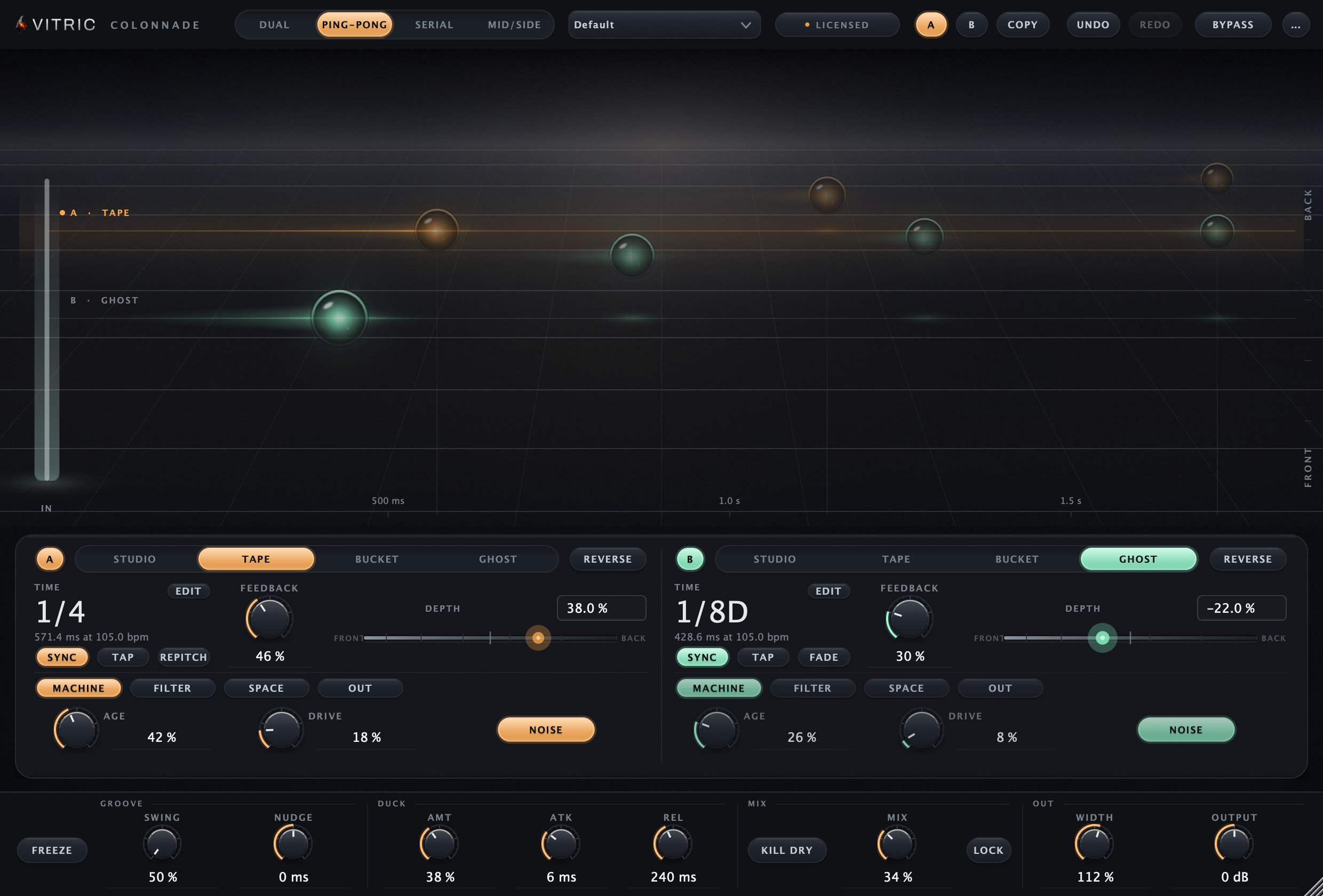
The trial uses the full plugin. Install it in your DAW, then start the 3-day trial from its license screen. No card required.
Read the Colonnade manualTHE LISTENING ROOM
Listen to Colonnade.
One performance. Two perspectives. Loudness matched.
One tape echo on the quarter note at 85 bpm (706 ms), 12% feedback, low-passed at 6 kHz, 26% mix, ducked under the voice.
About this demo
Rendered through Colonnade Delay 1.1.12 on macOS. Input and processed excerpts are matched in loudness. Switching keeps your place.
Open input audio ↗Open processed audio ↗IN MOTION
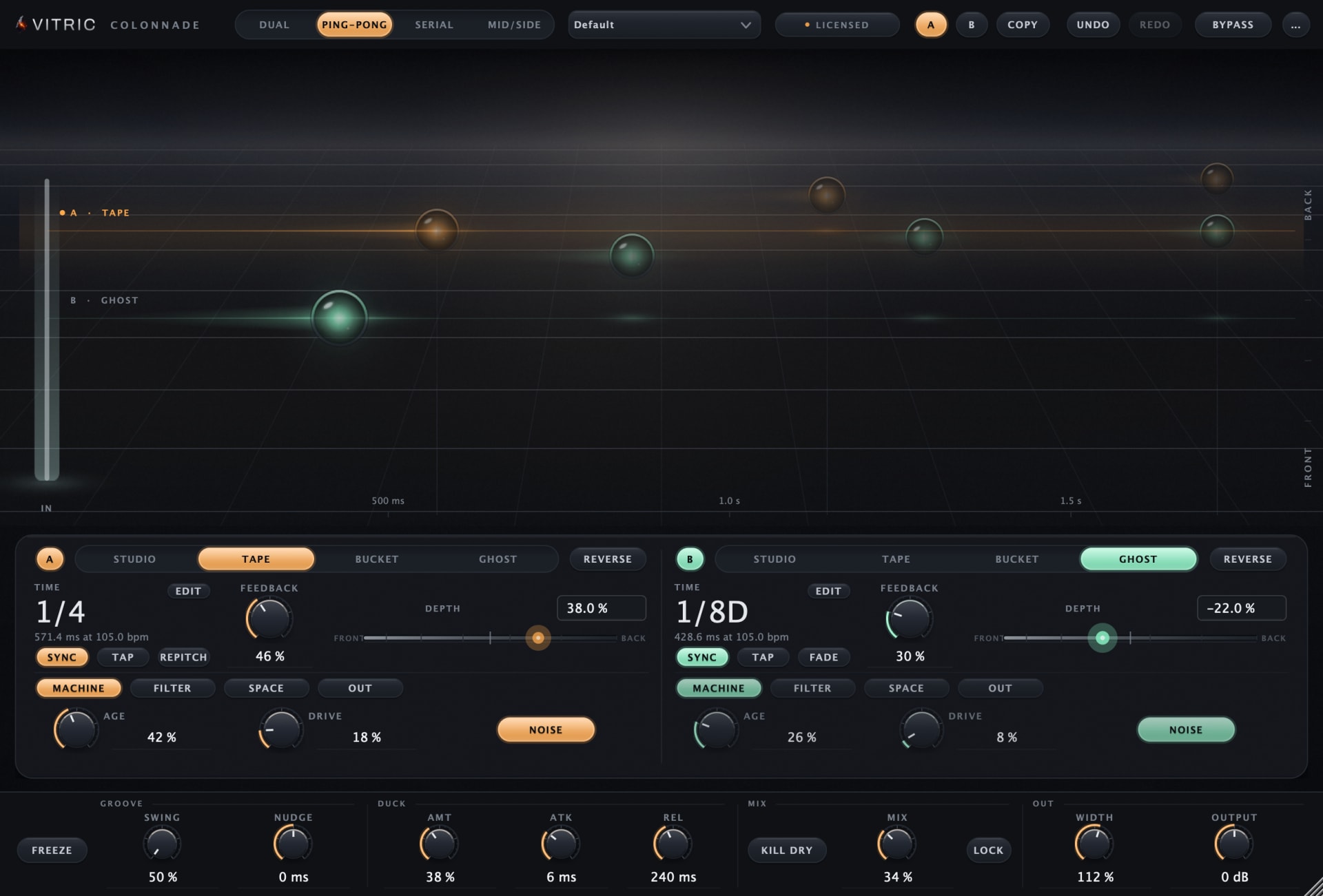
Colonnade, running.
IN YOUR SESSION
A close repeat. A distant wash. One delay.
Pair a short vocal slap with a longer tail, send repeats across the stereo image or feed A into B for a layered echo. Each engine has its own character, time, feedback and depth, with filters and pitch inside the loop.
A CLOSER LOOK
Inside Colonnade.
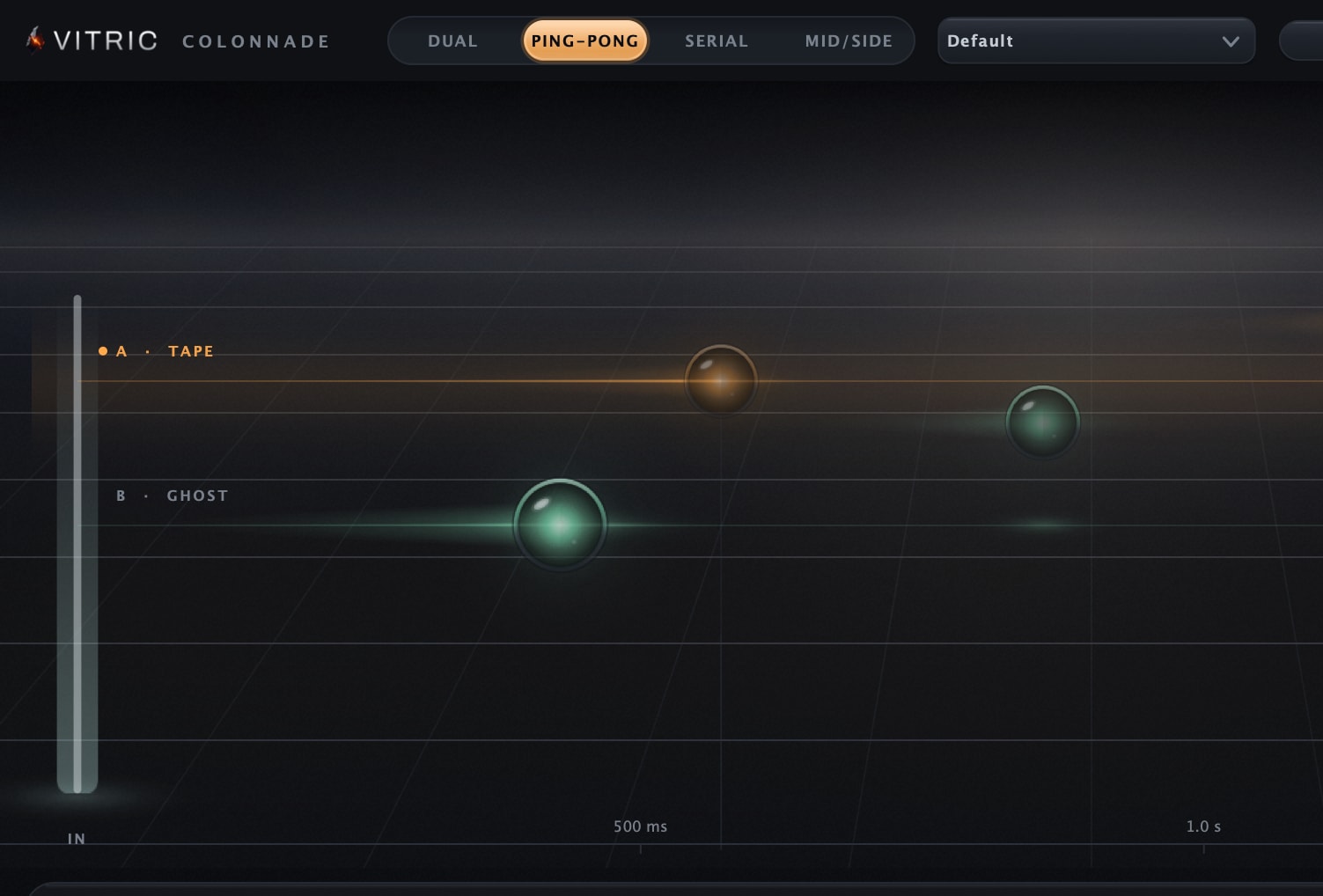
Two engines on one stage
The stage draws both engines against a time ruler. Ping-Pong routing alternates the repeats left and right, and each lane tag names the machine that lane is running.
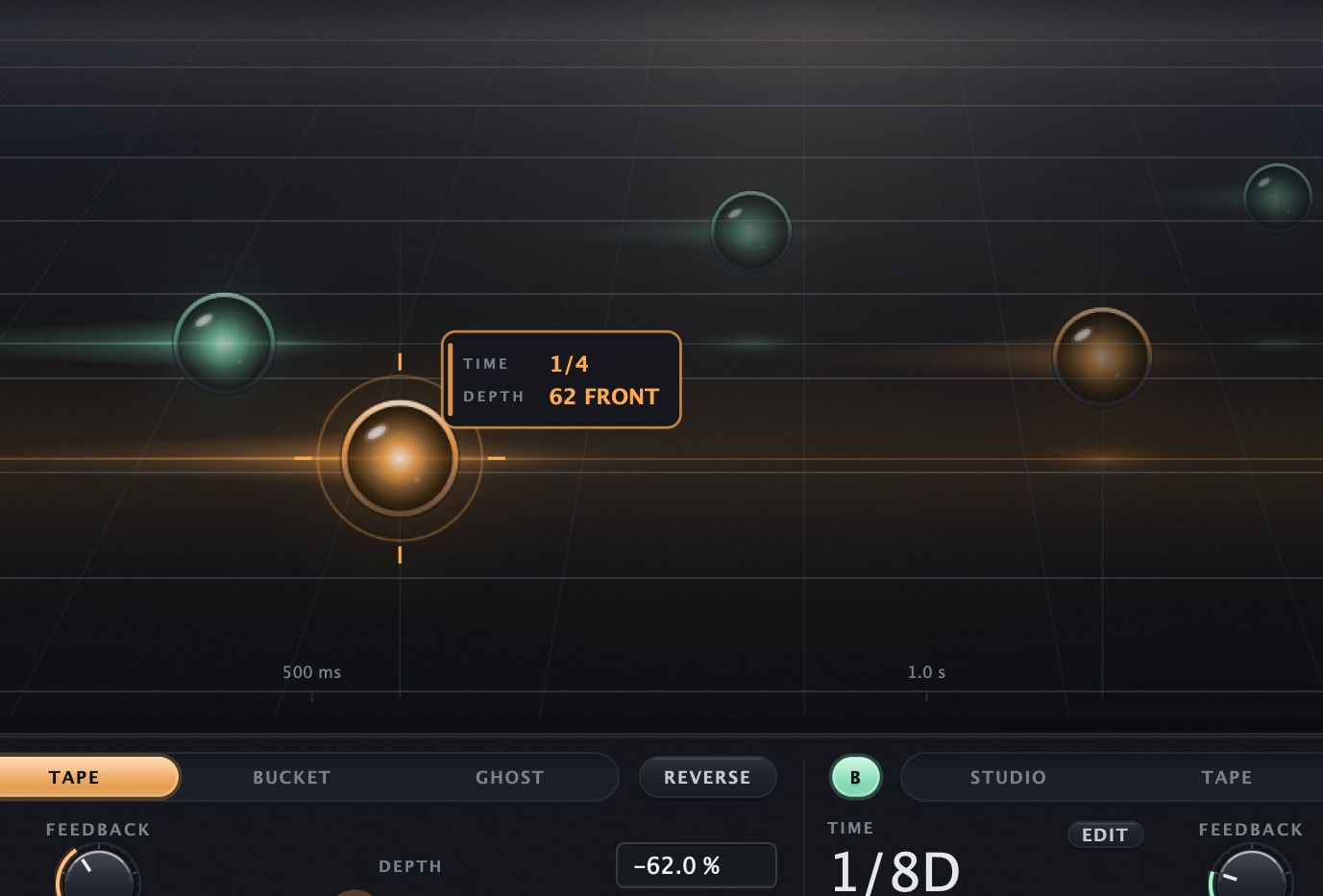
Drag a repeat through depth
Drag an engine’s head node horizontally for time and vertically for depth. Keep TIME, FEEDBACK and DEPTH visible while the remaining controls switch pages independently.
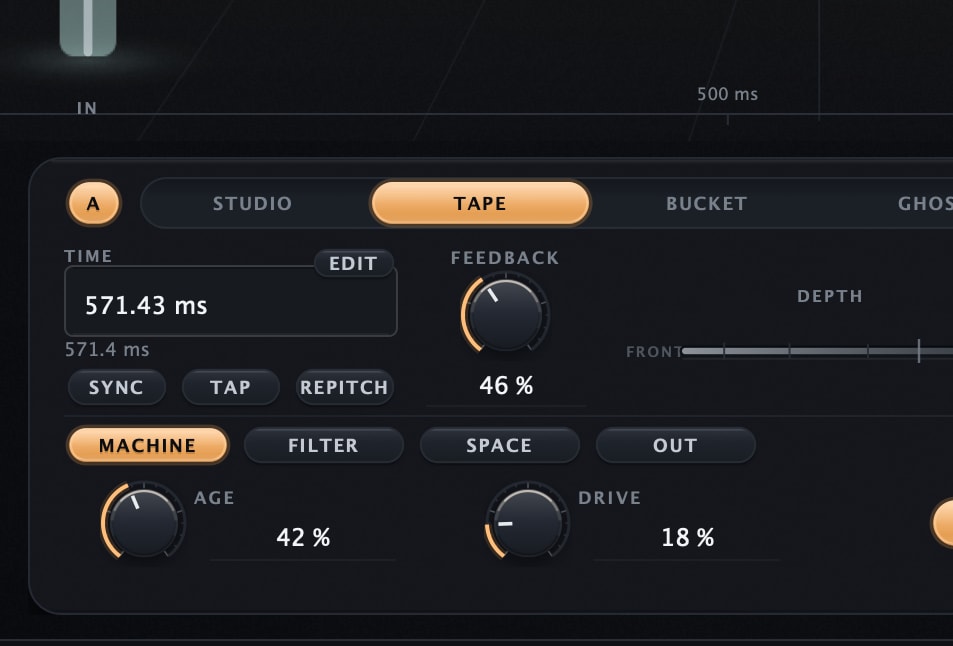
Type the exact time
Use TIME EDIT for exact milliseconds or seconds; with sync enabled it opens musical divisions. Free time runs from 1 ms to 4 seconds (under 41 ms, DIFFUSE and the depth smear step aside), and the large readout still supports scrubbing.
All features & controls
- Two delay engines with independent time, feedback and depth
- Studio, Tape, Bucket and Ghost characters
- Dual, Ping-Pong, Serial and Mid/Side routing
- Repitch or Fade for delay-time changes
- Quartz or Slide for pitch-shifter behavior
- Per-engine MACHINE, FILTER, SPACE and OUT pages
- OFF/LP/HP/BP filters inside each engine’s feedback loop
- FILTER OFF retains FREQ/RES; filtering A does not filter B
- Mid/Side puts A on the center and B on the sides; B’s WIDTH sets the side width, while PAN and A’s WIDTH are stored but inactive
- Exact time/value entry, interactive echo stage, A/B and mix lock
Four characters in the loop
Studio, Tape, Bucket and Ghost sit in one row per engine. Tape is lit: pre-emphasis into tanh into de-emphasis, with a head bump tracking speed between 40 and 95 Hz.
Bucket brigade, 8192 stages
Bucket derives a virtual clock from 8192 stages, filters at 0.4 times that clock, and runs an NE570-style 2:1 and 1:2 compander with a 5 ms time constant.
Ghost, quantized and dark
Ghost companders the loop down to 7 bits from 14, drops its sample and hold from 24 kHz to 8 kHz, then adds a dark low-pass, deep warble and crackle.
Four characters, measured
| Engine | The machine | What accumulates over the repeats |
|---|---|---|
| Studio | Clean digital line | Nothing. Transparent at any feedback |
| Tape | Program-dependent saturation, head bump, HF loss tracking speed, measured wow and flutter | Warmth, compression, wear |
| Bucket | Bucket brigade on a virtual clock with compander | Darkness as times stretch, pumping, bloom |
| Ghost | Companded bit reduction, sample rate reduction, slow warble | Grit that breathes with the signal |
Put it to work.
Vocal space
Run a short repeat beside a longer, quieter echo in Dual mode. Adjust each engine’s depth to place them around the vocal.
Moving stereo repeats
Choose Ping-Pong and the echoes alternate left and right across the image; in new instances that includes centered and mono sources. Then set the tone and feedback of each engine.
Rhythmic layers
In Serial, A feeds B. Combine two sync divisions and hear how the second engine reshapes the first.
A wider atmosphere
Use Mid/Side routing to treat the center and sides separately: A carries the center, B the sides, and B’s WIDTH sets how wide the side echoes are. PAN and A’s WIDTH are inactive there; LEVEL stays active.
THE DETAILS
Fits your setup.
- Engines
- 2
- Characters
- Studio / Tape / Bucket / Ghost
- Routing
- Dual / Ping-Pong / Serial / Mid-Side
- Time
- 1 ms to 4 s free; 21 sync divisions
- Time changes
- Repitch / Fade
- Pitch behavior
- Quartz / Slide
- Loop filter
- OFF / LP / HP / BP, per engine
- Latency
- Zero added samples
- Platforms
- Windows 10+ (64-bit); macOS 10.15+ Intel / 11+ Apple Silicon
- Windows
- Windows 10 or later, 64-bit. VST3, AAX, Standalone.
- macOS
- macOS 10.15 or later on Intel; macOS 11 or later on Apple Silicon. AU, VST3, AAX.
- Hosts
- A 64-bit host supporting your platform’s plugin format. Your DAW may require a newer operating system.
Use it in Pro Tools, Logic Pro, Ableton Live, Cubase, Studio One, FL Studio, REAPER, Bitwig Studio, and other compatible hosts.
Find the right format for your DAWQuestions about Colonnade.
What are the four characters?
Studio, Tape, Bucket and Ghost. Choose one independently for each engine; its character accumulates as the signal passes through the feedback loop.
How do the engines connect?
Dual runs them in parallel; Ping-Pong bounces the repeats left, right, left, and in new instances that includes centered and mono sources; Serial feeds A into B; Mid/Side separates the center and sides. Sessions saved before Colonnade 1.1.9 keep their earlier Ping-Pong, which crosses each side’s repeats to the opposite side, so a centered source stays centered there.
What is the difference between Repitch/Fade and Quartz/Slide?
Repitch and Fade control delay-time changes: Repitch glides with pitch movement, while Fade crossfades between times. Quartz and Slide are pitch-shifter modes; they do not select delay-time behavior.
Why can I still hear an unfiltered repeat?
Check that FILTER is active, then audition one engine at a time. Each engine has its own loop filter; A’s filter does not process B. The filtering compounds over successive repeats.
How do I get a cleaner, less diffuse echo?
Set DIFFUSE and DEPTH to zero and audition one engine at a time. GHOST retains its own minimum diffusion character even with DIFFUSE at zero.
Own Colonnade Delay? Leave a verified review from your account.
On KVR Audio
What KVR users say about Colonnade Delay.
1 user review on KVR Audio, an independent plugin database. Average 5.0 out of 5. Newest first, never filtered by rating.
ABednarskiSep 30, 2026Version 1.0 on Windows
★★★★★I have just download it last week, and make some tests. Making Electronic Music, I thing this delay will offer me a lot of interesting sounds ... A really nice product ! Thanks.
As of October 1, 2026. Rate Colonnade Delay on KVR.
FREE STUDIO TOOLS
Work out the next move.
Measure a mix or find a starting point. These tools run in your browser, with no account required.
GUIDES & JOURNAL
The technique behind Colonnade.
Practical explanations, build stories and examples to try in your own session.
PART OF THE COLLECTION
Colonnade, in a bundle.
Colonnade is included in these bundles. Compare their contents and current offers.
Find its next partner.
Explore all plugins
Hear it in your own session.
Colonnade. $15, or try it free for 3 days.
By buying, you agree to the EULA and Terms of Service.
Try free for 3 daysOne-time purchase · 3 computers at a time · 14-day money-back guarantee
Instant download: your license key arrives by email right after payment.
Or get all 12 with Vitric Access, $20 a month