

Harmonic Multiband Compressor
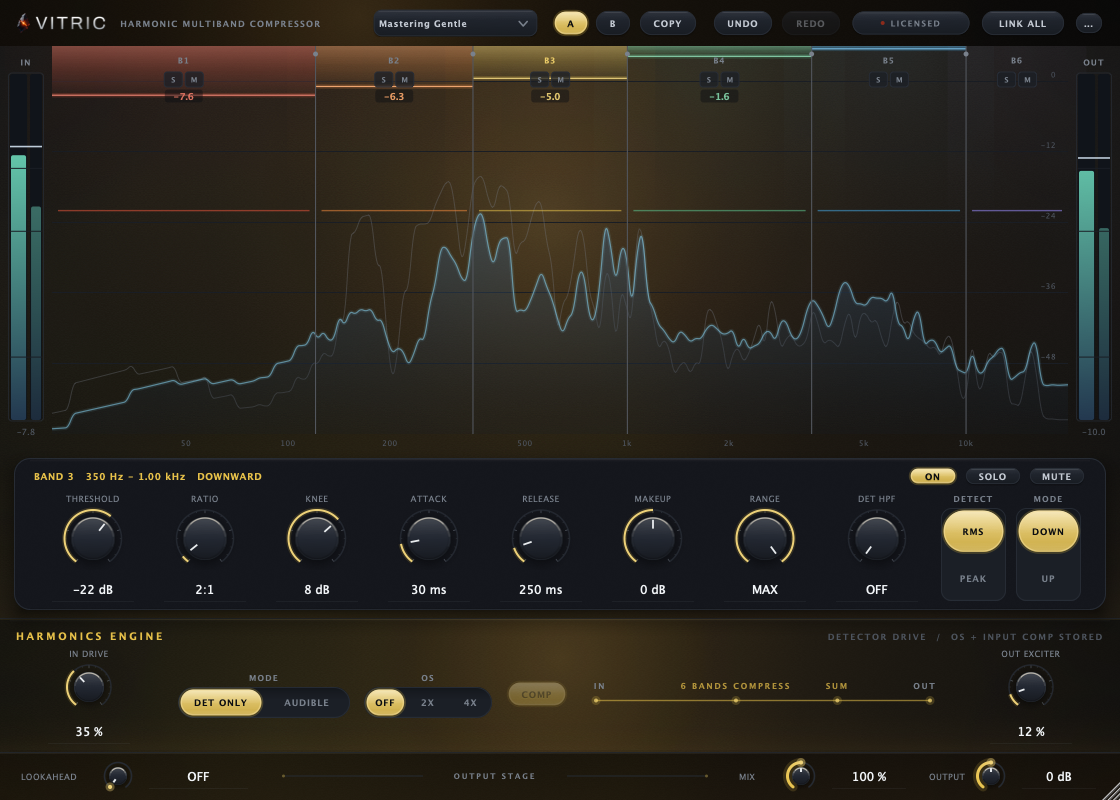
Harmonic Multiband Compressor is a six-band compressor with saturation built into the signal path. The Harmonics Engine can drive the compressor's detectors, saturate each band before it is compressed, or add harmonics to the finished mix, so the saturator-into-compressor chain lives in one plugin. It is for anyone who mixes or masters and wants to control each part of the spectrum on its own and add density without a second plugin.
This manual covers Harmonic Multiband Compressor 2.1.15 on macOS and Windows, in VST3, AU and AAX.
Quick start
- Insert Harmonic Multiband Compressor on a bus or a full mix. If the chip in the top bar reads LOCKED, Harmonic stays silent until you activate it or start a trial (see Installation and activation).
- Open the preset menu and choose Mastering Gentle: six bands at 2:1 with smooth detection.
- Press play. Each band shows its gain reduction at the top of the display.
- Click a band in the display to select it, then adjust its THRESHOLD in the panel below (or drag the band's threshold line in the display).
- Drag the vertical crossover lines to move where one band ends and the next begins.
- Raise IN DRIVE in the Harmonics Engine to make the compression smoother and denser. It makes every band compress harder, so raise the thresholds a little to compensate.
- Compare with your DAW's plugin bypass (Harmonic has no bypass button of its own). Match the level with OUTPUT first.
What's new in 2.1.15
- Fixed a rare crash when the host saves and restores settings at the same time.
- The Vocal De-Ess preset now works only the top two bands, where the ess lives.
- A reopened session shows its preset's name.
- The license chip tells you when an update is out.
- Security improvements to license file handling.
What's new in 2.1.12
What changed since 2.1.0:
- Your own presets. Save, recall, rename and delete presets from the preset menu.
- Smoother Harmonics Engine (new sessions). IN DRIVE now fades in instead of jumping. AUDIBLE removes DC offset the same way at every sample rate. With OS on, IN DRIVE at 0 % no longer shifts the timing. Sessions saved with 2.1.8 or earlier keep their original sound.
- Clearer tooltips. COMP, OUT EXCITER and ATTACK describe exactly what they do.
- Update notice. The license card tells you when a new version is out (see Updates).
- Sessions always reopen as saved, after every update and under every license state.
- Subscriptions renew by themselves in the plugin.
- Fixes: knob drags no longer hide or jump the pointer. A window could open blank on some Windows displays. A license activated in Logic Pro was not seen by other DAWs. Also fixed: a crash on macOS 10.15 and 11, and Windows user names with accented characters.
The window
The window has a top bar, the display (spectrum, bands and crossovers), the selected band's panel, the Harmonics Engine, and the OUTPUT STAGE along the bottom. Drag the corner to resize it, from 924 x 660 up to 1680 x 1200 pixels; it opens at 1120 x 800.
The top bar

- Preset menu. Factory presets and your own.
- A and B. Two complete setups to compare.
- COPY. Copies the active slot into the other.
- UNDO and REDO. Step through your changes.
- License chip. LICENSED, TRIAL or LOCKED.
- LINK ALL. Edits reach all six bands.
- ... (Options). Low Latency, tooltips, update checks and the shortcut sheet.
| Control | What it does | Range | Default |
|---|---|---|---|
| Preset menu | Factory presets and your own. Loading one replaces the current settings. | 6 factory presets plus yours | Default |
| A · B | Two full setups. Edits land in the slot that is lit. Press A to switch. | A or B | A |
| COPY | Copies the active slot into the other one. | ||
| UNDO · REDO | Step back and forward through your changes. | ||
| License chip | Shows LICENSED, TRIAL with the days left, or LOCKED. Click it to open the license card. | ||
| LINK ALL | Your edits reach all six bands at once. Thresholds move by the same amount, keeping their differences; ON, SOLO and MUTE stay per band. | On or off | Off |
| ... (Options) | Opens a menu: Low Latency turns off oversampling so OS adds no delay; also Show tooltips, Check for updates and the keyboard shortcut sheet. |
The display
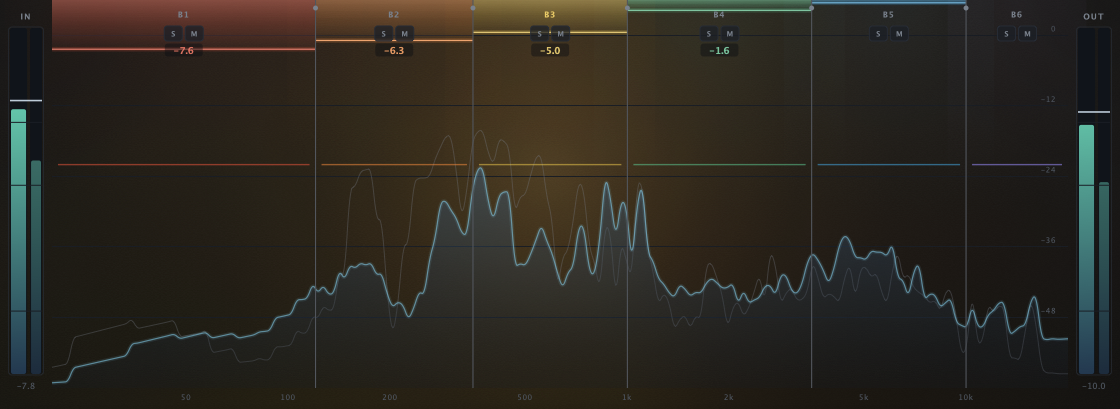
- IN meter. Input level.
- OUT meter. Output level.
- Band tab (B1 to B6). Click to select the band.
- S and M. Solo and mute that band.
- Gain reduction. How hard the band works, in dB; LIFT marks upward gain. Shows above about 0.5 dB.
- Crossover. Drag the line to move the split between two bands.
- Threshold line. Drag it to set that band's threshold.
- Spectrum. The output spectrum, lit, with the input drawn faintly behind it.
- Frequency scale. 20 Hz to 20 kHz.
Each band draws a curtain of light from the top in its own color, so you can see where the compressor works and by how much. The spectrum is tilted 4.5 dB per octave, so a balanced mix looks roughly flat.
The display is the main way to work:
- Click a band to select it; the panel below shows its controls. Keys 1 to 6 do the same. Band 1 is selected when the window opens.
- Drag a crossover to move the split between two bands (20 Hz to 20 kHz). Crossovers stay in order, at least 5 % apart. Hold Shift for fine moves; the mouse wheel steps a semitone (Shift: 10 cents). Crossovers start at 120 Hz, 350 Hz, 1 kHz, 3.5 kHz and 10 kHz.
- Double-click a crossover to type an exact frequency (
250,2.5k), limited by its neighbors. - Drag a threshold line to set that band's threshold, snapping to whole dB. Hold Shift for fine moves; the wheel steps 1 dB (Shift: 0.1 dB). Double-click to reset it to -18 dB.
- S and M solo or mute the band. Soloing several bands plays them together.
The band panel
The panel shows the selected band. Its header gives the band number, its frequency span and what it is doing: DOWNWARD, UPWARD LIFT, COMP OFF, MUTED or SOLO EXCLUDED. Click the value under a knob to type an exact value; Return applies and Esc cancels.
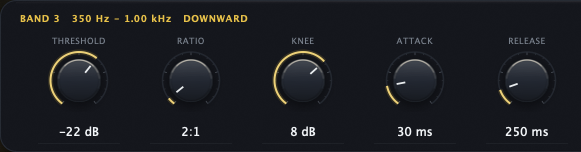
- Band header. Number, span and state.
- THRESHOLD. Where the band starts to work.
- RATIO. How strong the gain change is.
- KNEE. How gradually it starts.
- ATTACK. How fast it responds.
- RELEASE. How fast it recovers.
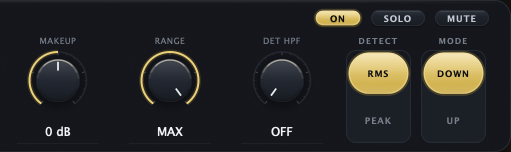
- ON, SOLO and MUTE. The band's switches.
- MAKEUP. Band gain after compression.
- RANGE. The most the gain can change.
- DET HPF. A low cut on the detector.
- DETECT. RMS or PEAK.
- MODE. DOWN or UP.
BAND
| Control | What it does | Range | Default |
|---|---|---|---|
| ON | Turns this band's compressor on. With it off, the band still passes through the Harmonics Engine, its controls dim, MAKEUP no longer applies and its threshold line is locked. Key B. | On or off | On |
| SOLO | Hear this band alone. Key S. | On or off | Off |
| MUTE | Silence this band. Key M. | On or off | Off |
| THRESHOLD | In DOWN, the level above which the band compresses; in UP, the level below which it lifts. | -60 to 0 dB | -18 dB |
| RATIO | How strong the gain change is around the threshold. | 1:1 to 20:1 | 4:1 |
| KNEE | Soft-knee width around the threshold. | 0 to 12 dB | 0 dB |
| ATTACK | How fast the band's gain responds. Below about 20 ms the response is softened by fixed smoothing; to catch fast peaks, add LOOKAHEAD. | 0.1 to 200 ms | 10 ms |
| RELEASE | How fast the gain recovers. | 10 to 2000 ms | 120 ms |
| MAKEUP | Band gain after compression. | -36 to +36 dB | 0 dB |
| RANGE | The most this band's gain can change. MAX is 60 dB. In UP mode the lift is capped at RANGE or 30 dB, whichever is smaller. | 0 to 60 dB | MAX |
| DET HPF | A high-pass filter on this band's detector only, so very low content does not trigger it. | OFF to 400 Hz | OFF |
| DETECT | RMS follows the average level (smooth); PEAK follows transients. | RMS, PEAK | PEAK |
| MODE | DOWN compresses above the threshold. UP lifts quiet signal below it. | DOWN, UP | DOWN |
The Harmonics Engine and output stage

- IN DRIVE. Saturation into every band.
- MODE. DET ONLY or AUDIBLE.
- OS. Oversampling for AUDIBLE.
- COMP. A level trim for AUDIBLE, not a compressor.
- Signal flow. Where each stage sits.
- OUT EXCITER. Color on the summed mix.
- LOOKAHEAD. Lets the detectors hear ahead.
- MIX. Processed and dry blend.
- OUTPUT. The final level.
The engine has two stages. IN works on every band after the crossover split and before compression. OUT works on the summed mix. The line in the middle shows the order (IN, 6 BANDS COMPRESS, SUM, OUT), and the text above OUT EXCITER says what the current settings do.
IN DRIVE has two modes. In DET ONLY, only the signal feeding each band's detector is saturated. The detectors read the bands hotter (about +9 dB at 35 %) with loud peaks rounded, so every band compresses more and more evenly, while the audio you hear stays clean. In AUDIBLE, each band's audio is saturated before it is compressed: you hear the saturation, the bands get louder, and the compressor reacts to it.
HARMONICS ENGINE
| Control | What it does | Range | Default |
|---|---|---|---|
| IN DRIVE | Saturation going into every band (one amount for all six). | 0 to 100 % | 0 % |
| MODE | DET ONLY: the detectors hear the saturation, you don't. AUDIBLE: you hear it, and the bands get louder. | DET ONLY, AUDIBLE | DET ONLY |
| OS | Oversampling for AUDIBLE saturation: less aliasing, some added latency. Stored but inactive in DET ONLY or with Low Latency on. | OFF, 2X, 4X | OFF |
| COMP | A level trim, not a compressor: turns the AUDIBLE saturation down by up to 6 dB as IN DRIVE rises. It is not a loudness match. AUDIBLE only. | On or off | On |
| OUT EXCITER | Adds saturated color to the summed mix. Low settings add subtle, bright density; high settings add darker, thicker color. It is level-matched, but settings above about 45 % play louder. | 0 to 100 % | 0 % |
OUTPUT STAGE
| Control | What it does | Range | Default |
|---|---|---|---|
| LOOKAHEAD | Lets the detectors hear the audio up to 10 ms early, so the compressors can catch fast peaks. Adds that much latency, which your DAW compensates. | OFF to 10 ms | OFF |
| MIX | Blends the processed and dry signal for parallel compression. Above 100 % it adds extra wet gain. | 0 to 200 % | 100 % |
| OUTPUT | Final output level. | -24 to +24 dB | 0 dB |
Latency and CPU
- With OS off and LOOKAHEAD off, Harmonic adds no latency.
- LOOKAHEAD and AUDIBLE oversampling add latency, which Harmonic reports to your DAW so everything stays aligned. The dry signal is delayed to match.
- Low Latency (in Options) turns the input oversampling off; LOOKAHEAD still adds its delay if it is on.
- Oversampling costs CPU: 4X costs the most.
Keyboard and mouse
Keys work when the Harmonic window has keyboard focus: click an empty part of the window once. While you type in a value box, the box keeps the keys.
| Action | Mac | Windows |
|---|---|---|
| Select band 1 to 6 | 1 to 6 | 1 to 6 |
| Solo or mute the shown band | S or M | S or M |
| Turn the shown band's compressor on or off (ON) | B | B |
| Switch A and B | A | A |
| Undo | Cmd + Z | Ctrl + Z |
| Redo | Cmd + Shift + Z or Cmd + Y | Ctrl + Shift + Z or Ctrl + Y |
| Show the shortcut sheet | ? | ? |
| Fine drag (knobs, crossovers, thresholds) | Shift + drag | Shift + drag |
| Step a knob (Shift for fine) | Mouse wheel over it | Mouse wheel over it |
| Move the last-clicked crossover a semitone (Shift: 10 cents) | ← or → | ← or → |
| Type the last-clicked crossover's frequency | Return | Enter |
| Reset a knob | Double-click, or Cmd + click | Double-click, or Ctrl + click |
| Type an exact value | Click the value under a knob | Click the value under a knob |
In Pro Tools, fine drag on knobs is Cmd + drag (Ctrl on Windows) and reset is Option + click (Alt on Windows).
Recipes
These are starting points. Every voice, mix and room is different, so adjust by ear and compare at matched levels.
Control a master gently
| Setting | Value |
|---|---|
| Start from | Mastering Gentle |
| Goal | 1 to 2 dB of gain reduction per band on the loud parts |
| IN DRIVE | 20 to 35 % in DET ONLY for a smoother response, then raise the thresholds to get back to 1 to 2 dB |
| OUT EXCITER | 5 to 15 % for a little density |
To compare two versions, put your start in A, click COPY, change B, and press A to switch. Match levels with OUTPUT first: the louder version always sounds better at first.
Tighten a bass
| Setting | Value |
|---|---|
| Start from | Bass Tightener |
| Crossovers 1 and 2 | 100 Hz and 300 Hz |
| Band 1 | -26 dB, 5:1, 15 ms attack, 180 ms release, +2 dB makeup, DET HPF 30 Hz |
| Band 2 | -22 dB, 3.5:1, 150 ms release |
These are the values the preset sets; every other control stays at its default. The lowest notes stop jumping out while the rest of the bass stays natural.
De-ess a vocal
| Setting | Value |
|---|---|
| Start from | Vocal De-Ess |
| Crossovers 4 and 5 | 5 kHz and 9 kHz |
| Band 5 | -30 dB, 6:1, 0.5 ms attack, 60 ms release, DET HPF 200 Hz |
| Band 6 | -28 dB, 8:1, 0.3 ms attack, 50 ms release, DET HPF 200 Hz |
| LOOKAHEAD | 2 to 5 ms |
Bands 1 to 4 stay at the default settings (-18 dB, 4:1). For de-essing only, turn their ON off. Solo band 5 to find the "s" sounds, then lower its threshold until they sit back. LOOKAHEAD lets the bands catch the start of each "s".
Thicken a drum bus
| Setting | Value |
|---|---|
| Start from | Default |
| MODE (Harmonics Engine) | DET ONLY, then AUDIBLE for more grit |
| IN DRIVE | 30 to 60 % |
| Bands 1, 2, 5 and 6 | Lower the thresholds one at a time: with the default crossovers these hold the kick, the snare body and the top |
| MIX | 60 to 80 % for parallel punch |
In AUDIBLE, IN DRIVE also makes each band louder (COMP takes back at most 6 dB), so match the level with OUTPUT before you compare.
Add color without compression
| Setting | Value |
|---|---|
| ON | Off in every band (select each band with 1 to 6 and press B) |
| OUT EXCITER | 5 to 20 % |
| IN DRIVE | Optional: AUDIBLE, 10 to 30 % |
With ON off, the bands still pass through the Harmonics Engine, so you keep the color and lose the compression. Low OUT EXCITER settings add bright density across the whole mix; higher settings sound darker and thicker.
Presets
| Preset | What it sets up |
|---|---|
| Default | Six bands at -18 dB, 4:1, peak detection |
| Vocal De-Ess | Fast, high-ratio compression on bands 5 and 6 (5 to 9 kHz and above) |
| Bass Tightener | Firm control of bands 1 and 2 below 300 Hz |
| Mastering Gentle | All six bands at -22 dB, 2:1, with soft knees and RMS detection |
| Presence Control | Bands 4 and 5 (roughly 1 to 10 kHz) at 3:1 |
| Pumpy Multi | Heavy low-end compression with a touch of the output exciter |
Every preset first sets all controls to their defaults, then applies its own values.
Your own presets
- Open the preset menu and choose Save preset..., then type a name.
- Your presets appear under User in the same menu.
- Rename preset and Delete preset manage the list; Show preset folder opens the folder on disk.
A saved preset holds every band and global control. The A and B slots and LINK ALL stay with the session. The files are in ~/Library/Application Support/Vitric Audio/Presets/Harmonic Multiband Compressor on macOS and %APPDATA%\Vitric Audio\Presets\Harmonic Multiband Compressor on Windows. Saving and loading your own presets needs an active license or trial; factory presets always work.
Specifications
- Bands: 6, split by Linkwitz-Riley crossovers, recombining flat within 0.5 dB.
- Per band: threshold, ratio, knee, attack, release, makeup, range (0 to 60 dB; upward lift capped at 30 dB), DOWN/UP mode, RMS/PEAK detection, detector high-pass, solo, mute.
- Harmonics Engine: IN DRIVE (DET ONLY or AUDIBLE, OFF/2X/4X oversampling), OUT EXCITER with level matching.
- Lookahead: 0 to 10 ms. Mix: 0 to 200 %. Output: -24 to +24 dB.
- Analyzer: 4096-point FFT, 4.5 dB/oct tilt.
- Channels: mono, stereo, or mono in and stereo out.
- Window: 924 x 660 to 1680 x 1200.
- Formats: VST3 and AAX on macOS and Windows; AU on macOS; an optional standalone app on Windows.
- Systems: macOS 10.15 or later on Intel, macOS 11 or later on Apple Silicon; Windows 10 or later, 64-bit.
Not included
- There is no external sidechain input and no bypass button on the face; use your DAW's plugin bypass.
- There are always six bands. To use fewer, turn ON off on the bands you don't need.
- It is not a linear-phase design.
- Harmonic works on mono and stereo tracks. It does not support surround or Atmos formats.
Installation and activation
Install
- Download the installer from vitricaudio.com/downloads or your account at vitricaudio.com/account.
- Save your work and quit your DAW.
- Run the
.pkg(Mac) or.exe(Windows). - Open your DAW. If Harmonic Multiband Compressor is not listed, rescan plugins.
Use AU in Logic Pro, AAX in Pro Tools and VST3 in other DAWs. The Mac installer puts the plugins in the standard folders:
- AU:
/Library/Audio/Plug-Ins/Components - VST3:
/Library/Audio/Plug-Ins/VST3 - AAX:
/Library/Application Support/Avid/Audio/Plug-Ins
On Windows:
- VST3:
C:\Program Files\Common Files\VST3 - AAX:
C:\Program Files\Common Files\Avid\Audio\Plug-Ins - Standalone app (optional in the installer):
C:\Program Files\Vitric Audio\Harmonic Multiband Compressor
Activate your license
Until you activate a license or start a trial, Harmonic passes no sound, the chip reads LOCKED and a large LOCKED mark sits over the window. The license card opens by itself once each time you open the window.
- Click the license chip to open the license card.
- Paste the
VT-...key from your purchase email or account page. Lost it? vitricaudio.com/license can resend your keys. - Click Apply license. The chip changes to LICENSED.
A full license works offline after activation and runs on up to three computers at a time.
Activate a computer that is offline
- On the offline computer, open the license card and click Copy code to copy its machine code (it starts with
VTM1-). - On any computer that is online, open vitricaudio.com/license, enter your key and the machine code, and download the license file.
- Copy the file to the offline computer, open the license card and click Load file.
Try it free for 72 hours
- Open the license card and click Start free trial. The trial page opens with the product and machine code filled in.
- Sign in with the emailed link and click Start my 72-hour trial.
- Click Copy trial key, paste it into the license card and click Apply license. Or click Download license file and use Load file. A backup copy is emailed to you.
The trial has every feature, runs 72 hours from issue and needs an internet connection while you use it. There is one trial per product, person and computer, and no payment details are needed. When it ends, Harmonic goes silent but keeps every setting in your projects.
Updates
Harmonic asks vitricaudio.com once a day, while its window is open, whether a newer version exists, and sends only the product, your version and your platform.
- Click the license chip. When a new version is out, the license card shows UPDATE AVAILABLE with the new version and yours.
- Click Download (the button shows the new version number) to open the product page and get the installer. The notice stays on the card until you install the new version.
- Quit your DAW and run the new installer over the old one. Your sessions reopen as saved.
Turn off Check for updates in Options to stop the checks.
Troubleshooting
Harmonic does not appear in my DAW
Rescan plugins and restart the DAW. In Logic Pro, use Logic Pro > Settings > Plug-in Manager and Reset & Rescan Selection. On Windows, make sure your DAW scans C:\Program Files\Common Files\VST3.
It went silent, or a band is missing
- The license chip reads LOCKED: Harmonic has not been activated, the trial ended, or the license needs attention. Click it. A trial needs an internet connection while you use it.
- A band is muted, or another band is soloed: check the S and M badges. The band header says MUTED or SOLO EXCLUDED.
It compresses too hard after I raised IN DRIVE
IN DRIVE makes every band compress harder. Raise the thresholds to compensate; turn on LINK ALL to move all six together.
OS or COMP is grayed out
They work on AUDIBLE saturation. Switch MODE to AUDIBLE, and turn off Low Latency in Options for OS.
It got louder
OUT EXCITER above about 45 % plays louder, IN DRIVE in AUDIBLE makes each band louder (COMP takes back at most 6 dB), and MIX above 100 % adds wet gain. Match levels with OUTPUT before you compare.
Shortcuts do nothing
Click an empty part of the Harmonic window once so it has keyboard focus. Some DAWs keep certain keys for themselves; use the mouse for those.
The presets menu says "User (unlock to use)"
Your own presets need an active license or trial. Activate Harmonic, and the menu items come back.
I lost my license key
Enter your email at vitricaudio.com/license to have your keys sent again, or find them in your account at vitricaudio.com/account.
Support
Write to support@vitricaudio.com with your Harmonic version, operating system, DAW and version, plugin format and the exact error if there is one.
Every purchase comes with a 14-day refund, no questions asked.