

Kiln Synthesizer
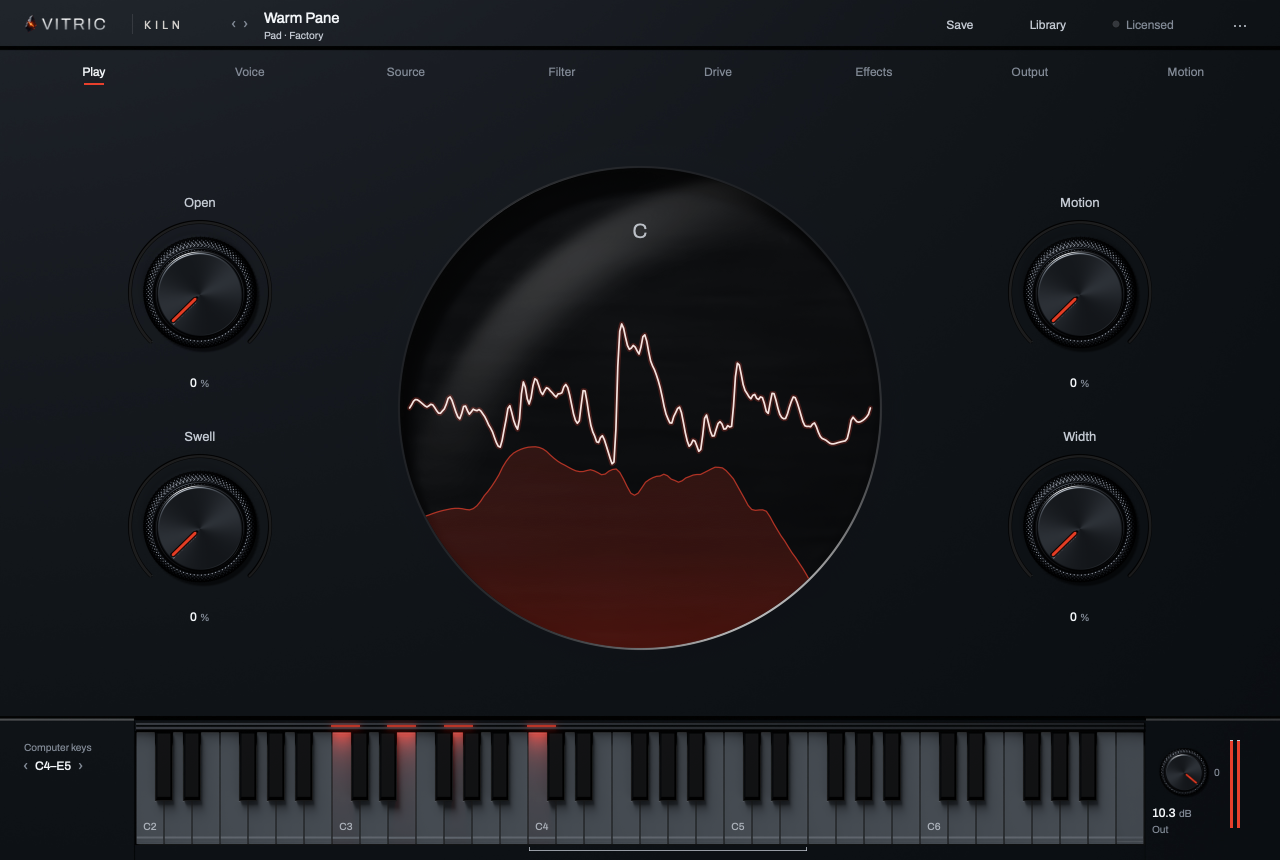
Kiln Synthesizer is a software instrument for basses, leads, pads, keys and plucks. It has three oscillators, two filters with a glass resonator, a per-voice drive built for 808s and sub basses, a pitch knock, a master clipper with Bass Mono, Chord Glide, four envelopes, four LFOs with fade-in, a 48-route modulation matrix, an arpeggiator and nine effects. It ships with 683 factory sounds.
This manual covers Kiln Synthesizer 1.1.2 on macOS and Windows, in VST3, AU and AAX.
Quick start
- Create an instrument (MIDI) track in your DAW and load Kiln Synthesizer on it. Kiln makes sound from notes; it is not an effect for an audio track. If the header reads Locked · Unlock, Kiln stays silent until you activate it or start a trial (see Installation and activation).
- Play your MIDI keyboard, or click Kiln's window and type:
a s d f g h j k l ;play the white keys from C4 up, andw e t y u o pabove them play the black keys. - Click Library, choose Bass under Type, and click a sound: it loads, and you can play it straight away while the Library stays open. Up and Down step through the list; Esc closes it. The arrows next to the sound's name (or [ and ]) also step through sounds, with the Library open or closed.
- Turn the macros on the Play page. Each macro the sound uses is named for what it changes, such as Drive or Punch; one that reads Not assigned does nothing in this sound.
- Click Save, type a name, pick one of the seven types and click Save to keep your version as one of your own sounds.
What's new in 1.1.2
- Fixed a rare crash when the host saves and restores settings at the same time.
What's new in 1.1.1
- Short, heavily damped reverb settings now fade out as set, instead of ringing on or becoming unstable.
- On Windows, Kiln finds its artwork inside the loaded plugin, wherever it is installed.
- Security improvements to license file handling.
What's new in 1.1.0
A free update for every Kiln owner.
- 59 new factory sounds, and the best come first. 12 pads, 12 keys, 12 plucks, 13 leads, 3 808s, 5 gliding and gritty basses and 2 subs, each with four macros named for what they do. A new Kiln opens on Slow Pour, a warm sliding 808, instead of a bare saw; a plain Init is the first row of Factory in the Library.
- A new Library. It opens over the controls and leaves the keys live: click a sound and play it at once, step through the list with Up and Down, and close it with Esc to keep what you were playing. Featured sounds first, Favourites, seven types, character words, packs, search and sort. See The Library.
- A Legacy shelf. 212 older factory sounds, the earlier basses and near-copies of other sounds, sit on one shelf at the end of the Library. Nothing is removed: every sound keeps its name, and songs that use them sound the same.
- Chord Glide, rebuilt. Each note leaves fast, settles softly into the new chord and lands a touch apart from the others, like an analog poly. It works whether you let go of the last chord, play legato or hold the sustain pedal, and a single note added to a held chord never moves it. Switching it on while Glide is Off sets Glide to 180 ms. Projects made with Kiln 1.0 keep the Chord Glide they were made with. See The sill.
- Every page in the glass face. Voice, Source, Filter, Effects, Output and Motion now use the same knobs, words and glass as the Play and Drive pages. The glass shows what each page edits: the EQ's curve, the filter's response, the envelope or LFO shape, the oscillator's wave or sample.
- About forty settings that lived only in your DAW now have a control, such as the filter routing and slope, Filter Balance in Split, Saturation Mix, Delay's low and high cut, the Sub's wave and octave, the noise filter, voices, MPE, bend range, envelope loop, LFO sync rate, and each oscillator's unison stack, warp, FM, ring and sync. Filter FM, on each filter, is the one working setting left only in your DAW; see Settings in your DAW only.
- Sound fixes. Six wavetables (PWM Sweep, Sync Sweep, Bend Low, Bend High, S-Fold and Knee) lose a DC offset that thumped at the start and end of notes. A Glass filter's Mix and a wavetable's Warp Amount now follow the modulation matrix, and the Sync warp sweeps smoothly. A few factory sounds are fixed: on Glass Ladder, Super Glide, Chip Hop and Tin Comet, Bright now adds bite; Burnt Glow and Burnt Lantern lose their high fizz; Buzz Cinder and Long Cinder end their notes cleanly. The Utility's DC block and LFO Smooth behave the same at 96 and 192 kHz as at 48 kHz. Projects made with Kiln 1.0 sound as they did.
- Your sounds where every host can see them. In Logic, GarageBand and MainStage, your sounds now save in the same folder as in every other host. Sounds saved in those hosts before 1.1 still show up.
- Smaller fixes. Compressor Attack and Release and Reverb Pre-delay read in ms in your DAW's automation lanes; the Voices control covers its full 1 to 64; the LFO display draws the shape you hear; the license status in the header now reads Update when a newer Kiln is out.
- The Field timbre map is retired. The Library's types, words and favourites replace it. Anneal stays in the options menu.
- Your songs are safe. No parameter was added, removed or renamed. A project or a user sound saved with an earlier Kiln opens with the engine it was made with, and sounds exactly as it did.
Earlier updates
- 1.0.3 (Windows): the glass draws the waveform line of the sound you play, as it does on macOS.
- 1.0.2: no click when you let go of a note on sounds with a curved release; sounds and A/B recall exactly; a little lighter on Windows.
- 1.0.1: Knock, the Clipper and Bass Mono got their own views on the Drive page; the glide curve (Lin or Exp) on the sill; LFO fade-in on the face; readouts in plain units; the modulation matrix in words; a Mac installer half the size.
- 1.0: the glass face and the Play page; Chord Glide; a bass engine (per-voice drive with six characters and Low Keep, Knock, an exponential glide, Clean Legato, Bass Mono and a master clipper); LFOs that fade in; 70 new factory sounds (64 basses and 6 leads); cleaner drive and soft clip. Obsidian 1.1 came with it, a free update for Obsidian owners.
The window
Kiln's window has four parts that stay in place: the header at the top, the page names under it, the key bed at the bottom, and the page itself in the middle. On every page except Play, the lower right holds the sill (the voice controls) above the preset's four macros, so the controls you reach for most are always in sight. Most pages show one part at a time: the words at a page's top right pick its views, and the glass on the left draws what the page edits.
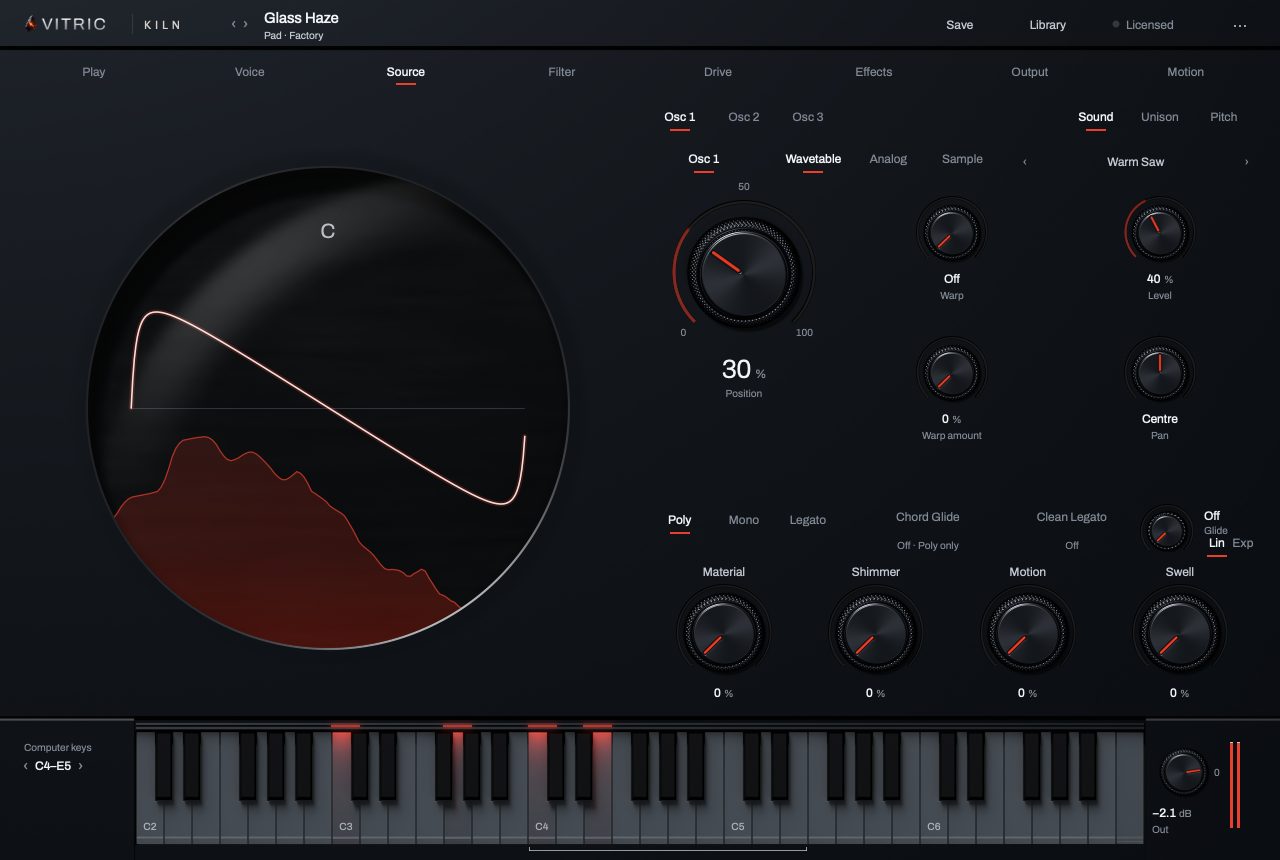
- Oscillators. Osc 1, Osc 2 and Osc 3; the bright one is shown.
- Views. Sound, Unison and Pitch. Click a word to switch.
- The glass. What the page edits; here, the oscillator's wave.
- Controls. The shown oscillator's controls for this view.
- The sill. Voice mode, Chord Glide, Clean Legato, Glide and its curve.
- Macros. The preset's four macros, on every page.
The header and pages

- Previous and next. Step through sounds. [ and ] do the same.
- Sound name. The sound's name, with its type and where it comes from, such as 808 · Factory. Click to open the Library.
- Save. Opens the Library on its save row.
- Library. Browse, play, search and save sounds.
- License. Reads Licensed, Trial · with the days left, or Locked · Unlock, and Update · with the version when a newer Kiln is out. Click it to open the license card.
- Options (···). Tooltips, keyboard shortcuts, update checks, tuning and Anneal.
- Pages. Play, Voice, Source, Filter, Drive, Effects, Output and Motion. Keys 1 to 8 open them in order.
The key bed

- Computer keys. The range your computer keyboard plays. The arrows (or Z and X) move it an octave.
- Keys. Click to play. Notes from your DAW or MIDI keyboard light the keys too.
- Typing range. The bracket under the keys marks what the computer keys reach.
- Low Keep mark. On the Play and Drive pages, while Drive is on, the drive's Low Keep frequency shows at its note.
- Out. Kiln's master output.
- Meter. The output level.
| Control | What it does | Range | Default |
|---|---|---|---|
| Computer keys | Moves the computer-keyboard range by octaves. | C4 to E5 | |
| Keys | Click a key to play it. Notes from your DAW or MIDI keyboard light their keys. | Five octaves from C2 | |
| Out | Kiln's master output level. The wheel steps 0.5 dB; double-click for 0 dB. | −60 to +12 dB | 0.0 dB |
The Play page
The Play page is for playing, not editing: the glass window shows what you hear, and the macros are the moves the sound designer chose for this sound.
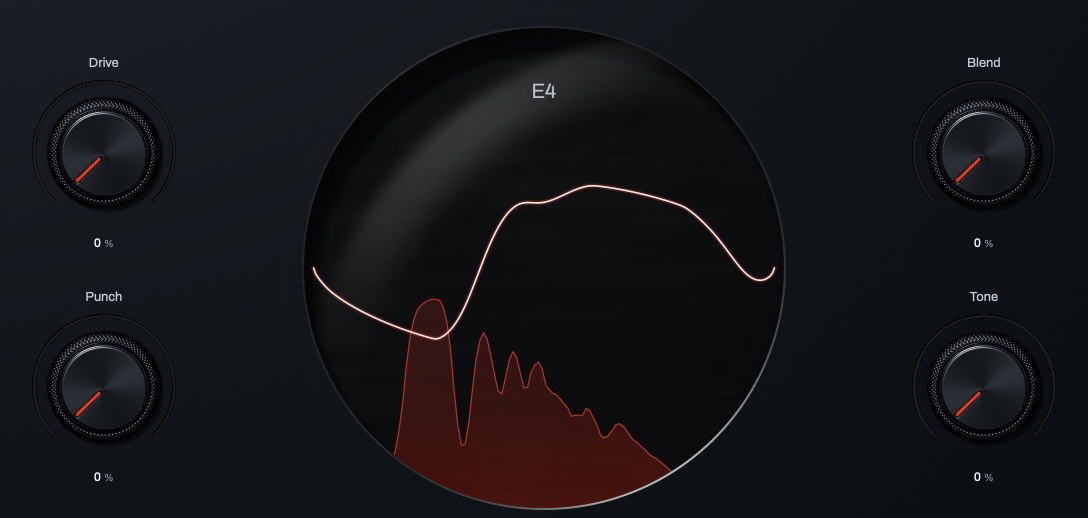
- Macro 1. Named by the preset (here, Drive).
- Macro 2. Here, Blend.
- Macro 3. Here, Punch.
- Macro 4. Here, Tone.
- Note or chord. One or two held notes show their names; three or more show the chord.
- Waveform. The sound as it plays, steady on the lowest note.
- Spectrum. The sound's frequency content, low on the left.
| Control | What it does | Range | Default |
|---|---|---|---|
| Macros 1 to 4 | Each moves everything the sound routes to it. The name comes from the preset (a macro the sound doesn't name shows the first control it moves); a macro the sound does not use reads Not assigned and is dimmed. Click the value to type one. | 0 to 100 % | Set by the preset |
The new basses and leads
On the 64 basses new in 1.0 the macros are Drive, Blend (or Sub on eight of them), Punch and Tone:
- Drive raises the drive amount.
- Blend brings the clean voice back in under the drive (it lowers the drive's Mix). Where that slot is Sub, it sets the sub oscillator's level.
- Punch shortens the amp envelope and adds Knock at the same time.
- Tone moves the filter or the oscillator shape.
On the six new leads they are Bright, Vibrato, Shape and Pluck. Bright adds bite on four of them (it brings in the drive) and moves the filter on the other two (its cutoff or its resonance); Shape moves the oscillator's shape. Vibrato sets the vibrato depth and Pluck shortens the amp envelope.
The 59 sounds new in 1.1 name their macros the same way, for what each one does in that sound.
The Library
Click Library in the header (or the sound's name). The Library opens over the controls and leaves the keys live: click a sound and play it straight away, on the on-screen keys, your computer keys or MIDI.
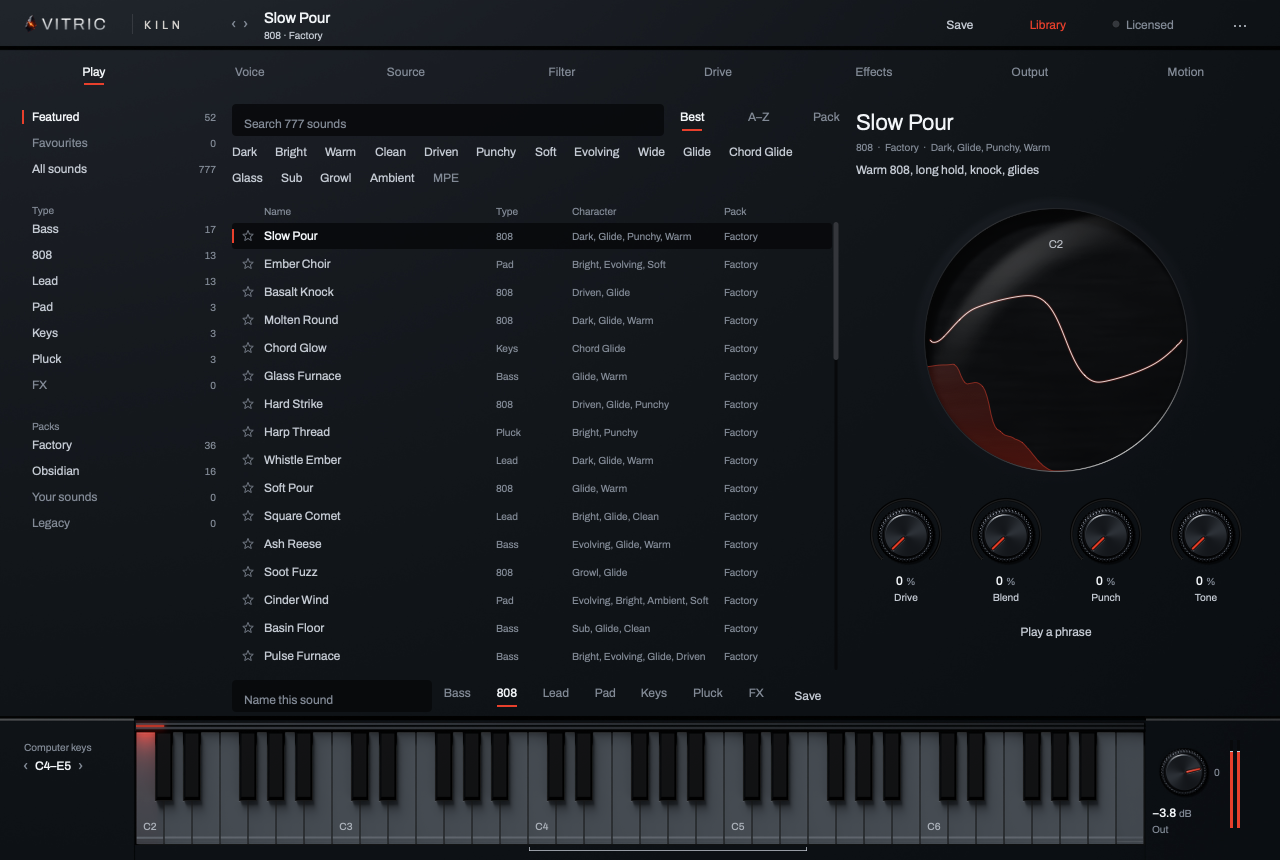
- Featured, Favourites, All sounds. Each time you open Kiln's window, the Library first opens on Featured: 36 of the best factory sounds, mostly leads, basses and 808s with a few pads, keys and plucks, starting with Slow Pour, the sound a new Kiln opens on. If you own Obsidian, 16 of its sounds are featured too. When the sound you are on is not featured, that first open goes to All sounds instead. Favourites are the sounds you starred. While the window stays open, the Library reopens where you left it, or on All sounds if the sound you are on is not in that view. The types, packs, words and search below work inside the one you choose here, so choose All sounds to look through everything.
- Type. Bass, 808, Lead, Pad, Keys, Pluck and FX. The number beside each is how many sounds it would show. Click a chosen type again to clear it.
- Packs. Factory (471 sounds plus Init at the top: one saw, everything else off, to start from scratch), each expansion pack you own, Your sounds and, last, Legacy (212 older factory sounds, kept so your songs still find them). In All sounds, pick a type with a pack to see, say, the legacy pads. Click a chosen pack again to clear it.
- Search. Narrows the list: it reads names, types, packs, character words and descriptions, so in All sounds "legacy bass" finds the older basses.
- Sort. Best (our order within each type), A–Z, or Pack.
- Character words. Dark, Bright, Warm, Driven, Glide and the rest. Pick one or more; a sound must have them all.
- Star. Adds the sound to your Favourites, or takes it out.
- The glass. Shows the sound as you play it.
- Macros. The sound's four macros, live: turn them while it plays.
- Play a phrase. Plays a short line that suits the sound's type; it reads Stop while it plays.
- Save. Name your sound, pick its type and click Save.
- Click a row to load it. Up and Down (and Page Up, Page Down, Home and End) step through the list and load as they go; Enter loads the selected row. A double-click loads and closes. Esc, Library again or any page name closes the Library, and the sound you were playing stays.
- Typing in Search or the name box sends the keys to the box; click the list again to play.
- Factory sounds never change: Save always makes your own copy, and the Library tells you if the name is taken or the file could not be written.
- [ and ] (or the header arrows) step through the factory sounds, then your packs, then your own sounds, with the Library open or closed.
- Your favourites are kept in one file beside your own sounds, so every project sees the same stars.
Expansion packs
A Vitric Sounds expansion pack, such as Obsidian, downloads as a zip. Unzip it and put its .xml pack files straight into Kiln's Expansions folder (not in a folder inside it), which Kiln creates the first time you open the Library, then open the Library again. Until a pack is installed, the Library shows the folder under Packs.
- macOS:
~/Library/Vitric Audio/Kiln/Expansions - Windows:
%APPDATA%\Vitric Audio\Kiln\Expansions
The pack appears under Packs, and its sounds join All sounds and the types. Put every file from the zip in the folder: each Kiln plays the newest version it can read. Obsidian 2.1 (93 sounds) needs Kiln 1.1; Obsidian 2.0 (91 sounds) and 1.1 (66 sounds) work from Kiln 1.0; Kiln 0.3 keeps using Obsidian 1.0. When a newer version of a pack you own is out, the Library says so under Packs. A session saved with a pack sound reopens with its sound and name even if you later remove the pack.
The sill
These voice controls sit at the lower right of every page except Play, above the four macros.
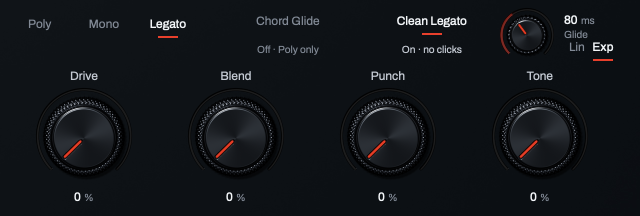
- Voice mode. Poly, Mono or Legato.
- Chord Glide. Each note of a new chord slides from the nearest note of the last chord. Its state reads under it.
- Clean Legato. Slides and re-attacks without clicks.
- Glide. How long a slide takes.
- Glide curve. Lin or Exp.
- Macros. The same four macros as on the Play page.
| Control | What it does | Range | Default |
|---|---|---|---|
| Poly · Mono · Legato | Poly plays chords. Mono plays one note at a time, re-attacks every note and slides only between notes that overlap (turn Legato only off on the Voice page to make it slide into every note). Legato plays one note at a time and slides between overlapping notes without re-attacking. | Poly, Mono, Legato | Poly |
| Chord Glide | In Poly, each note of a new chord slides from the nearest note of the last chord (let go, still held, or held by the sustain pedal), over the Glide time. With Glide at Off, chords do not slide, so turning Chord Glide on while Glide is Off also sets Glide to 180 ms, in one undo step; a Glide you have set is left alone. The line under it reads On · Poly, Needs Poly (on, but in Mono or Legato) or Off · Poly only. | On or off | Off |
| Clean Legato | A sounding voice keeps its phase and filter state through a slide or a re-attack, so slides never click. On in every new 1.0 sound. Reads On · no clicks or Off. | On or off | Off |
| Glide | How long a slide takes; Chord Glide uses the same time. A bare number is read as seconds up to 5 and as milliseconds above 5, so 70 gives 70 ms. | Off to 5 s | Off |
| Lin · Exp | The glide curve. Lin: the pitch moves at an even speed. Exp: it leaves fast, then settles into the note, like an 808 slide. | Lin, Exp | Lin |
Chord Glide, step by step
- Set the voice mode to Poly.
- Turn on Chord Glide. The line under it reads On · Poly, and if Glide was Off it is now 180 ms, a good place to start.
- Play a chord, then the next one. Each note of the new chord slides from the closest note of the last one and lands softly, so the voices move like a section of players. Voices never cross, and a three-note chord can move to a four-note chord.
The last chord can be one you just let go of (within about a second and a half), one you are still holding when two or more new notes land together (the held notes move into the new chord without a new attack), or one the sustain pedal holds. A single note added to a held chord never moves it. A quick roll (all notes within about 30 ms) glides as one chord. Projects saved with Kiln 1.0 keep the Chord Glide they were made with.
The Voice page
The Voice page has two views, picked by the words Arp and Voice at its top right: the arpeggiator, and how notes become voices. The glass shows the sound you play.
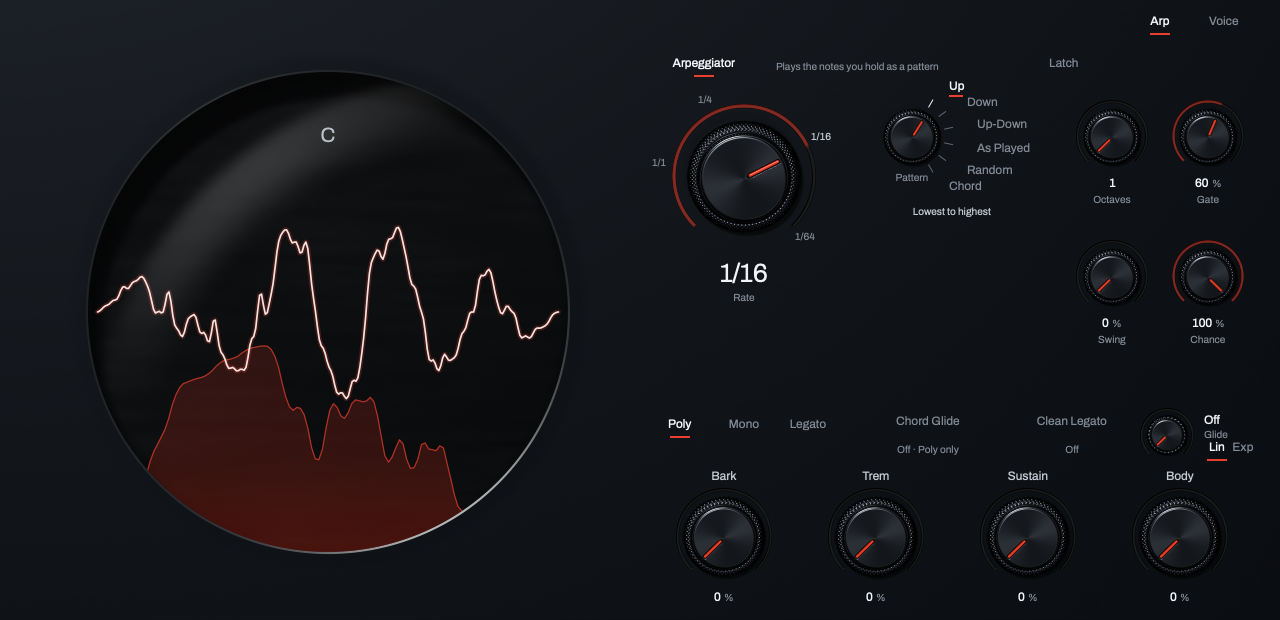
- Views. Arp and Voice.
- Arpeggiator. Turns the arpeggiator on.
- Latch. Keeps the pattern going after you let go.
- Rate. The step length, in time with your DAW.
- Pattern. The order the notes play in.
- Octaves. How many octaves the pattern climbs.
- Gate. How long each step sounds.
- Swing. Pushes every other step late.
- Chance. The chance each step plays.
Arp
| Control | What it does | Range | Default |
|---|---|---|---|
| Arpeggiator | Plays the notes you hold as a pattern at the Rate. | On or off | Off |
| Latch | The pattern keeps playing after you let go; the next chord you play replaces it. | On or off | Off |
| Rate | The step length, a note value in time with your DAW. | 8/1 to 1/64, with dotted (D) and triplet (T) values | 1/16 |
| Pattern | The order the notes play in: Up, Down, Up-Down, As Played, Random, or Chord (the whole chord on each step). Click a word or turn the dial; the line under the dial says what it does. | 6 patterns | Up |
| Octaves | How many octaves the pattern climbs. | 1 to 4 | 1 |
| Gate | How long each step holds, as a share of the step. Short is staccato. | 5 to 100 % | 60 % |
| Swing | Delays every other step for a shuffle. | 0 to 75 % | 0 % |
| Chance | The chance each step plays. The choices are seeded, so a bounce plays the same pattern every time. | 0 to 100 % | 100 % |
Voice
| Control | What it does | Range | Default |
|---|---|---|---|
| Voices | How many notes can sound at once in Poly. | 1 to 64 | 16 |
| Time · Rate (Glide measures) | Time: every slide takes the Glide time. Rate: the Glide time is per octave, so wider slides take longer. | Time, Rate | Time |
| Legato only | On: Mono and Legato glide only between notes that overlap. Off: every new note glides from the last one, in every voice mode, even across a gap. | On or off | On |
| MPE | Auto: on when your DAW sends MPE. On or Off: always. | Auto, On, Off | Auto |
| Bend range | How far the pitch wheel bends, up and down. | 0 to 48 st | 2 st |
| Tune | Tunes all of Kiln. | −100 to +100 ct | 0 ct |
| Drift | A slow analog wander in pitch. Seeded, so offline bounces repeat exactly. | 0 to 100 % | 10 % |
| Drift spread | How differently each voice drifts. | 0 to 100 % | 15 % |
The Source page
The Source page holds the three oscillators. Pick one with the words Osc 1, Osc 2 and Osc 3, and one of its three views with Sound, Unison and Pitch at the top right; The window shows the page. The glass draws the oscillator's wave: one cycle of the wavetable frame or the analog shape, or the whole sample with its start and loop marked.
Sound
| Control | What it does | Range | Default |
|---|---|---|---|
| Osc 1, Osc 2, Osc 3 (switch) | Turns the oscillator on. | On or off | Osc 1 on, Osc 2 and 3 off |
| Wavetable · Analog · Sample | The engine. Wavetable scans one of 80 tables; Analog is one lane from sine to pulse; Sample plays a file you load. | 3 engines | Wavetable |
| Table (‹ name ›) | Wavetable: the table this oscillator plays. The arrows step through the 80 tables; click the name for the list. | 80 tables | Init Saw |
| Position | Wavetable: scans through the table's frames. | 0 to 100 % | 0 % |
| Warp | Wavetable: bends the frames: Bend, Sync, PWM, Formant, Mirror, Quantize, or FM Sibling (FM from the next oscillator; Osc 3, or a next oscillator that is off, uses its own sine). Off leaves them as they are. | Off and 7 modes | Off |
| Warp amount | Wavetable: how far the warp goes. It does nothing while Warp is Off. | 0 to 100 % | 0 % |
| Shape | Analog: one lane from sine through triangle and saw to pulse. Double-click for the sine. | 0 to 100 % | 0 % |
| Pulse width | Analog: the pulse's duty, in the pulse end of the lane. | 1 to 99 % | 50 % |
| Sync | Analog: hard-sync pitch above the note, the classic sync sweep. | 0 to 48 st | 0 st |
| Start | Sample: where the sample begins, as a share of its length (from the end when reversed). | 0 to 100 % | 0 % |
| Loop | Sample: Off plays once; Loop repeats the loop; X-fade blends across the loop's seam. | Off, Loop, X-fade | Off |
| Reverse | Sample: plays the sample backwards. | On or off | Off |
| Crossfade | Sample: how much of the loop blends across its seam (X-fade only). | 0 to 100 % | 10 % |
| Level | The oscillator's level. | 0 to 100 % | 75 % |
| Pan | Its place, left to right. Double-click for the centre. | Left 100 % to Right 100 % | Centre |
Loading a sample
Pick Sample, then click Load to choose a WAV, AIFF or FLAC file, or drop a file on the Source page's controls, on the right: it loads into the shown oscillator and switches it to Sample. Clear removes it. The sample's name shows beside Load. Kiln reads the root key from the file's sampler data when it has any, otherwise from a pitch analysis (C4 when the sound has no clear pitch). The session keeps a copy of each sample, up to 16 MB per sound; beyond that it saves a link to the file. If the linked file has moved, the name reads Missing: and the file's name; click Load and choose it again. Long files load their first 2,097,152 samples (about 48 s at 44.1 kHz).
Unison
| Control | What it does | Range | Default |
|---|---|---|---|
| Voices | How many stacked copies each note plays. More copies cost more CPU. | 1 to 16 | 1 |
| Unison · Octave · Fifth (Stack) | Unison: every copy at the note. Octave or Fifth: copies stacked an octave or a fifth apart. | 3 stacks | Unison |
| Stereo · Phase · Table · Formant (Spread across) | What the copies differ in: stereo place, start phase, table position or formant. | 4 kinds | Stereo |
| Detune | How far the outer copies are detuned. | 0 to 100 ct | 12 ct |
| Spread | How far the copies spread. | 0 to 100 % | 60 % |
| Blend | How loud the outer copies are against the centre. | 0 to 100 % | 70 % |
| Detune curve | How the detune spreads across the copies. | Linear, Exponential, Custom | Linear |
Pitch
| Control | What it does | Range | Default |
|---|---|---|---|
| Octave | Coarse pitch. | −4 to +4 | 0 |
| Semitone | Pitch in semitones. | −12 to +12 st | 0 st |
| Fine | Fine pitch. | −100 to +100 ct | 0 ct |
| Phase | Where the wave starts, with Retrigger. | 0 to 360° | 0° |
| Retrigger | Free: the wave runs on. Retrig: every note starts at Phase. Random: every note starts somewhere new. | Free, Retrig, Random | Free |
| FM from | Which oscillator modulates this one's phase. Only a higher-numbered oscillator that is on works (Osc 1 from Osc 2 or 3). Wavetable and Analog only. | None, Osc 1, Osc 2, Osc 3 | None |
| FM amount | How hard the FM source pushes. Wavetable and Analog only. | 0 to 100 % | 0 % |
| Route | Where this oscillator goes: Filter 1, Filter 2, both, or straight past the filters. | Filter 1, Filter 2, Both, Direct | Filter 1 |
| Ring | Multiplies this oscillator by the one chosen in FM from, which must be higher-numbered, so Ring never works on Osc 3. It does nothing while FM from is None or a lower oscillator. If that oscillator is off or at Level 0, this one goes silent. | On or off | Off |
| Sync | Hard-syncs this oscillator to the next one's pitch: Osc 1 to Osc 2, Osc 2 to Osc 3, Osc 3 to Osc 1. Wavetable and Analog only. | On or off | Off |
The Filter page
Two filters. Pick one with Filter 1 or Filter 2; Serial, Parallel and Split at the top right set how they connect. The glass draws the shown filter's real response (the other filter faint behind it, when it is on) with a point for cutoff and resonance: drag it, or double-click it to reset both. The Glass model draws its modes instead, without the point.
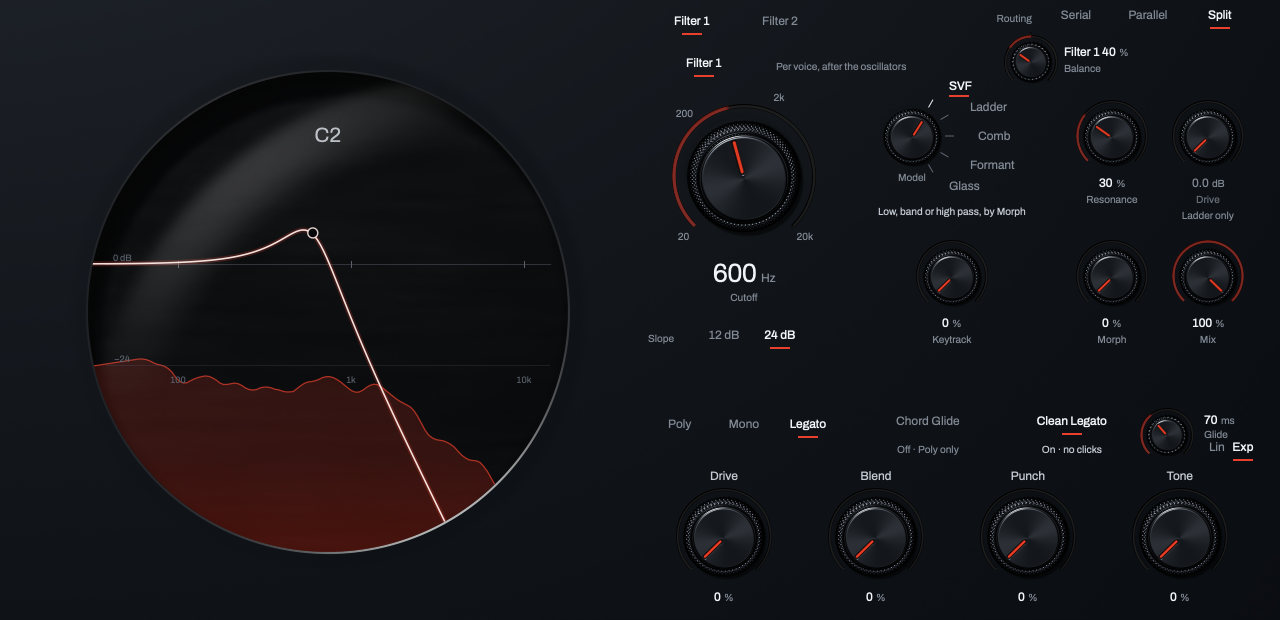
- Filters. Filter 1 and Filter 2.
- Routing. Serial, Parallel or Split.
- Balance. In Split, how far each filter reaches into the other side.
- Cutoff. Where the filter acts.
- Model. SVF, Ladder, Comb, Formant or Glass.
- Resonance. Emphasis at the cutoff.
- Drive. Heat into the Ladder.
- Keytrack. How far the cutoff follows the note.
- Morph. Low to band to high pass, or the vowel.
- Mix. Unfiltered and filtered blend.
- Slope. 12 or 24 dB an octave.
- The point. Cutoff and resonance in the glass.
| Control | What it does | Range | Default |
|---|---|---|---|
| Serial · Parallel · Split (Routing) | Serial: Filter 1 feeds Filter 2. Parallel: each filters what its oscillators send it. Split: Filter 1 left, Filter 2 right. | 3 routings | Serial |
| Filter 1, Filter 2 (switch) | Turns the filter on. | On or off | Filter 1 on, Filter 2 off |
| Cutoff | Where the filter acts. Drag the knob or the point in the glass; Shift is fine. | 20 Hz to 20 kHz | 20.0 kHz |
| Model | SVF (low, band or high pass by Morph), Ladder, Comb, Formant, or Glass, the resonator Kiln is named for. Click a word or turn the dial; the line under it says what it does. | 5 models | SVF |
| Resonance | Emphasis at the cutoff. The Ladder sings near the top. | 0 to 100 % | 15 % |
| Drive | Ladder only: heat into the ladder. | 0 to 24 dB | 0.0 dB |
| Morph | SVF: low pass through band pass to high pass. Formant: sweeps the vowel. | 0 to 100 % | 0 % |
| Mix | Blend of the unfiltered sound and the filtered one. | 0 to 100 % | 100 % |
| Keytrack | How far the cutoff follows the note you play. | 0 to 100 % | 0 % |
| 12 dB · 24 dB (Slope) | SVF only: how steep it cuts, per octave. | 12 dB, 24 dB | 24 dB |
| Balance | Split only. Filter 1 plays on the left, Filter 2 on the right; turn left and Filter 1 also fills the right side, turn right and Filter 2 fills the left. Centre: each reaches halfway. Double-click for the centre. | Filter 1 100 % to Filter 2 100 % | Centre |
The Glass resonator
With Glass chosen, the filter shows its own controls, with Material as the large knob. The resonator rings at each note you play, so you play it like an instrument: start from a sound with the Glass character word, move Material and Position, then set Damping for the length of the ring.
| Control | What it does | Range | Default |
|---|---|---|---|
| Material | What the resonator is made of: glass, metal in the middle, then wood. | 0 to 100 % | 20 % |
| Size | The body: small rings high, large rings low. | 0 to 100 % | 50 % |
| Position | Where it is struck; it picks which modes ring. | 0 to 100 % | 30 % |
| Damping | How fast the ring dies; the high modes go first. | 0 to 100 % | 40 % |
| Shimmer | A slow drift in the modes that keeps the ring alive. | 0 to 100 % | 15 % |
| Modes | How many partials ring. More is richer and costs more CPU. | 4 to 64 | 24 |
| Follows note | On: tuned to each note you play. Off: it rings at one fixed pitch. | On or off | On |
| Mix | As above. | 0 to 100 % | 100 % |
The Drive page
The Drive page has three views, picked by the words Drive, Knock and Clipper at its top right. Drive and Knock work on each voice; the Clipper and Bass Mono work on Kiln's master output. The glass window on the left shows the sound in every view. Each time you open Kiln's window, the page starts on the Drive view.
The Drive view
The drive works on each voice separately, after the filter, so every note of a chord distorts on its own and a bass keeps its shape under heavy drive.
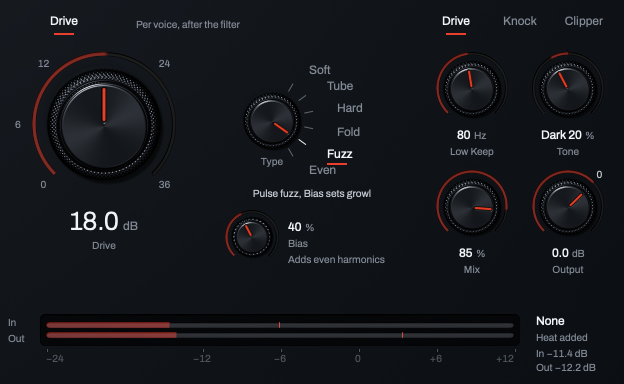
- Drive. Turns the drive on.
- Drive (the large knob). How hard each voice is driven.
- Type. The drive's character.
- Bias. Adds even harmonics to some types.
- Low Keep. Keeps the lows below it clean.
- Tone. Darker or brighter.
- Mix. Clean and driven blend.
- Output. Level after the drive.
- Views. Drive, Knock and Clipper. Click a word to switch.
| Control | What it does | Range | Default |
|---|---|---|---|
| Drive | Turns the per-voice drive on or off. The Drive view's controls dim while it is off. | On or off | Off |
| Drive (the large knob) | How hard each voice is driven. | 0 to 36 dB | 12.0 dB |
| Type | The drive's character: Soft, Tube, Hard, Fold, Fuzz or Even (listed below). Click a word or turn the dial. | 6 types | Soft |
| Bias | Adds asymmetry (even harmonics) to Tube, Fuzz and Even. No effect on Soft, Hard or Fold; the note under it says so. | 0 to 100 % | 0 % |
| Low Keep | Everything below this frequency stays clean under any drive, so the sub holds. Off at full left. The frequency also shows as a mark on the keys while Drive is on. | Off, 20 to 300 Hz | Off |
| Tone | Darker to the left, brighter to the right, Flat in the centre. Double-click for Flat. | Dark 100 % to Bright 100 % | Flat |
| Mix | Blend of the clean voice and the driven one. | 0 to 100 % | 100 % |
| Output | Level after the drive. The wheel steps 0.5 dB; double-click for 0 dB. | −24 to +12 dB | 0.0 dB |
| Heat meter | The drive's input and output levels, and how much heat it adds. With Drive on and nothing playing, it shows, dimmed, what the drive adds at −6 dB in. With Drive off it reads Off. |
The six types:
- Soft: smooth, round saturation.
- Tube: warm, asymmetric glow.
- Hard: tight, bright hard clip.
- Fold: folds the wave over itself.
- Fuzz: pulse fuzz; Bias sets the growl.
- Even: even-harmonic growl.
Knock
Knock is a pitch sweep into every note: each note starts away from its pitch and sweeps in, the punch of an 808. It moves every oscillator and the sub.
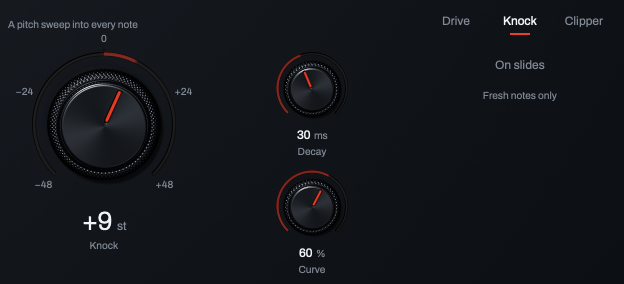
- Views. Drive, Knock and Clipper.
- Knock. How far the pitch starts from the note.
- Decay. How long the sweep takes.
- Curve. The shape of the sweep.
- On slides. Whether legato slides get the sweep.
| Control | What it does | Range | Default |
|---|---|---|---|
| Knock | How far each note's pitch starts from the note. Above the note it falls in like an 808's knock; below, it rises. Double-click for Off. | −48 to +48 st | Off |
| Decay | How long the sweep takes to land on the note. A bare number is read as seconds up to 1 and as milliseconds above 1, so 30 gives 30 ms. | 1 ms to 1 s | 40 ms |
| Curve | The sweep's shape: 0 % falls in a straight line; higher values drop fast first, then settle. | 0 to 100 % | 60 % |
| On slides | Off: only notes that start fresh get the sweep, and the line under it reads Fresh notes only. On: legato slides get it too (Slides too). | On or off | Off |
The Clipper and Bass Mono
The Clipper sits on the master, after the effects and after Bass Mono. It holds peaks just under 0 dB.
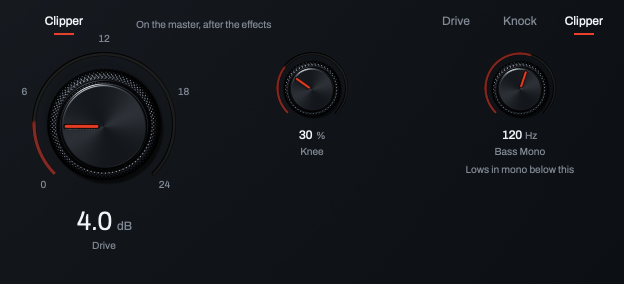
- Clipper. Turns the master clipper on.
- Drive. How hard the master is pushed into it.
- Knee. How softly it rounds the peaks.
- Bass Mono. Lows in mono below this frequency.
| Control | What it does | Range | Default |
|---|---|---|---|
| Clipper | Turns the master clipper on or off. Drive and Knee are dimmed while it is off. | On or off | Off |
| Drive | How hard the master is pushed into the clipper. | 0 to 24 dB | 0.0 dB |
| Knee | How softly the clipper rounds the peaks: 0 % is a hard corner, 100 % the softest. | 0 to 100 % | 30 % |
| Bass Mono | Everything below this frequency plays in mono on the master, so the low end stays centred. Off at full left. It works with the Clipper on or off. | Off, 20 to 300 Hz | Off |
The Effects page
Nine effects in a chain: EQ, Compressor, Saturation, Chorus, Phaser, Flanger, Delay, Reverb and Utility. Click a name to show that effect; a name is bright when the effect is on and dim when it is off. Each effect's own name, at the upper left of its controls, is its on switch. Each stays off until the sound or you turn it on.
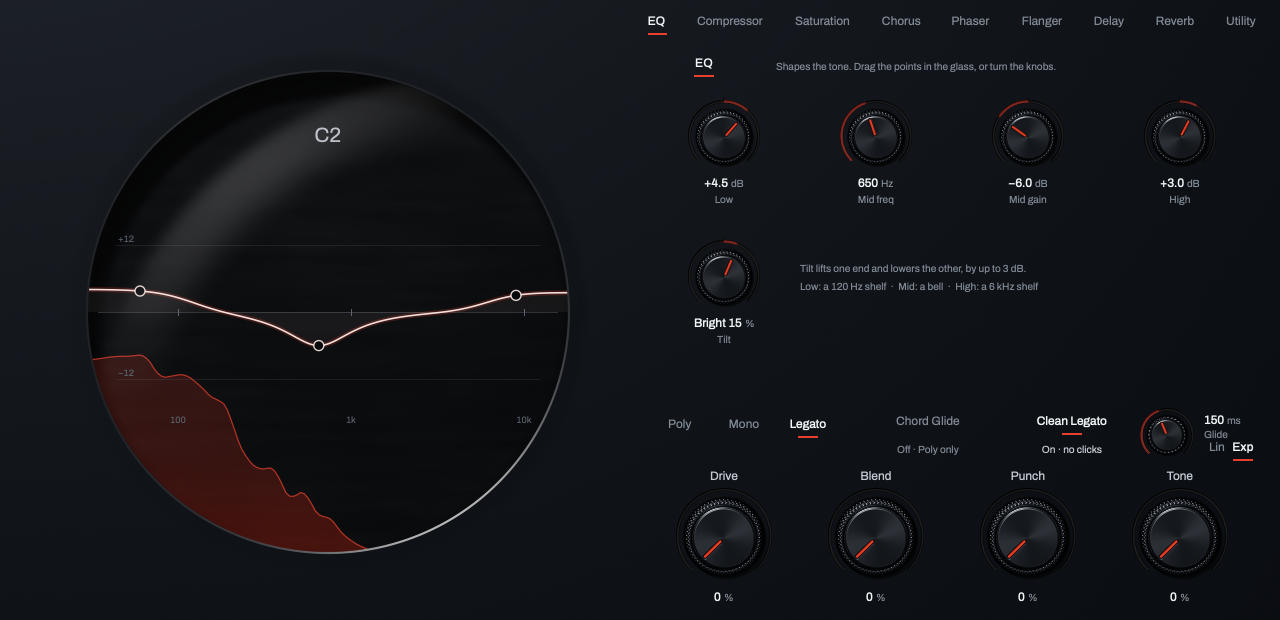
- Effects. The nine names; bright when on.
- EQ. The EQ's on switch.
- Points. Low, Mid and High in the glass.
- Low. The low shelf.
- Mid freq, Mid gain. The mid bell.
- High. The high shelf.
- Tilt. Darker or brighter overall.
EQ, compressor and saturation
| Control | What it does | Range | Default |
|---|---|---|---|
| EQ: the glass | The EQ's curve over the sound, with three points: Low, Mid and High. Drag a point; Shift for fine; double-click to reset its gain. The knobs below move with it. | ||
| EQ: Low | The low shelf at 120 Hz. | −15 to +15 dB | 0.0 dB |
| EQ: Mid freq | Where the mid bell sits. | 100 Hz to 8 kHz | 900 Hz |
| EQ: Mid gain | The mid bell's boost or cut. | −15 to +15 dB | 0.0 dB |
| EQ: High | The high shelf at 6 kHz. | −15 to +15 dB | 0.0 dB |
| EQ: Tilt | Leans the whole sound darker or brighter, by up to 3 dB at each end. Flat in the centre. | Dark 100 % to Bright 100 % | Flat |
| Compressor: Clean · OTT | Clean: one compressor on the whole sound. OTT: three bands, each squeezed from above and lifted from below. | Clean, OTT | Clean |
| Compressor: Threshold | Where compression starts. Lower squeezes more. | −60 to 0 dB | −18.0 dB |
| Compressor: Ratio | Clean only: how hard it squeezes above the threshold. | 1.0:1 to 20.0:1 | 3.0:1 |
| Compressor: Attack | How fast it grabs. Slower lets the front of each note through. | 0.1 to 200 ms | 12 ms |
| Compressor: Release | How fast it lets go. | 5 ms to 2 s | 140 ms |
| Compressor: Upward, Downward | OTT only: lifts the quiet parts of each band, and squeezes the loud parts. | 0 to 100 % | 50 % |
| Compressor: Mix | Blend of the dry sound and the compressed one. | 0 to 100 % | 100 % |
| Saturation: Drive | How hard the sound is pushed into the saturator. | 0 to 36 dB | 6.0 dB |
| Saturation: Type | Tape, Tube, Fold or Crush. Click a word or turn the dial. | 4 types | Tape |
| Saturation: Tone | Darker or brighter, after the saturator. Flat in the centre. | Dark 100 % to Bright 100 % | Flat |
| Saturation: Mix | Blend of the clean sound and the saturated one. In projects and user sounds saved with Kiln 0.3 or earlier it shows dimmed with a note, because their saturation was always fully wet. | 0 to 100 % | 100 % |
Chorus, phaser and flanger
| Control | What it does | Range | Default |
|---|---|---|---|
| Chorus: Rate, Depth | How fast and how far the copies drift. | 0.01 to 8 Hz; 0 to 100 % | 0.40 Hz; 50 % |
| Chorus: Voices | How many copies. | 2 to 4 | 3 |
| Chorus: Mix | Blend. | 0 to 100 % | 50 % |
| Phaser: Rate, Depth | How fast and how wide the sweep. | 0.01 to 8 Hz; 0 to 100 % | 0.30 Hz; 70 % |
| Phaser: Stages | More stages, more notches. | 2 to 8 | 6 |
| Phaser: Feedback | Sharpens the notches into a resonant whistle. | 0 to 90 % | 30 % |
| Phaser: Mix | Blend. | 0 to 100 % | 50 % |
| Flanger: Rate, Depth | How fast and how wide the sweep. | 0.01 to 8 Hz; 0 to 100 % | 0.25 Hz; 60 % |
| Flanger: Feedback | More feedback, more metal. | 0 to 90 % | 50 % |
| Flanger: Mix | Blend. | 0 to 100 % | 50 % |
Delay, reverb and utility
| Control | What it does | Range | Default |
|---|---|---|---|
| Delay: Sync | On: Left and Right are note values in time with your DAW. Off: they are milliseconds. | On or off | On |
| Delay: Left, Right | The two echoes' times: note values with Sync on, milliseconds with it off. | 8/1 to 1/64; 1 ms to 2 s | 1/8 and 1/4; 350 ms and 500 ms |
| Delay: Feedback | How many repeats. | 0 to 98 % | 45 % |
| Delay: Ping-pong | Bounces the repeats between left and right. | 0 to 100 % | 0 % |
| Delay: Wow | A tape-style wander in the repeats' pitch. | 0 to 100 % | 15 % |
| Delay: Diffuse | Smears each repeat; they stay on the grid. | 0 to 100 % | 0 % |
| Delay: Low cut, High cut | Thins the repeats below, and darkens them above, these frequencies. | 20 Hz to 2 kHz; 500 Hz to 20 kHz | 120 Hz; 9.00 kHz |
| Delay: Mix | Blend. | 0 to 100 % | 25 % |
| Reverb: Size | How big the space is. | 0 to 100 % | 50 % |
| Reverb: Decay | How long the tail lasts. | 0.1 to 20 s | 2.20 s |
| Reverb: Pre-delay | A gap before the tail starts. | 0 to 200 ms | 12 ms |
| Reverb: Damping | How fast the highs die away in the tail. | 0 to 100 % | 40 % |
| Reverb: Shimmer | Feeds a pitched copy back into the tail. | 0 to 100 % | 0 % |
| Reverb: Octave · Fifth · Detune | What the shimmer adds: an octave up, a fifth up, or a slight detune. | 3 intervals | Octave |
| Reverb: Width | How wide the tail spreads. | 0 to 150 % | 100 % |
| Reverb: Mix | Blend. | 0 to 100 % | 25 % |
| Utility: Width | Stereo width: 0 % is mono, 100 % as it is, 200 % wider. | 0 to 200 % | 100 % |
| Utility: Pan | Left to right. Double-click for the centre. | Left 100 % to Right 100 % | Centre |
| Utility: Gain | Level at the end of the chain. | −24 to +24 dB | 0.0 dB |
| Utility: DC block | Removes any DC offset while the Utility is on. The line under it reads On or Off. | On or off | On |
The Output page
Three views, picked by Output, Sub and Noise at the top right: the end of the chain, the sub oscillator, and the noise source. Drift is on the Voice page, and the macros are in the macro row.
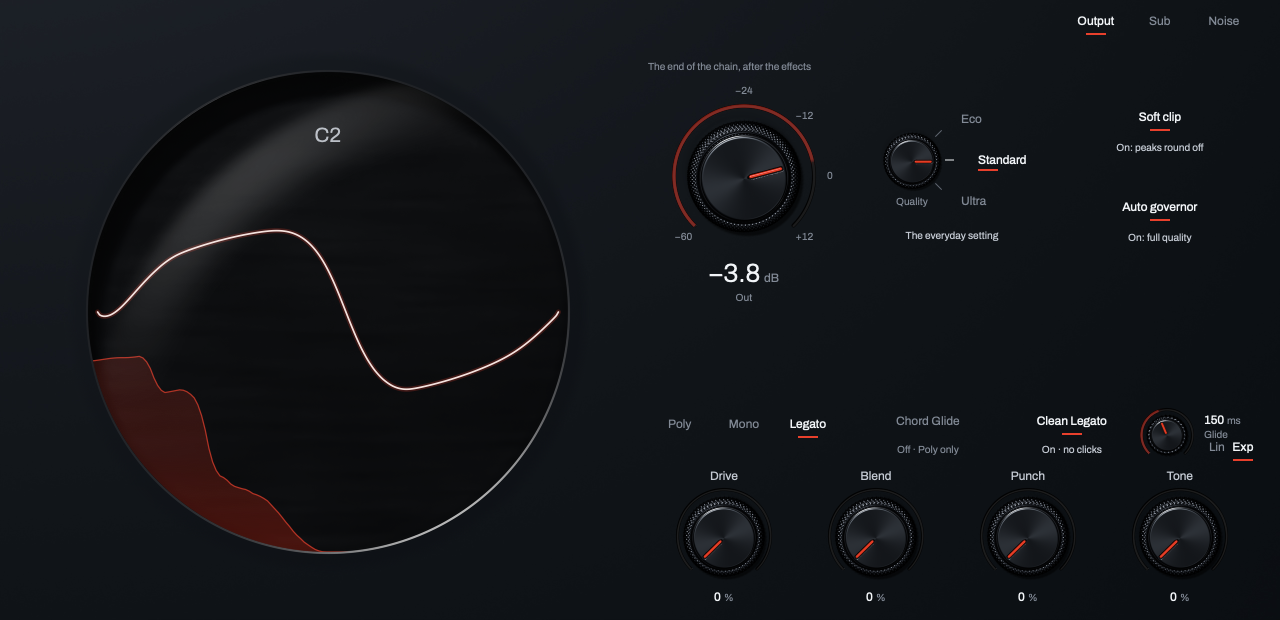
- Views. Output, Sub and Noise.
- Out. Kiln's master output.
- Quality. Eco, Standard or Ultra.
- Soft clip. A gentle ceiling on the master.
- Auto governor. Keeps playback running under load.
| Control | What it does | Range | Default |
|---|---|---|---|
| Out | Kiln's master output (the same as Out on the key bed). The wheel steps 0.5 dB; double-click for 0 dB. | −60 to +12 dB | 0.0 dB |
| Quality | Eco, Standard or Ultra. Eco halves unison and lightens the oscillators to save CPU; Ultra is the cleanest. Bounces always render at Ultra. | 3 levels | Standard |
| Soft clip | A gentle ceiling on the master, after the effects and the Clipper, so peaks round off instead of going over. Out comes after it. The line under it says what it is doing. | On or off | On |
| Auto governor | If the computer can't keep up, Kiln eases off Ultra, then Eco, then voices, before the audio drops out. Off during offline bounces. The line under it shows its level. | On or off | On |
| Sub (switch) | A dedicated sub oscillator. | On or off | Off |
| Sub: Level | How loud the sub is. | 0 to 100 % | 60 % |
| Sub: Sine · Triangle · Square (Wave) | Sine is the cleanest low end; Triangle and Square add buzz you hear on small speakers. | 3 waves | Sine |
| Sub: −1 · −2 (Octave) | One or two octaves below the note. | −1, −2 | −1 |
| Noise (switch) | A colored noise source beside the oscillators, through its own filter. | On or off | Off |
| Noise: Level | How loud the noise is. | 0 to 100 % | 40 % |
| Noise: Color | Darker to the left, brighter to the right; white in the centre. | Dark 100 % to Bright 100 % | Flat (white) |
| Noise: Off · LP · HP · BP (Noise filter) | The noise's own filter: off, low pass, high pass or band pass. | 4 settings | Off |
| Noise: Frequency | Where the noise filter acts. Dim while the filter is Off. | 20 Hz to 20 kHz | 20.0 kHz |
| Noise: Keytrack | On: the noise filter follows the note you play. | On or off | Off |
The Motion page
Motion holds the modulation in three views, picked by Envelopes, LFOs and Matrix at the top right. The glass draws the shown envelope's or LFO's shape.
Envelopes
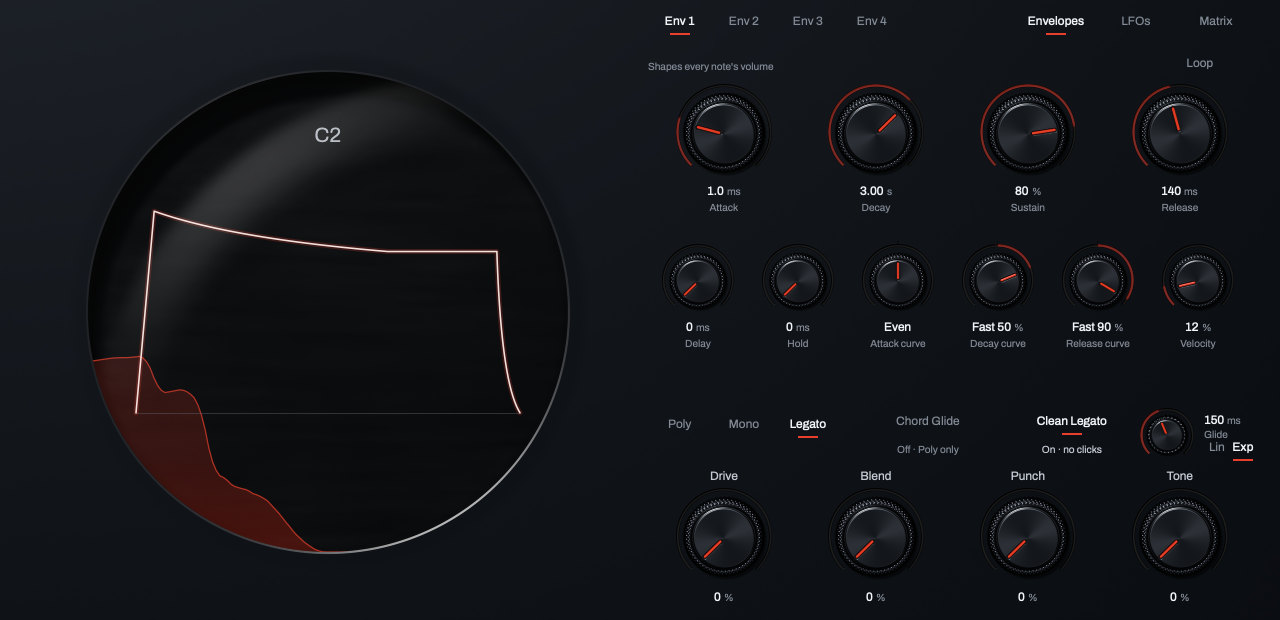
- Env 1 to Env 4. Pick which envelope the controls show.
- Attack, Decay, Sustain, Release. The envelope's stages.
- Delay, Hold. A wait before the attack, and time at the top.
- Curves. The shape of the attack, decay and release.
- Velocity. How much harder playing raises it.
- Loop. Repeats while the key is held.
| Control | What it does | Range | Default |
|---|---|---|---|
| Env 1 to Env 4 | Four envelopes. Env 1 shapes each note's volume; Env 2 to Env 4 do nothing until a matrix route uses them. | ||
| Attack | How long the rise takes. | 0 ms to 20 s | 5.0 ms |
| Decay | How long it falls to the Sustain level. | 1 ms to 30 s | 600 ms |
| Sustain | The level held while the key is down. | 0 to 100 % | 75 % |
| Release | How long it fades after you let go. | 1 ms to 30 s | 120 ms |
| Delay | A wait before the attack starts. | 0 ms to 2 s | 0 ms |
| Hold | How long it stays at the top before the decay. | 0 ms to 2 s | 0 ms |
| Attack curve, Decay curve, Release curve | The shape of each stage: slow start to the left, fast start to the right, Even in the centre. | Slow 100 % to Fast 100 % | Even |
| Velocity | How much harder playing raises this envelope. | 0 to 100 % | Env 1: 35 %; others 0 % |
| Loop | On: the envelope repeats from the attack while the key is held. | On or off | Off |
LFOs
An LFO moves nothing until a matrix route uses it as a source (see Matrix).
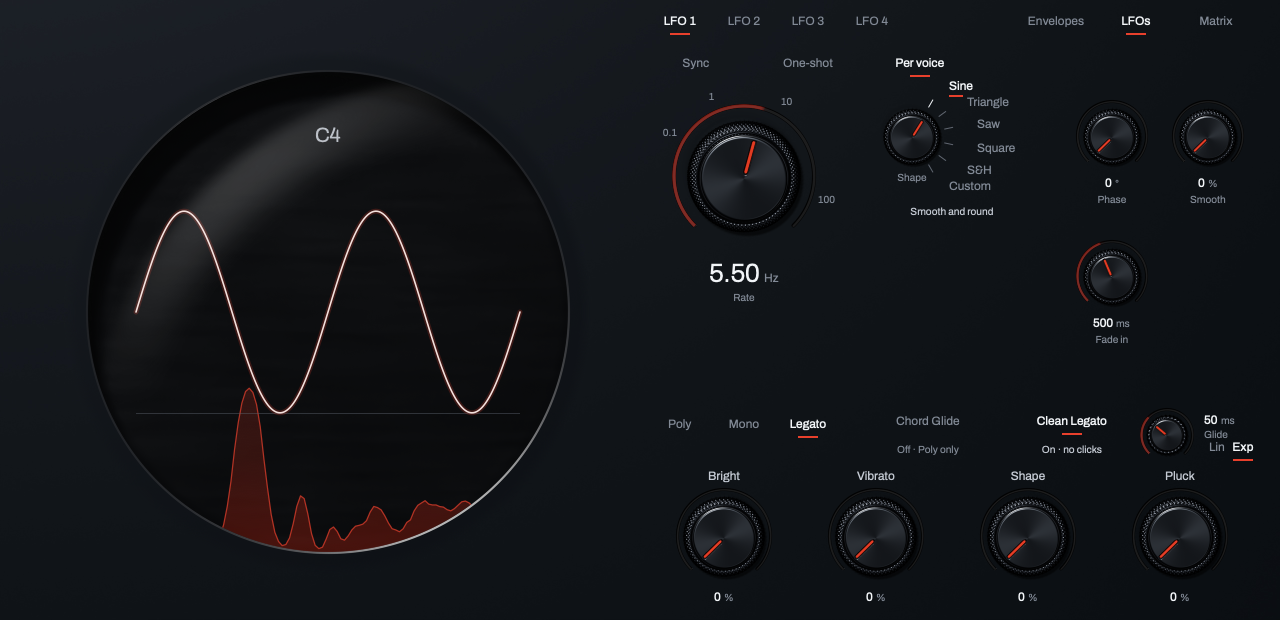
- LFO 1 to LFO 4. Pick which LFO the controls show.
- Sync, One-shot, Per voice. Tempo sync, one cycle per note, one LFO per voice.
- Rate. How fast it moves.
- Shape. The wave the LFO draws.
- Phase, Smooth. Where it starts, and how round it is.
- Fade in. The time to full depth after each attack.
| Control | What it does | Range | Default |
|---|---|---|---|
| LFO 1 to LFO 4 | Four LFOs. | ||
| Sync | On: the LFO runs at a note value in time with your DAW, and Rate shows note values. Off: Rate is in Hz. | On or off | Off |
| One-shot | On: it runs once per note, then stops, like an extra envelope. | On or off | Off |
| Per voice | On: every note starts its own LFO. Off: one LFO moves every note together. | On or off | On |
| Rate | How fast it moves: free in Hz (the wheel steps a semitone), or a note value with Sync on. | 0.01 to 200 Hz; 8/1 to 1/64 | 2.00 Hz; 1/8 |
| Shape | Sine, Triangle, Saw (falling), Square, S&H (a random step each cycle) or Custom (it plays a sine; there is no shape editor). Click a word or turn the dial. | 6 shapes | Sine |
| Phase | Where in its cycle it starts at each note. With Per voice off, it offsets the shared LFO. | 0 to 360° | 0° |
| Smooth | Rounds the corners; tames S&H. | 0 to 100 % | 0 % |
| Fade in | How long the LFO takes to reach full depth after each attack, so vibrato blooms on held notes. A legato slide does not start it again. At 0 ms it is off. | 0 ms to 5 s | 0 ms |
Matrix
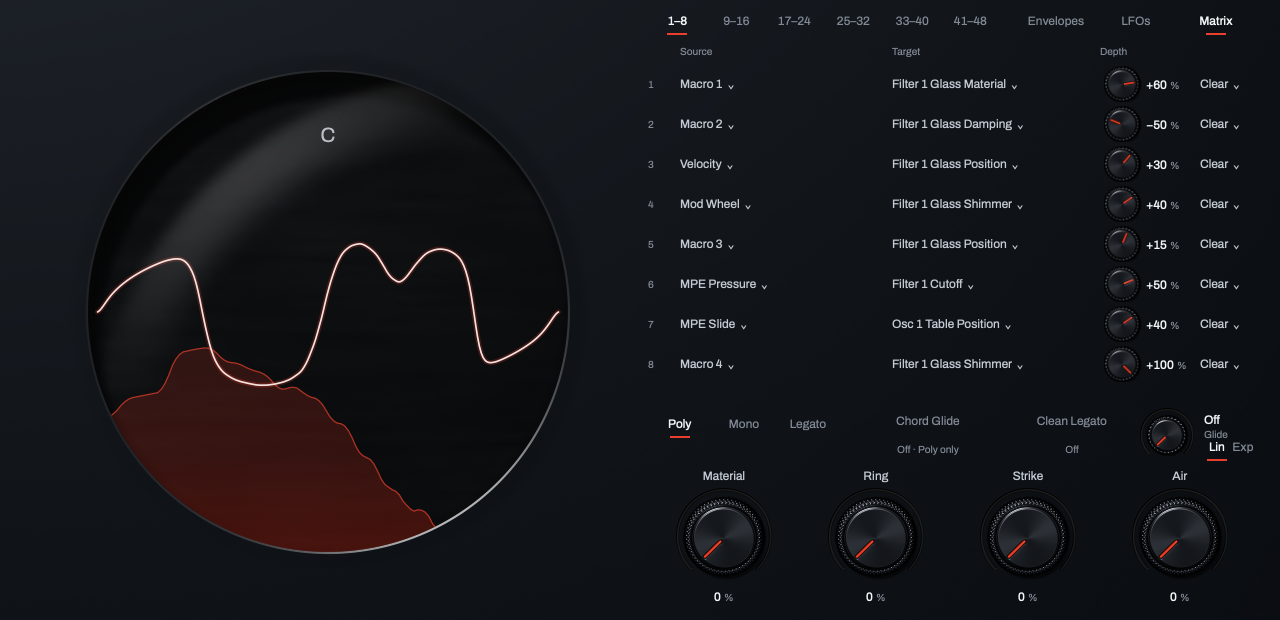
- Pages. Six pages of eight routes, 1–8 to 41–48.
- Source. What moves the target.
- Target. The control it moves.
- Depth. How far, and in which direction.
- Clear. Empties the route.
The matrix has 48 routes in six pages of eight, picked by 1–8 to 41–48. Each route has a source, a target and a depth. Click Choose a source or Choose a target to pick from a menu (the targets are grouped by kind); turn the depth knob, from −100 to +100 %; Clear empties the route. Init has no routes; every factory sound uses some. A route you have only half made (a source without a target) stays put while you finish it.
- Sources: Env 1 to Env 4, LFO 1 to LFO 4, Random, Chaos, Macro 1 to Macro 4, Velocity, Release Velocity, Note, Mod Wheel, Pitch Wheel, Aftertouch, MPE Pressure, MPE Slide, MPE Lift, and Gate Count (how many keys are held, full at eight).
- Targets: each oscillator's Level, Pan, Pitch, Fine, Table Position, Warp Amount, Unison Detune, Unison Spread, FM Amount, Pulse Width, Shape and Sample Start; each filter's Cutoff, Resonance, Morph, Drive, Mix and Glass Material, Position, Damping and Shimmer; each envelope's Attack, Decay, Sustain and Release; each LFO's Rate; Sub Level, Noise Level, Noise Color, Drift, Drive Amount, Drive Mix and Pitch Env Amount (Knock); and the depth of any route (Mod 1 Depth to Mod 48 Depth). The effects are not targets.
The menus and the rows name each target in full, such as Osc 1 Table Position or Filter 1 Glass Material. Drive Amount and Drive Mix are the Drive view's large Drive knob and its Mix, and Pitch Env Amount is Knock. Warp Amount does nothing while that oscillator's Warp is Off.
To add movement: pick a source and a target, start the depth near zero, and raise it while you hold a note.
Settings in your DAW only
Almost every setting has a control on Kiln's face. These remain in your DAW's parameter list:
| Control | What it does | Range | Default |
|---|---|---|---|
| Filter 1 Filter FM Source, Filter 2 Filter FM Source | An oscillator that moves this filter's cutoff. Sub is also listed; it does nothing. | None, Osc 1, Osc 2, Osc 3, Sub | None |
| Filter 1 Filter FM, Filter 2 Filter FM | How far that oscillator moves the cutoff. | 0.00 to 1.00 | 0.00 |
| LFO 1 Stereo Phase to LFO 4 Stereo Phase | Not active in 1.1: it does nothing. | 0.00 to 0.50 | 0.00 |
Anneal and tuning
Anneal
Anneal starts a sound for you from a recording. Open it from Options > Anneal from audio….
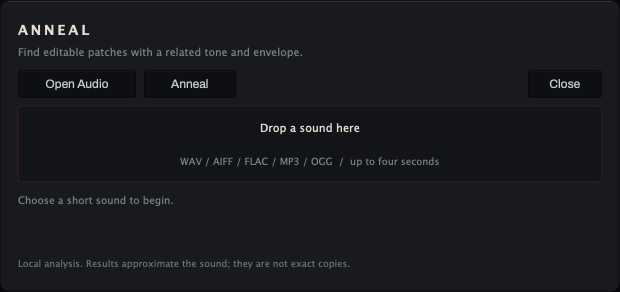
- Open Audio. Choose a file, or drop one on the panel.
- Anneal. Starts the search.
- Close. Closes the panel and stops a search; so does a click outside the panel, or Esc.
- Drop area. Drop one audio file here.
- Status. What Anneal is doing.
To start a sound from a recording:
- Click Open Audio and choose a short, isolated sound, or drop one on the panel: WAV, AIFF, FLAC, MP3 or OGG, mono or stereo. Anneal analyzes up to the first four seconds.
- Click Anneal and wait. While it searches, Cancel appears; it stops the search and keeps the recording loaded.
- Click Apply on each result (up to four) to hear it, then close the panel and shape the one you like with the normal controls.
- Save it as a user sound.
The percentage on each result is how closely its features match, not a promise that it copies the recording. The analysis runs on your computer.
Tuning
In Options, under Tuning, choose Load scale (.scl)…, Load keyboard map (.kbm)… or Reset tuning to 12-TET. A scale alone maps from C4 at 261.63 Hz; a keyboard map sets the reference key and frequency. The scale and map are saved with your session.
While one is active, the header shows Scale: and its name (with + Map when a keyboard map is loaded); click it for the same items. When an MTS-ESP tuning master is running, the header reads MTS-ESP and the master's tuning takes over. A file Kiln cannot use shows Tuning refused with the reason.
Keyboard and mouse
Letters on your computer keyboard play notes, so Kiln's own shortcuts use digits, brackets and two letters.
| Action | Mac | Windows |
|---|---|---|
| Play notes (C upward) | a w s e d f t g y h u j k o l p ; | a w s e d f t g y h u j k o l p ; |
| Typing octave down or up | Z or X | Z or X |
| Open a page | 1 to 8 | 1 to 8 |
| Previous or next sound | [ or ] | [ or ] |
| Step through the Library and load | Up or Down | Up or Down |
| Load the selected Library row | Enter | Enter |
| Close the Library, Anneal or the shortcut sheet | Esc | Esc |
| Show the shortcut sheet | ? | ? |
| Fine drag on a knob | Shift + drag | Shift + drag |
| Reset a knob | Double-click, or Cmd + click | Double-click, or Ctrl + click |
| Step a knob on its grid | Mouse wheel (Shift for fine) | Mouse wheel (Shift for fine) |
| Type an exact value | Click the value | Click the value |
In Pro Tools, fine drag is Cmd + drag (Ctrl on Windows) and reset is Option + click (Alt on Windows). Typing into a box (a value, Search or the save name), or opening Anneal, the shortcut sheet or the license card, pauses the computer keys and releases any notes you were holding with them. The Library leaves them live, so you can play each sound as you pick it.
A typed value can use the units the readouts show: 2.75 kHz, -3 ct, 53 ms, 0.05 s, or 40% (40 alone works too on a control that reads in percent). On most percent controls a bare 1 or 0.5 is read as a fraction (100 % or 50 %), so add % to small values. Type off where a readout says Off. Kiln keeps the exact number you type, even when the readout rounds it.
Recipes
A sliding 808
| Setting | Value |
|---|---|
| Sound | A bass from the 808 or Bass type |
| Voice mode | Legato |
| Glide | 60 to 120 ms, with Exp |
| Clean Legato | On |
| Knock (Drive page, Knock view) | +7 to +12 st, Decay 30 to 60 ms |
| Macro Punch | 30 to 60 % for more knock |
Play overlapping notes to slide; leave a gap to re-attack.
Chords that glide
| Setting | Value |
|---|---|
| Sound | A pad or lead |
| Voice mode | Poly |
| Chord Glide | On (Glide starts at 180 ms) |
| Glide | 150 to 300 ms |
Play a chord progression, letting go of each chord just before you play the next one. Every voice slides to its nearest new note.
Grit on a sub without losing the sub
| Setting | Value |
|---|---|
| Sound | A sustained sub bass from the Bass type |
| Drive | On, Type Fuzz or Even |
| Drive (the large knob) | 12 to 24 dB |
| Low Keep | 80 to 120 Hz |
| Bias | 30 to 60 % |
| Bass Mono (Clipper view) | 100 Hz |
The drive adds harmonics above Low Keep while the sub stays clean and centred.
A lead with vibrato that blooms
| Setting | Value |
|---|---|
| Sound | One of the new leads, such as Glass Ladder |
| Macro Vibrato | 40 to 70 % |
| LFO 1 Fade in (Motion page, LFOs view) | 300 to 800 ms |
Short notes stay straight; held notes open into vibrato.
A filter wobble
| Setting | Value |
|---|---|
| Sound | A bass or a lead |
| Filter 1 | On, with the oscillator's Route (Source page, Pitch view) on Filter 1 or Both |
| Filter 1 Cutoff | 300 to 800 Hz |
| Matrix route (Motion page) | Source LFO 1, target Filter 1 Cutoff |
| Depth | Start near 0 % and raise it while you hold a note |
| LFO 1 Rate (LFOs view) | 2 to 6 Hz |
Hold a note: the filter opens and closes with LFO 1.
A glass pluck
| Setting | Value |
|---|---|
| Sound | A Keys or Pluck sound with the Glass character word |
| Filter 1 model | Glass |
| Material | 10 % for glass, 50 % for metal, 90 % for wood |
| Damping | Lower for a longer ring |
Quality, CPU and old sessions
- Quality (Eco, Standard, Ultra) on the Output page trades CPU against quality. Offline bounces always run Ultra, so you can work on Eco and still bounce clean, if your DAW tells Kiln it is bouncing offline. A real-time export may not, so set Ultra yourself before a real-time export.
- Auto governor keeps playback running under heavy load by easing off Ultra, then Eco, then voices.
- Unison is the biggest CPU cost: each extra unison voice (Source page, Unison view) is another oscillator per note.
- Old sessions keep the old engine. A project or user sound saved with Kiln 0.3 or earlier opens with the engine it was made with, including the old filter drive, soft clip and voice stealing, so it sounds exactly as you left it. Every control new in 1.0 starts off in those sessions. A project saved with Kiln 1.0 likewise keeps its Chord Glide, its matrix and warp, and the six wavetables as 1.0 played them.
Specifications
- Voices: up to 64 in Poly (16 by default).
- Latency: none.
- Sounds: 683 factory sounds and 80 wavetables.
- Samples: WAV, AIFF or FLAC; the first 2,097,152 samples of a file.
- Window: 1280 x 860 when it opens; resizable from 1120 x 752 to 1920 x 1290, keeping its shape.
- Formats: VST3 and AAX on macOS and Windows; AU on macOS.
- Systems: macOS 10.15 or later on Intel, macOS 11 or later on Apple Silicon; Windows 10 or later, 64-bit.
Credits
- Interface type: Archivo, copyright 2020 The Archivo Project Authors, used under the SIL Open Font License, Version 1.1.
- Tuning: the MTS-ESP client library, copyright 2021 ODDSound Ltd., used under its license.
Installation and activation
Install
- Download the installer from vitricaudio.com/downloads or your account at vitricaudio.com/account.
- Save your work and quit your DAW.
- Run the
.pkg(Mac) or.exe(Windows). - Open your DAW, rescan plugins if needed, and load Kiln Synthesizer on an instrument track.
Use AU in Logic Pro, AAX in Pro Tools and VST3 in other DAWs. The Mac installer puts the plugins in the standard folders:
- AU:
/Library/Audio/Plug-Ins/Components - VST3:
/Library/Audio/Plug-Ins/VST3 - AAX:
/Library/Application Support/Avid/Audio/Plug-Ins
On Windows:
- VST3:
C:\Program Files\Common Files\VST3 - AAX:
C:\Program Files\Common Files\Avid\Audio\Plug-Ins
Activate your license
Until you activate a license or start a trial, Kiln plays no sound and the header reads Locked · Unlock.
- Click the license status in the header to open the license card.
- Paste the
VT-...key from your purchase email or account page. Lost it? vitricaudio.com/license can resend your keys. - Click Apply license. The header then reads Licensed.
A full license works offline after activation and runs on up to three computers at a time.
Activate a computer that is offline
- On the offline computer, open the license card and click Copy code to copy its machine code (it starts with
VTM1-). - On any computer that is online, open vitricaudio.com/license, enter your key and the machine code, and download the license file.
- Copy the file to the offline computer, open the license card and click Load file.
Try it free for 72 hours
- Open the license card and click Start free trial. The trial page opens with the product and machine code filled in.
- Sign in with the emailed link and click Start my 72-hour trial.
- Click Copy trial key, paste it into the license card and click Apply license. Or click Download license file and use Load file. A backup copy is emailed to you.
The trial has every feature, runs 72 hours from issue and needs an internet connection while you use it. There is one trial per product, person and computer, and no payment details are needed. When it ends, Kiln goes silent but keeps every setting in your projects.
Updates
When a newer Kiln exists, the license status in the header reads Update · with its version, such as Update · 1.1.1. Click it: the license card shows UPDATE AVAILABLE with Download 1.1.1 (it opens the product page) and Later (the header goes back to Licensed, or the trial days, until the next version). Kiln checks once a day while its window is open and sends only the product, your version and your platform; turn Check for updates off in Options to stop it. Quit your DAW and run the new installer over the old one. Your projects reopen as saved.
Troubleshooting
No sound
- Kiln is an instrument: check that it is on an instrument (MIDI) track, the track is armed or monitoring, and notes reach it (the keys light when they do).
- If one oscillator is silent, its Ring may be taking its signal from an oscillator that is off or at Level 0 (the one in FM from, Source page, Pitch view). Turn that oscillator on, or Ring off.
- Look at the header: Locked · Unlock means Kiln has not been activated, the trial ended, or the license needs attention. Click it.
- On the Source page, check that an oscillator is on with its Level up, and that Out is not turned down.
- On the Filter page, check that Cutoff on an active filter is not turned all the way down.
The pattern keeps playing after I let go
Latch is on in the arpeggiator. Turn it off.
I can't find a control
Most pages show one part at a time. Click the words at a page's top right: Arp and Voice on the Voice page; Sound, Unison and Pitch on the Source page (for each of Osc 1 to Osc 3); Drive, Knock and Clipper on the Drive page; Output, Sub and Noise on the Output page; Envelopes, LFOs and Matrix on the Motion page. On the Filter page, Filter 1 and Filter 2 pick the filter; on the Motion page, the words above the controls pick the envelope, the LFO or the page of routes. The Effects page shows one effect at a time: click its name. The Drive page starts on the Drive view each time Kiln's window opens. Filter FM is the one working setting left only in your DAW (see Settings in your DAW only).
A control does nothing
- Table, Position and Warp work on Wavetable oscillators; Shape, Pulse width and Sync (Sound view) on Analog; Start, Loop, Reverse and Crossfade on Sample. Warp amount does nothing while Warp is Off.
- FM amount needs FM from set to a higher-numbered oscillator that is on (Source page, Pitch view), and Ring needs FM from set to a higher-numbered oscillator. On a Sample oscillator, FM amount and the Sync switch (Pitch view) do nothing.
- On the Filter page, Drive works on the Ladder and Slope on the SVF; Balance works in Split.
- On the compressor, Ratio works in Clean, and Upward and Downward in OTT.
- The noise filter's Frequency does nothing while its filter is Off.
- Bias does nothing on Soft, Hard and Fold drive; the note under it says so.
- Decay, Curve and On slides do nothing while Knock is Off, unless a matrix route moves Pitch Env Amount (the Punch macro on the new basses does).
- The Clipper's Drive and Knee do nothing while the Clipper is off.
- An LFO, and Env 2 to Env 4, move nothing until a matrix route uses them.
- Chord Glide does nothing in Mono or Legato (it reads Needs Poly) or while Glide is Off.
- A macro that reads Not assigned is not used by this sound; route it on the Motion page.
Notes slide when I don't want them to, or don't slide
Notes slide in Mono and Legato when they overlap, and in Poly with Chord Glide on. With Legato only off (Voice page, Voice view), every note slides from the last one, in any voice mode. To stop it, set Glide to Off, turn Chord Glide off, turn Legato only back on, or (in Mono and Legato) leave a gap between notes. If nothing slides, check that Glide is above Off and that the notes overlap.
The computer keys or shortcuts do nothing
Click an empty part of Kiln's window once so it has the keyboard. Typing into a box (a value, Search or the save name), or an open Anneal panel, shortcut sheet or license card, pauses the computer keys; after typing in the Library, click the list to play again. Some DAWs keep certain keys for themselves; use your MIDI keyboard or the on-screen keys for those.
It crackles or my computer runs short
Lower the unison Voices on the oscillators (Source page, Unison view), choose Eco under Quality on the Output page, keep Auto governor on, or raise your DAW's buffer size. Offline bounces still run Ultra.
The end of my bounce cuts off the reverb or delay
Leave a few bars after the last note inside the export range, or turn on your DAW's option to include effect tails.
I can't find an old bass
In the Library, choose All sounds, then the Legacy shelf, last under Packs: the earlier factory sounds are there, and every sound keeps its name. Pick a type with it, such as Bass, or search: in All sounds "legacy bass" finds the older basses.
Kiln does not appear in my DAW
Rescan plugins and restart the DAW. In Logic Pro, use Logic Pro > Settings > Plug-in Manager and Reset & Rescan Selection. Look for Kiln among instruments, not effects.
I lost my license key
Enter your email at vitricaudio.com/license to have your keys sent again, or find them in your account at vitricaudio.com/account.
Support
Write to support@vitricaudio.com with your Kiln version, operating system, DAW and version, plugin format and the exact error if there is one.
Every purchase comes with a 14-day refund, no questions asked.