Colonnade Delay: the manual
The manual for Colonnade Delay: installation and activation, the two engines and four characters, the depth axis, the echo stage as a control surface, routing, groove, and the FAQ. Covers version 1.1.
Colonnade Delay is a dual-engine character delay that stages its echoes in space. Two independent delay lines, A and B, each carry one of four character engines inside the feedback loop, so tone, saturation and wear build up as the repeats go on; each pass through the loop feeds two repeats. Each engine also has a Depth control that moves its repeats from in front of the dry signal to far behind it. Two engines at different depths give the mix the receding rows the name describes: a close slap against a distant wash, from one insert.
This manual covers Colonnade Delay 1.1: installation, activation, the interface, session workflows and the reference controls. It was updated on 1 October 2026. For more techniques, visit the guides index.
Overview
Each engine is a complete delay line: time (free from 1 ms to 4 seconds, or host synced across 21 divisions from 1/64 to 1/1 including dotted and triplet), feedback to 120 percent, a character engine, a multimode resonant filter, drive, diffusion, pitch shifting, pan, width, level, reverse and depth. The engines route four ways: Dual, Ping-Pong, Serial with A feeding B, and Mid/Side.
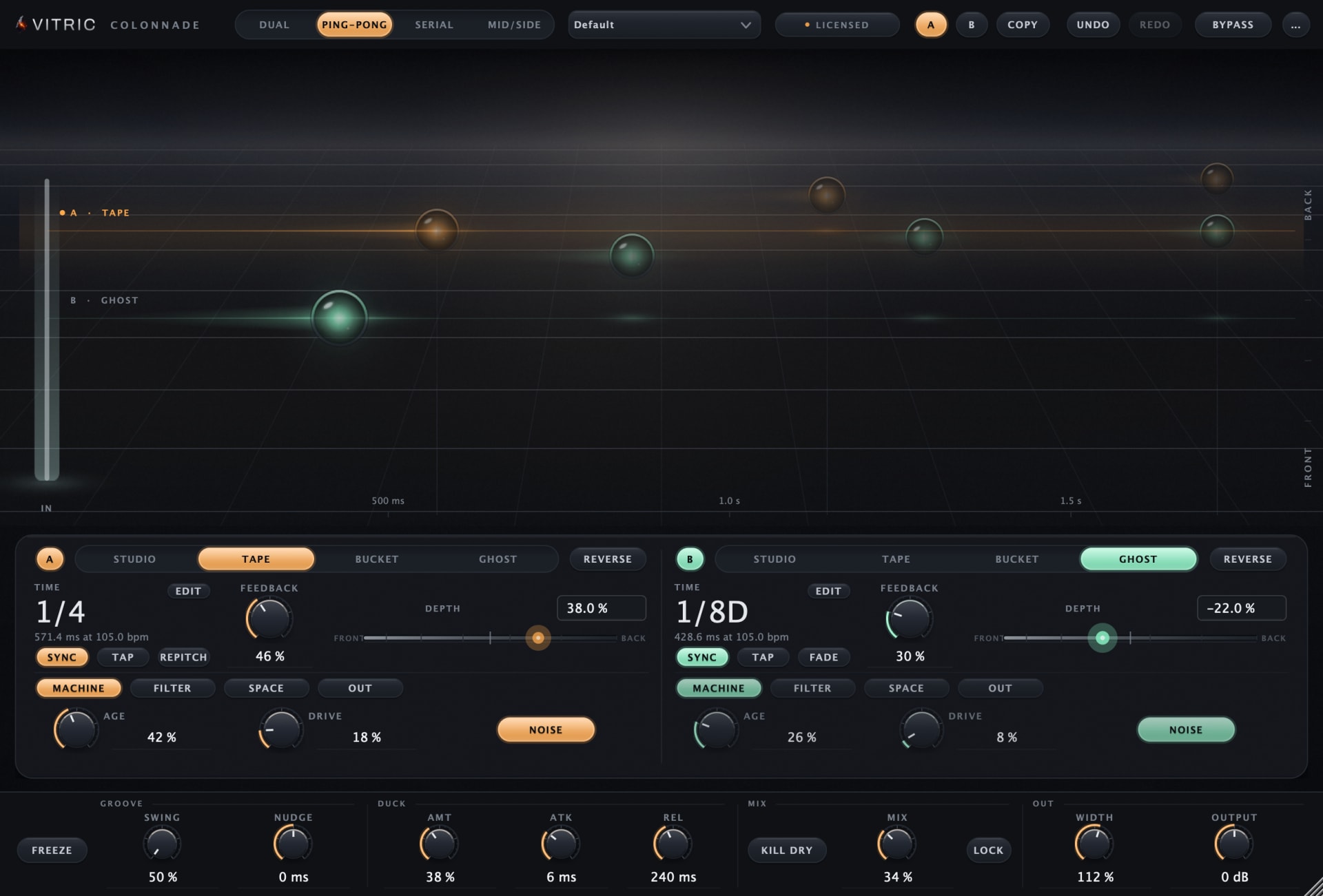
The echo stage display draws each engine's repeats as receding pulses of light at their actual times, staged by depth, on a beat grid when synced. It is a control surface, not a picture: the repeats themselves are the handles, covered in the interface tour below.
The plugin runs at zero samples of added latency. CPU use depends on both engines' character, pitch, diffusion and other settings, as well as the host, hardware and editor size. Every control carries a tooltip.
Installation and activation
Get the current Colonnade Delay installer for your computer. Save your session and close your DAW, run the Windows .exe or macOS .pkg, then reopen the DAW. Rescan plugins if necessary.
Insert Colonnade Delay on an audio track or bus. Use AU in Logic Pro, AAX in Pro Tools, or VST3 in a compatible host. AU is available on macOS; both platforms include VST3 and AAX.
Windows builds require Windows 10 or later, 64-bit. Mac builds require macOS 10.15 or later on Intel, or macOS 11 or later on Apple Silicon. Your DAW may require a newer operating system.
Start a three-day trial
- Open the plugin’s license panel and choose Start free trial. This opens the trial page for Colonnade Delay with your product and machine code filled in.
- Sign in using the link sent to your email. Check the product and machine code, then choose Email my trial.
- Save the attached license file from your email. On the same computer, choose Load file in the plugin’s license panel.
Install first: the three days begin when the trial license is issued. Every feature is available during that window. Keep the computer connected for periodic internet verification. There is one trial per product, person and machine, with no payment details or automatic charge. At expiry, processing locks while the plugin keeps its saved project settings.
Activate a full perpetual license
Paste the VT-... key from your purchase email or account into the license panel and choose Apply license. Full perpetual licenses work offline after activation.
For an offline studio computer, use the license portal on an online device. Enter your key and the studio computer’s VTM1-... machine code, download the bound file, transfer it to the studio computer and choose Load file. The portal can also resend your active full-license keys.
A full license runs on up to three computers at a time. Deactivating does not open a slot on its own, because permanent offline files cannot be remotely erased, so when you replace a computer, contact support and we move the license to the new one for free. A trial is bound to its issuing computer.
Find the plugin after installation
Open the plugin from your DAW’s plugin browser. Check that its supported format was installed, restart the DAW, and inspect its rescan or failed-plugin list if the plugin is missing. The Mac package installs plugins, not a standalone application. Windows may also offer a standalone app under C:\Program Files\Vitric Audio.
Standard installation folders
| Format | macOS | Windows |
|---|---|---|
| AU | /Library/Audio/Plug-Ins/Components | Not available |
| VST3 | /Library/Audio/Plug-Ins/VST3 | C:\Program Files\Common Files\VST3 |
| AAX | /Library/Application Support/Avid/Audio/Plug-Ins | C:\Program Files\Common Files\Avid\Audio\Plug-Ins |
If installation or activation still fails, send support the product version, operating system, DAW version, plugin format and exact error.
Interface tour
The window is resizable from 1000 by 680 up to 1860 by 1260. The toolbar holds the routing selector, the preset menu with section headings and stepper buttons, A/B compare with COPY, undo and redo, and bypass, which crossfades click free and is host automatable. The echo stage fills the face; the two engine decks sit below it, and the utility strip runs along the bottom.
The echo stage
Every audible repeat is drawn at its actual time, staged front to back by depth, with the beat grid visible when an engine is synced. The display is driven directly:
| Gesture | What it does |
|---|---|
| Drag a lane's head node | Time sideways, depth up and down; the node follows your pointer and a HUD reads TIME and DEPTH |
| Drag the lane away from the node | Time only |
| Drag the last repeat (the decay grip) | Feedback: growing the train outward is what feedback does |
| Mouse wheel over a lane | Feedback |
| Shift while dragging | Fine adjustment |
| Double-click an echo-stage drag target | Reset that target; numeric fields are used for exact entry |
| Right-click a lane | The lane menu: on, sync, reverse, resets, copy between A and B |
| Click an engine deck | Focuses that engine; the chrome re-lights in its colour |
When an engine is synced its repeats snap to divisions as you drag. Ducking reads as the trails dimming, freeze holds the stage with a FROZEN caption, and feedback past 100 percent raises a SELF-OSC caption over the lane.
The four characters
All four engines live inside the feedback loop, so colour is written into the signal on every pass through the loop, and each pass feeds two repeats:
| Engine | The machine | What accumulates over the repeats |
|---|---|---|
| Studio | Clean digital line | Nothing. Transparent at any feedback |
| Tape | Program-dependent saturation, head bump and high-frequency loss tracking tape speed, wow and flutter built from measured machine behavior, optional hiss and splice noise | Warmth, compression, wear |
| Bucket | Bucket brigade on a virtual clock, so repeats darken as times get longer; compander pumping and bloom, optional clock whine | Darkness as times stretch, pumping, bloom |
| Ghost | Companded bit reduction that breathes with the signal, sample rate reduction, deep slow warble, smeared repeats | Grit that breathes with the signal |
An Age control per engine sweeps the Tape, Bucket and Ghost models from calibrated new to worn, and their noise layer (tape hiss and splice, clock whine, crackle) can be switched off. Ghost's slow warble is part of its transport and stays on. Studio has no age or noise.
The engine decks
Each engine keeps TIME, FEEDBACK and DEPTH visible. Choose TIME EDIT to type a free time in milliseconds or seconds; with sync on, it opens the musical division choices instead. The large time readout still supports scrubbing. Continuous controls have exact value fields: Return applies and Escape cancels. DEPTH reads as a percentage. The remaining controls are paged independently per engine: MACHINE (age, drive, noise), FILTER (type, frequency, resonance), SPACE (diffusion, pitch, pitch mode) and OUT (pan, width, level).
- Time behavior. Repitch glides between times like a tape transport, with motor constants measured from a real echo machine, so the move is the doppler. Fade crossfades cleanly at constant pitch. Both are click free, including host tempo changes.
- Feedback. 0 to 120 percent. Self oscillation begins at 100 percent and stays bounded and musical to 120, limited inside the loop the way tape saturation limits a real echo machine.
- Filter. OFF, low pass, high pass or band pass in each engine's feedback loop. OFF retains FREQ and RES without applying them. An active filter affects the first repeat and compounds each pass; filtering A does not filter B's output.
- Pitch. Pitch shifting inside the loop, plus or minus 24 semitones with cent resolution. Quartz is clean and granular; Slide glides between pitches. Because the shifter is in the loop, an octave setting climbs another octave every second repeat, since each pass through the loop feeds two repeats.
- Diffusion. From discrete repeats to a washed, reverb adjacent smear, without moving the echo off the grid.
- Depth. -100 in front of the dry signal to +100 far behind it. One control drives level, air absorption, smear, arrival time and stereo width together, so a repeat recedes instead of just getting quieter.
Why does a repeat still sound unfiltered or diffuse?
Check that FILTER is not OFF, then audition one engine at a time: the other engine has its own filter and can remain unfiltered. These are feedback-loop filters, not a single output cut. For a cleaner repeat, set DIFFUSE and DEPTH to zero. GHOST retains a minimum diffusion character even at zero DIFFUSE, so choose another character when comparing an unsmeared repeat.
Routing
- Dual. A and B run in parallel.
- Ping-Pong. The repeats bounce from side to side: the first on the left, the second on the right, the third on the left. Both sides are fed from a mono sum of the input, so centered and mono sources alternate too, and a source panned hard to one side still bounces, starting on the left. This is Ping-Pong in new instances. Sessions saved before Colonnade 1.1.9 keep the routing they were made with: each side's repeats cross to the opposite side, so a centered mono source stays centered. Choosing Ping-Pong again or picking a preset from Colonnade's menu does not change that; to use the new routing in such a session, add a new Colonnade instance.
- Serial. A feeds B, for compound machines: a tape eighth feeding a bucket quarter is one patch.
- Mid/Side. A on the centre of the image, B on the sides. Each engine runs mono in this mode, so PAN is stored but ignored on both, and so is A's WIDTH. B's WIDTH sets how wide the side echoes are: 0 percent removes them, 100 is the normal width and 200 doubles them, while the centre stays put. LEVEL remains active.
Groove, ducking and the utility strip
- Swing. 50 to 75 percent on synced engines, in the MPC convention. The swung repeat moves; the grid never does.
- Nudge. Plus or minus 30 ms, sliding repeats ahead of or behind the pocket.
- Ducking. Driven by the dry signal, with amount, attack and release.
- Freeze. A click-free loop hold. The loop filter, diffusion and pitch shifter keep running on the held loop, so with those active the frozen sound keeps changing on every pass.
- Kill dry. Removes the dry signal for send use.
- Mix and mix lock. The mix control with a lock so presets never change your send balance.
- Width and output. Global stereo width and an output trim.
Presets, A/B and undo
44 factory presets organized by source and job: Vocals, Drums, Guitars, Keys and Synths, Mix FX, Ambient and Sound Design. Preset recall respects mix lock. A/B holds two complete plugin states with a COPY button, and both slots persist with the session. Undo and redo live in the toolbar.
Saving and recalling your own presets
- Open the preset menu and choose Save preset..., then type a name.
- Your presets appear under User at the end of the same menu, after the factory sections. Choose one to recall it into the active A/B slot.
- Rename preset and Delete preset manage the list, and Show preset folder opens the folder the files are saved in.
A saved preset holds both engines and the global controls, Routing included, and is available in any project. Bypass, kill dry and mix lock keep their current state, and with mix lock on, MIX holds too, as with the factory presets. The stepper buttons step through the factory presets only. The files live in ~/Library/Application Support/Vitric Audio/Presets/Colonnade Delay on macOS and %APPDATA%\Vitric Audio\Presets\Colonnade Delay on Windows. Saving and loading your own presets needs an unlocked plugin (a purchase or an active trial).
Workflows
Vocal slap and throw
One instance covers both jobs. Put a clean Studio eighth on A at a slightly negative depth so it sits against the dry vocal, and a worn Tape quarter on B pushed far back: the depth control carries the level, air loss, smear and width of distance in one move. Set ducking so both lines duck under the phrase and bloom in the gaps. The stage shows the slap up front and the throw rows behind it, which is exactly what the mix will do.
Guitars
Bucket. The virtual clock darkens every repeat as times get longer, and the compander pumps the way the pedal lineage does. At the turnaround, grab the decay grip and lean the feedback past 100: self oscillation stays bounded and musical to 120 percent, so the swell is playable rather than a runaway.
Synths and shimmer ladders
Put the pitch shifter inside the loop to work: an octave up in Quartz mode climbs another octave every second repeat, building a ladder that diffusion can smear toward a wash. Slide mode glides between pitches instead, which reads as a transport being played. Depth staging keeps the ladder behind the dry synth while it climbs.
Mix FX and send use
On a send, engage kill dry and lock the mix so preset browsing never upsets the send balance. Mid/Side routing puts one engine on the centre and one on the sides for width moves a normal delay cannot make. Freeze holds a loop click free while you ride depth live; filter moves keep shaping the frozen loop on every pass.
Reference
| Control | Range | What it sets |
|---|---|---|
| Time | 1 ms to 4 s free, or 21 sync divisions (1/64 to 1/1, dotted and triplet) | Per-engine delay time |
| Time mode | Repitch or Fade | Transport glide with pitch, or clean crossfade at constant pitch |
| Feedback | 0 to 120 percent | Regeneration; self-oscillation from 100 percent, bounded |
| Character | Studio, Tape, Bucket, Ghost | The engine inside the feedback loop |
| Age | Calibrated new to worn | Condition of the modeled machine |
| Filter | LP, HP or BP, resonant | Filtering inside the feedback path |
| Pitch | Plus or minus 24 semitones, cent resolution, Quartz or Slide | Shift per pass through the loop |
| Depth | -100 (front) to +100 (back) | Level, air, smear, arrival time and width in one control |
| Swing / Nudge | 50 to 75 percent / plus or minus 30 ms | Groove on synced engines |
| Routing | Dual, Ping-Pong, Serial, Mid/Side | How A and B connect |
| Spec | Value |
|---|---|
| Engines | 2 independent delay lines, full per-engine control |
| Characters | Studio, Tape, Bucket, Ghost, all inside the feedback loop |
| Latency | Zero samples at all settings, nothing reported to the host |
| Timing | Sample-accurate echo placement at 44.1, 48, 96 and 192 kHz, with the short-time limits listed below |
| CPU | Varies with engine settings, host, hardware and editor size |
| Extras | Ducking, freeze, per-engine reverse, kill dry, mix lock, tap tempo per engine, global width, output trim |
| Sessions | A/B with copy, undo and redo, host-automatable click-free bypass |
| Presets | 44 factory presets in six sections; your own presets saved to disk |
| Window | Resizable, 1000x680 to 1860x1260, tooltips on every control |
| Validation | Passes pluginval at strictness level 5 |
| Formats | VST3, AU, AAX |
| Platforms | Windows 10+ (64-bit); macOS 10.15+ Intel / 11+ Apple Silicon |
| Activations | 3 computers at a time per purchased perpetual license; moving to a new computer is free |
What it does not do
The following limits apply to this version:
- No oversampling. There is no HQ mode; the unit runs at the session rate.
- No modulation matrix. Deliberate. This is a character and depth instrument, not a modular routing environment.
- Pan is inactive in Mid/Side. That routing collapses each engine to mono, so the per-engine pan control does nothing there, and neither does A's WIDTH, because A carries the mono centre.
- No diffusion or depth smear under 41 ms. When an engine's first echo (TIME, with NUDGE) is under 41 ms, DIFFUSE, Ghost's built-in diffusion and the smear part of DEPTH step aside, because each is a longer delay than the echo itself. The SPACE page dims DIFFUSE and says why. A time from 41 ms to about 42 ms plays at about 42 ms. With PITCH active the shortest echo is about 72 ms.
FAQ
What does the depth control actually do? It moves an engine's repeats from in front of the dry signal to far behind it by driving five things together: level, air absorption, smear, arrival time and stereo width. That combination is what distance sounds like in a room, so the echo recedes instead of just getting quieter.
Are the characters in the feedback loop or on the output? In the loop. Tape, Bucket and Ghost colour the signal on every pass, so saturation, darkening and wear accumulate pass after pass, one pass for every two repeats. The tenth repeat of a worn tape setting is audibly further gone than the first.
Does it self-oscillate? Yes, deliberately. Self oscillation begins at 100 percent feedback and stays bounded and musical up to 120, limited inside the loop the way tape saturation limits a real echo machine.
Can it do shimmer? The pitch shifter sits inside the feedback loop with a range of plus or minus 24 semitones, so an octave setting climbs another octave every second repeat. Quartz keeps the shifts clean and granular; Slide glides between pitches.
Does it add latency? No. Zero samples at all settings, nothing reported to the host, and echo placement is sample accurate at 44.1, 48, 96 and 192 kHz, with the short-time limits listed under What it does not do.
Do tempo changes click? No. Both time behaviors are click free through host tempo changes: Repitch glides like a transport, Fade crossfades at constant pitch.
Can I use it as a send effect? Yes. Kill dry removes the dry signal, and mix lock holds your wet balance through preset changes, so a send instance stays a send.
What DAWs does it support? Use AU on macOS, VST3 in a compatible 64-bit host, or AAX in Pro Tools. Your DAW may require a newer OS than the plugin build minimum. Check the DAW's system requirements and supported plugin formats.
Can I try it before buying? Yes. Install the plugin, then choose Start free trial in its license panel or visit the trial page. The full-function trial lasts three days from license issuance and needs internet access for periodic verification. It is limited to one per product, per person and machine, with no automatic charge.
What if I get a new computer? Write to support and we move your license to it for free. A permanent offline license cannot be remotely erased, so deactivating in the portal does not open a slot on its own; support does the move for you.
Support
Questions, activation trouble, or anything this manual does not cover: support@vitricaudio.com. Every purchase also carries a 14 day money back guarantee, no questions asked, so the real test is always your own sessions.