
Colorfield Mix Stage Depth and room placement plugin
Put every track at its own distance in the same room.
Plugin for Mac & Windows.
Try it free on your computer.
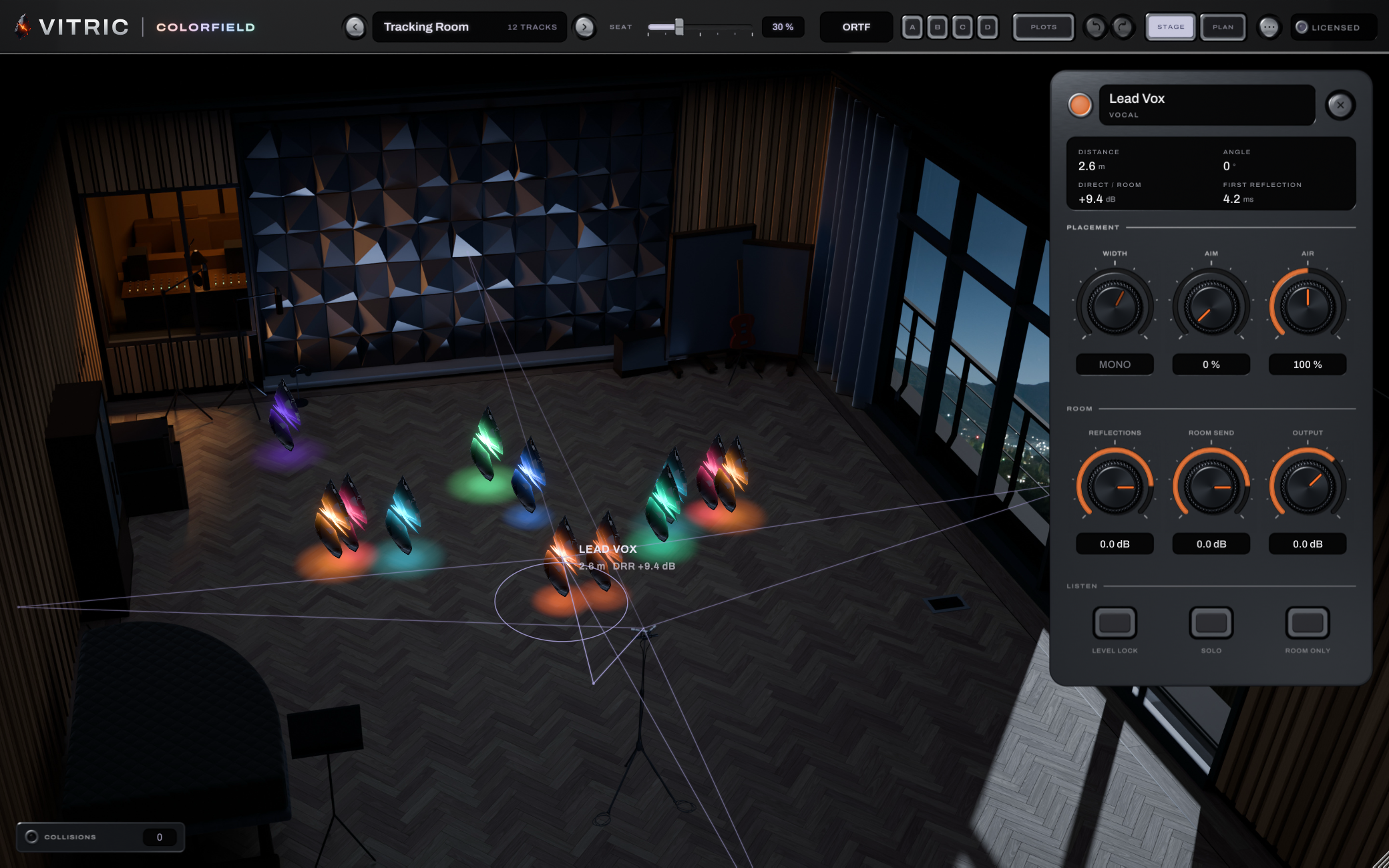
Put Colorfield on every track and the whole band stands on one lit stage. Drag a track forward, back, left or right, and it moves in one modeled room: its level, early reflections, air and share of the room change together, the way distance does. Six rooms, from a tracking room to a concert hall.
Launch price through November 19
Pay by card, PayPal, Apple Pay or Google Pay.
By buying, you agree to the EULA and Terms of Service.
Try free for 3 daysOne-time purchase · 3 computers at a time · 14-day money-back guarantee
Instant download: your license key arrives by email right after payment.
Or get all 13 with Vitric Access, $20 a month
Secure checkout by Paddle. No card required for the trial.
Mac & Windows · VST3, AU, AAX and the Stage app · version 1.0.5
Prices in US dollars. Checkout charges in your local currency where available. US and Canadian sales tax is added at checkout. In the EU, UK, Japan and Australia, tax is already included.
The trial uses the full plugin. Install it in your DAW, then start the 3-day trial from its license screen. No card required.
Read the Colorfield manual Manual (PDF)
IN YOUR SESSION
Depth that sounds like distance.
Turning a track down doesn't send it to the back of the room; it just makes it quieter. In a real room, distance changes how much of the room you hear, how soon the first reflections arrive, how much high end the air takes and how much close-up warmth is left. Colorfield moves all of that at once when you drag a track, and every track sits in the same room, so the parts sound like they were played together.
A CLOSER LOOK
Inside Colorfield.
One stage for every track
Open any Colorfield window and every Colorfield in the session stands on the same lit stage, named and colored from your tracks where the DAW shares them. Drag any of them from the one window, or Shift-click several and move them as a group.
Distance you can hear
Depth moves level, the balance of direct sound and room, the gap before the first reflections, the air's high-frequency loss and the close-mic warmth together. Hold Shift once a drag is under way and the level stays where it was while the rest moves.
Six rooms
Tracking Room, Drum Room, Club, Echo Chamber, Loft and Concert Hall, each modeled from its shape and materials, from a 5 by 7 meter echo chamber to a 38 meter hall. The whole mix changes room at once, and the listener can sit anywhere from the front row to the back.
All features & controls
- One instance per track; every instance in the session on one shared stage
- Position and Depth by dragging on the stage; Width and Aim on the track's deck, dragged or typed
- Six rooms: Tracking Room, Drum Room, Club, Echo Chamber, Loft and Concert Hall
- Listener seat from the front row to the back of the room
- Listener arrays: ORTF, Spaced Pair and XY
- Per track: Air, Reflections and Room Send, Output from -24 to +12 dB
- Level Lock per track; hold Shift during a drag to keep the level
- SOLO and ROOM ONLY per track
- Collision drawer: up to four masking pairs, each with a suggested move
- Four scenes (A to D) with a one-second glide on recall
- Eight factory stage plots
- Shift-click to select several tracks and move them as a group
- STAGE and PLAN views (P); arrow keys move the selected track, Tab picks the next
- 100 steps of undo and redo
- Drags and scene glides go to your host as automation gestures
- Zero reported latency; the direct sound is never delayed
- VoiceOver reads each track on the stage by name, distance and angle
- Resizable window, 1152 x 720 to 2560 x 1600
- The Stage app: open a folder of WAV, AIFF or FLAC stems (mono or stereo, up to 12 minutes each), play them on one stage, loop a region and EXPORT MIX to a 24-bit stereo WAV that ends with the longest stem
- Purchased licenses work offline; trials require an internet connection
- macOS (Apple silicon and Intel): AU, VST3, AAX and the Stage app. Windows 10+ 64-bit: VST3, AAX and the Stage app
Level Lock
Turn on Level Lock for a track and moving it keeps its loudness steady while the room still changes around it, so you judge placement, not volume.
Collisions, with a suggested move
The collision drawer lists tracks that mask each other where they stand: the same frequencies, close together on the stage. For each pair it suggests the nearest move that cuts the masking by at least 40 %. Apply it in one click, or move them yourself.
Scenes and plots
Shift-click A, B, C or D to store where every track stands, and click to glide back to it in one second. Start a session from one of eight factory plots, from Club EDM to Orchestra.
STAGE and PLAN
See the room as a lit stage from the seats, or from above as a plan. Press P to switch.
No added delay, no surprises at bounce
Colorfield reports zero latency: the direct sound is never delayed, so it stays tight and folds to mono cleanly; only the room's reflections and tail arrive later, as they do in a room. In our test host, an offline render matches playback bit for bit at buffer sizes from 64 to 4096 samples, automation included, when the host reports its timeline position.
Measured
| Claim | Measured |
|---|---|
| One room for the whole mix | Four instances' room tails null against one shared tail below -120 dB |
| Level Lock | Loudness held within 0.33 LU in our tests, from the front of the stage to the back wall |
| Distance cues | Direct level within 0.12 dB of the inverse-square law; direct-to-room ratio within 1.23 dB of Barron's model |
| No clicks | Every parameter sweep and switch under -70 dB on a click detector |
| Bounce equals playback | Automation renders bit-exact at host block sizes from 64 to 4096 samples (test host) |
| Mac and Windows | Same settings and input gave bit-identical output on both in our tests |
| Long sessions | 64 instances for 2 hours in one host process: no invalid, clipped or silent blocks |
Put it to work.
A band that played together
Put one Colorfield on each track and start from a plot such as Rock band or Jazz trio. The drums go back, the guitars go to the sides, and every part shares one room instead of five reverbs tuned by ear.
The lead vocal up front, still in the room
In the factory plots the lead vocal stands near the front with its reflections 6 dB down and 4 dB more room behind it, so it reads close without sounding dry or pasted on.
Orchestral and acoustic seating
The Orchestra and Singer-songwriter plots seat the parts the way they would sit on a stage. The Concert Hall is a fan-shaped hall in timber and plaster, full of people.
The same band in another room
Choose another room in the header and every track on the stage moves into it at once, with the change crossfaded. Hear the mix in the Drum Room, then the Loft, without touching a single track.
A mix from a folder of stems
Drop a folder of stems on the Stage app and mix them with no DAW. Every stem gets its own Colorfield on one stage, one playhead runs them all, and EXPORT MIX writes the mix to a 24-bit WAV.
THE DETAILS
Fits your setup.
- Rooms
- Tracking Room, Drum Room, Club, Echo Chamber, Loft, Concert Hall
- Placement
- Position, depth, width and aim per track; Level Lock
- Listener
- Seat front to back; ORTF, spaced pair or XY array
- Latency
- Zero reported; the direct sound is never delayed
- Sample rates
- 44.1 to 96 kHz tested
- Formats
- macOS (Apple silicon and Intel): AU, VST3, AAX and the Stage app. Windows 10+ 64-bit: VST3, AAX and the Stage app
- Windows
- Windows 10 or later, 64-bit. VST3, AAX and the Stage app.
- macOS
- macOS 10.15 or later on Intel; macOS 11 or later on Apple Silicon. AU, VST3, AAX and the Stage app.
- Hosts
- A 64-bit host supporting your platform’s plugin format. Your DAW may require a newer operating system.
Use it in Pro Tools, Logic Pro, Ableton Live, Cubase, Studio One, FL Studio, REAPER, Bitwig Studio, and other compatible hosts.
Find the right format for your DAWQuestions about Colorfield.
Do I put it on every track?
Yes. One Colorfield per track, and the whole session appears on one stage you can open from any of them. Each instance processes only its own track, so nothing passes audio between tracks.
Is it a reverb?
It models the room each track stands in: the direct sound, the early reflections from the walls and the room's tail, all set by where you put the track. Every track runs the same room, so the tails add up to one room rather than a stack of reverbs.
Does the bounce match what I hear?
Colorfield reports zero latency, and in our test host an offline render matches playback bit for bit at buffer sizes from 64 to 4096 samples, automation included, as long as the host reports its timeline position while it plays.
What if my DAW runs plugins in separate processes?
Your audio is still right: each instance renders its own track's placement on its own. The shared stage shows the instances running in the same process, so a track your DAW runs in a separate process (bridged or sandboxed) does not appear on the others' stage. Run Colorfield in the same process as the rest of the session to see every track on one stage.
Which formats and platforms?
macOS (Apple silicon and Intel): AU, VST3 and AAX, plus the Stage app. Windows 10 or later, 64-bit: VST3 and AAX, plus the Stage app. Use AAX in Pro Tools. The installer also adds the six rooms (about 47 MB).
What happens without a license?
Colorfield is silent without a license or an active trial, and its license window reads LOCKED. Saved sessions still reopen with every track where you placed it. The Stage app uses the same license or trial: without one it plays silence, and EXPORT MIX opens the license card.
Is Colorfield in the bundles?
Yes, in The Vitric Bundle, with the other twelve Vitric plugins. The Mix, Vocal and Low End bundles don't include it. Vitric Access and Vitric Pro include it too.
Is there a free trial?
Yes. Every released Vitric plugin has a free 3 day trial with every feature available during the trial window. Trials need a live internet connection; the plugin checks in every few minutes. Purchased perpetual licenses work offline. Get the installer from the downloads page and request your machine-bound trial license on the trial page. At the signed expiry the plugin’s output goes silent until you install a purchased license or a valid subscription grant. The plugin can still load, so projects and saved settings are not deleted.
Own Colorfield Mix Stage? Leave a verified review from your account.
FREE STUDIO TOOLS
Work out the next move.
Measure a mix or find a starting point. These tools run in your browser, with no account required.
PART OF THE COLLECTION
Colorfield, in a bundle.
Colorfield is included in these bundles. Compare their contents and current offers.
Find its next partner.
Explore all plugins
Hear it in your own session.
Colorfield. $59, or try it free for 3 days.
By buying, you agree to the EULA and Terms of Service.
Try free for 3 daysOne-time purchase · 3 computers at a time · 14-day money-back guarantee
Instant download: your license key arrives by email right after payment.
Or get all 13 with Vitric Access, $20 a month