How to add depth to a mix
Depth is the front-to-back picture of a mix. It comes from four cues: level, brightness, how much room you hear next to the dry sound, and how soon the room answers. Here is how to set each one with faders, EQ and one shared reverb.
A mix has two directions. Left to right is stereo placement, set by panning. Front to back is depth, and it comes from the cues your ear uses to judge distance in a real room. You can set each of them with faders, an EQ and one shared reverb.
What depth in a mix is
When a source moves away from you, four things change at once:
- Level. The direct sound gets quieter. In open air it falls about 6 dB each time the distance doubles.
- Brightness. High frequencies fade faster than lows over distance, and more of what reaches you has bounced off surfaces that soak up treble.
- Room next to the dry sound. A room's reflected sound changes far less with distance than the direct sound does, so a far source has more room around its dry signal.
- The gap before the room answers. A close source reaches you well ahead of its first reflections. As it moves back, the direct path grows nearly as long as the reflected paths, and the gap shrinks.
So close sounds are loud, bright and dry, and far sounds are quieter, darker and wetter. Move the cues together: a part that is only turned down sounds quieter, not further away.
Decide the front-to-back picture first
Before you open a plugin, write the order down. A common picture for a song with vocals:
- Front: the lead vocal and the kick, with the snare and bass close behind.
- Middle: rhythm parts such as guitars, keys and percussion.
- Back: pads, strings, backing vocals and effects.
Keep the front row to two or three parts; every part you add there makes the others less distinct. The order is a choice for the song, so a club track might keep the drums closest and set the vocal a row back.
Level and top end
Start with the fader and an EQ, before any reverb. For each row back, try pulling the part down 2 to 3 dB and taking off some top end: a gentle high shelf, 2 to 4 dB down from around 6 to 8 kHz, or a low-pass brought down from 20 kHz until the part stops reaching forward. A far part can lose a little low end too, because a close directional microphone adds bass (the proximity effect) and a distant one does not.
Treat these as moves to audition, not fixed values. The guide to EQ starting points covers shelf and filter shapes, and the EQ frequency chart shows where each instrument's brightness sits.
Use one reverb for the whole mix
Put one reverb on an aux return, set it 100 percent wet, and send every part that needs space to it. Parts that share a reverb share a room, so they sound like they were played together. A different reverb on each track puts each one in a different room, and the ear hears a set of effects instead of distance.
The send level is now your main depth control: little or no send for the front row, more for the middle, the most for the back. As a start, try 4 to 6 dB more send for each row back. With post-fader sends, pulling a part down also lowers its reverb, so raise the send afterwards; distance comes from the balance of dry and wet. A room or a short hall suits most songs, and the guides to what reverb is and types of reverb describe each one.
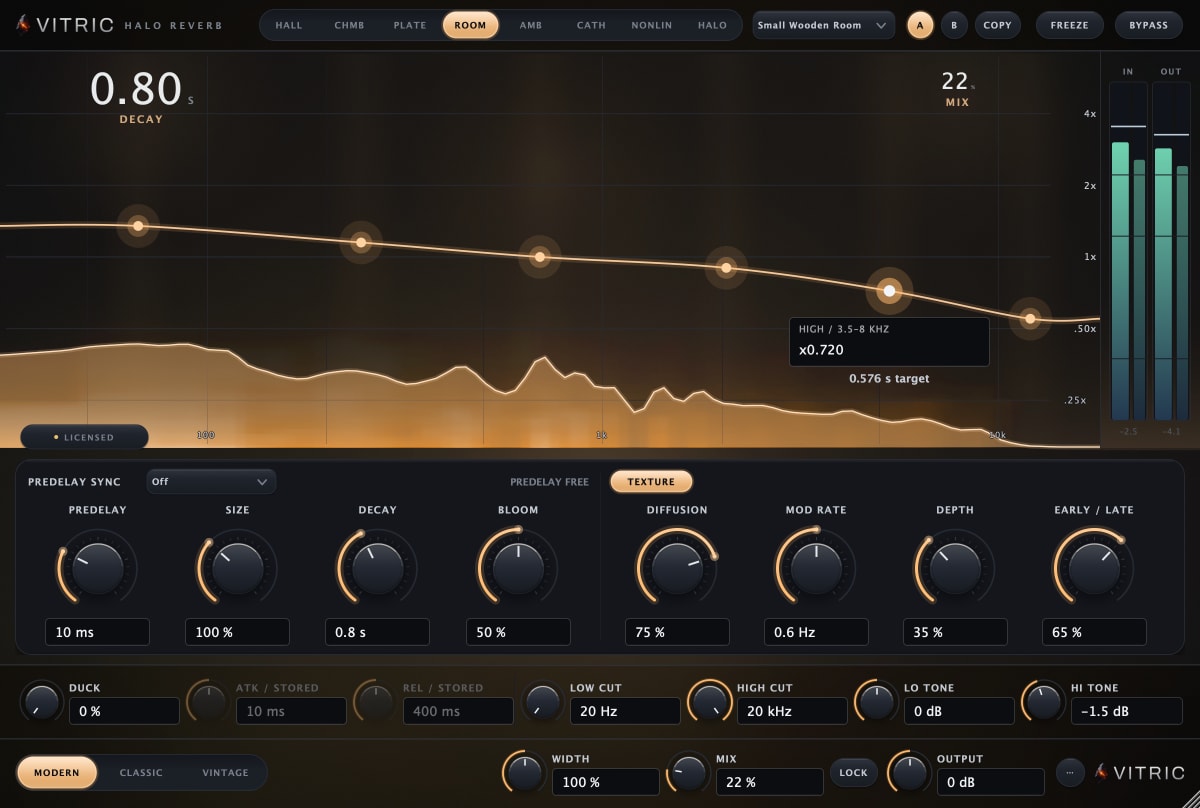
Any reverb plugin can be the shared room. Halo Reverb has the controls this guide uses: a predelay that can follow the host tempo, an Early/Late balance between reflections and tail, and a low cut and a high cut on the wet path.
Pre-delay sets the distance from the dry sound
Pre-delay is the gap between the dry sound and the start of the reverb, so it sets the fourth cue. A long pre-delay lets a consonant or a drum hit land clear of the room, and the part stays forward even with plenty of reverb behind it. A short one joins the part to the room and pushes it back.
Set it from the tempo rather than a preset. The reverb calculator turns the song's BPM into a pre-delay for a note value: at 120 BPM a 1/64 note is 31.25 ms and a 1/32 note is 62.5 ms. Start the vocal on a 1/64 note (if your reverb's tempo sync stops at 1/32, type the milliseconds instead) and compare one step shorter and one longer on the same phrase. Keep the longest value at which the reverb still feels attached to the voice; past that, it becomes a separate slap.
One reverb has one pre-delay, so if the front and back rows need different gaps, duplicate the return and change only the pre-delay: the tempo value for the front row, near 0 ms for the back. The decay and tone still match, so the two returns stay close to one room. The journal post on reverb pre-delay vs decay has a listening exercise for choosing the value.
Decay and high cut on the reverb return
With one shared reverb, decay is one decision for the whole song: shorter for fast, busy arrangements so the tail clears before the next hit, longer for sparse ones. The calculator also gives a decay that, with the pre-delay, fills a number of beats; about two beats is a fair start for a busy song and four for a slow one. Decay is often given as RT60, the time the tail takes to fall by 60 dB, so it fades rather than stops there. Judge it in the busiest section.
Then filter the return, not the dry tracks. A high cut on the reverb is a common starting point: it keeps the tail off the cymbals and the top of the vocal, and a darker room sits further behind the dry sound. Try a low-pass around 6 to 10 kHz, and a high-pass around 150 to 250 Hz so the low end does not build up. When the arrangement has no room for a tail, a single slapback or a filtered tempo delay gives distance with less wash; see types of delay.
Early reflections and the tail
Early reflections are the first echoes off nearby walls, floor and ceiling. They tell the ear how far the source is from those surfaces and how big the room is. The tail is the dense wash that follows, and it adds size and sustain. For placing a part, the reflections matter more than a long tail.
A far part needs more reflections relative to its dry sound, and a close part fewer. If your reverb has an early/late balance, keep the reflections clearly audible and the tail moderate, then push parts back with their sends. If raising a send adds wash before it adds distance, shorten the decay or move the balance toward the reflections. The lead vocal wants the opposite, a little tail and few reflections, so on a front-row copy of the return, move the balance toward the tail.
Check it in mono and at low volume
Fold the mix to mono and listen to the order, not the sound. Summing changes how a wide stereo reverb sits against the dry parts, and a back part that only seemed distant because it was spread wide collapses into the center and crowds the vocal. If the three rows keep their order in mono, the depth comes from level, tone and the room. The mono vs stereo guide explains the check.
Then turn the monitors down. The ear hears less low end at low volume, and the quietest parts, the back row and the reverb, fade first. You should still hear the vocal in front and the pads behind it; if the back row vanishes, it is too quiet or too dark. Check again after any change to the lead vocal's level, since every other row is judged against it.
Doing it in one window with Colorfield
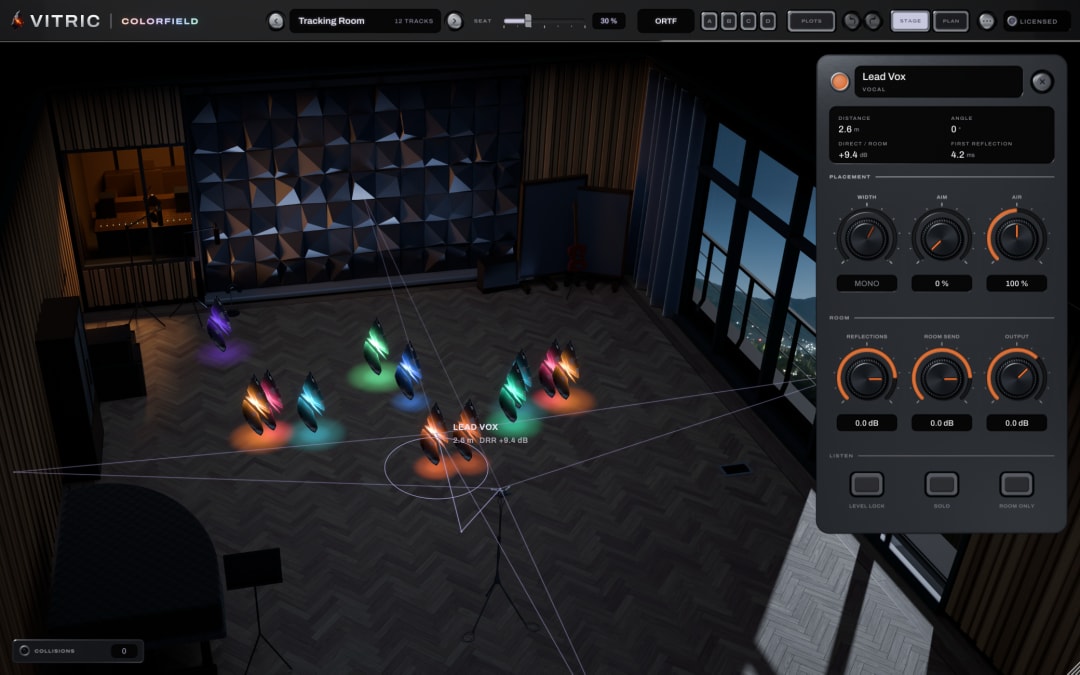
Colorfield Mix Stage follows the same idea as this guide: one room, each track at its own distance. Put one Colorfield on every track, and every Colorfield window shows all the tracks standing in the same lit room. Drag a track forward or back for distance, and left or right for its place in the stereo picture. As it moves back it gets quieter (without Level Lock, up to 10 LU quieter at the back of the stage than at the front), the room around it grows and the air softens its highs. There are six rooms, PLOTS places every track by its role in one step, and the collisions list shows which tracks mask each other, with a suggested move to APPLY. The direct sound is never delayed: Colorfield reports 0 samples of latency to your host. It runs as VST3, AU and AAX on Mac, and VST3 and AAX on Windows, plus the Stage app. It has a free 3-day trial.
Questions
What makes a sound feel far away in a mix?
It is quieter, darker and wetter than the parts in front of it: less direct level, less top end, more room next to the dry signal, and a shorter gap before the room arrives.
Should I use one reverb or many?
One shared reverb, so every part sits in the same room and each part's send level sets its distance. Add a second short ambience or a special reverb only for an effect that should stand apart from the room.
Does reverb pre-delay change depth?
Yes. A longer pre-delay leaves a gap between the dry sound and the room, which keeps the source clear and forward. A short one joins the source to the room and pushes it back. Set it in time with the tempo.