JournalBehind the build
How Clearwall Limiter works: one structure, three styles and a true-peak ceiling that holds
Inside Clearwall Limiter: how Clear, Punch and Dense share one signal path and one latency, why Learn Drive sets Drive once instead of riding gain, how Unity and Delta keep a comparison honest, and the measurements behind the true-peak ceiling.
A mastering limiter has one job you can measure and several you can only hear. The measurable one is the ceiling: no true peak above the level you set. The audible ones are harder. Keep the snap of the kick. Keep the weight of the 808 when the master is pushed. Don't let the louder setting win a comparison just because it is louder. Clearwall Limiter was built so that each of those jobs has a mechanism you can name and a number you can check. This is how it works.
One signal path, three styles
Clear, Punch and Dense are not three algorithms behind a switch. They are three settings of the same chain, which runs in this order:
- Drive raises the input level, from 0 to 30 dB.
- A clip stage shaves the first milliseconds of hits that rise out of quieter material. A peak-memory gate decides what counts as a hit.
- A two-stage gain: a slow floor, set by Release (316 ms to 3.16 s), under a fast stage set by Attack (0.3 ms by default, 0.1 to 10 ms).
- The loud end: past about 5 dB of floor depth (3 dB in Dense), the floor fades out and the bass clip rises, so loud masters keep their low end.
- Containment: a linear-phase band-limit at about 20 kHz, in Master quality.
- A true-peak verify stage, then the output.
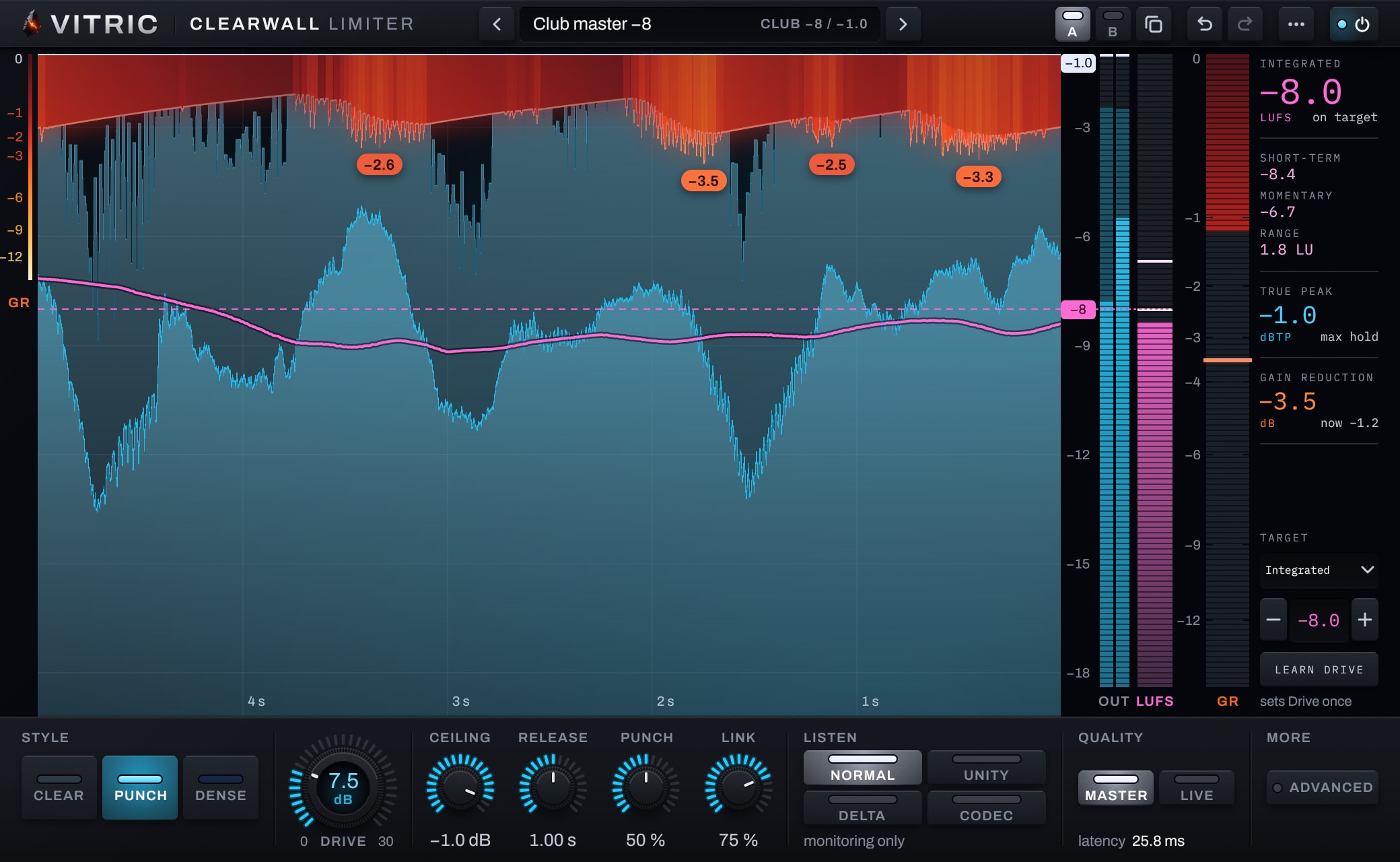
The styles differ in how the clip stage and the loud end behave. Clear clips only the tips of hits and leaves the rest to a smooth gain. Punch clips the first milliseconds of each drum hit, where the snap lives, and leaves the rest to the gain. Dense hands more of the work to the clipper as you push.
Because the path is the same, the latency is the same. Within a quality mode, all three styles report one fixed delay to your host, so switching style in the middle of playback never moves your timing. That matters for the comparison you actually want to make: the same music, the same level, only the style changed.
Where the clipping goes, and where it doesn't
Clipping is the fastest way to take a peak off a drum: it costs no attack time and no release time, so nothing around the hit is turned down. It is also the easiest way to ruin a bass line, because a clipped low note turns into a different waveform. Clearwall's clip stage therefore splits the signal at 300 Hz and treats the two halves differently.
- Above 300 Hz, a gated hit clip takes only the first milliseconds of a hit that rises out of quieter material. A held note is never a hit, so in Clear and Punch a sustained synth or vocal is left to the gain stages.
- Below 300 Hz, an ungated bass clip sits higher than the hit clip. It can shave the crest of a held 808, but as you push into the loud end its threshold rises, so the bass is clipped less, not more.
- While the bass leads, the fast gain stage is held across each bass cycle instead of tracking the waveform inside it. A gain stage that follows a 50 Hz wave up and down is modulating it, and that modulation is heard as distortion on the low end and a wobble on everything above it.
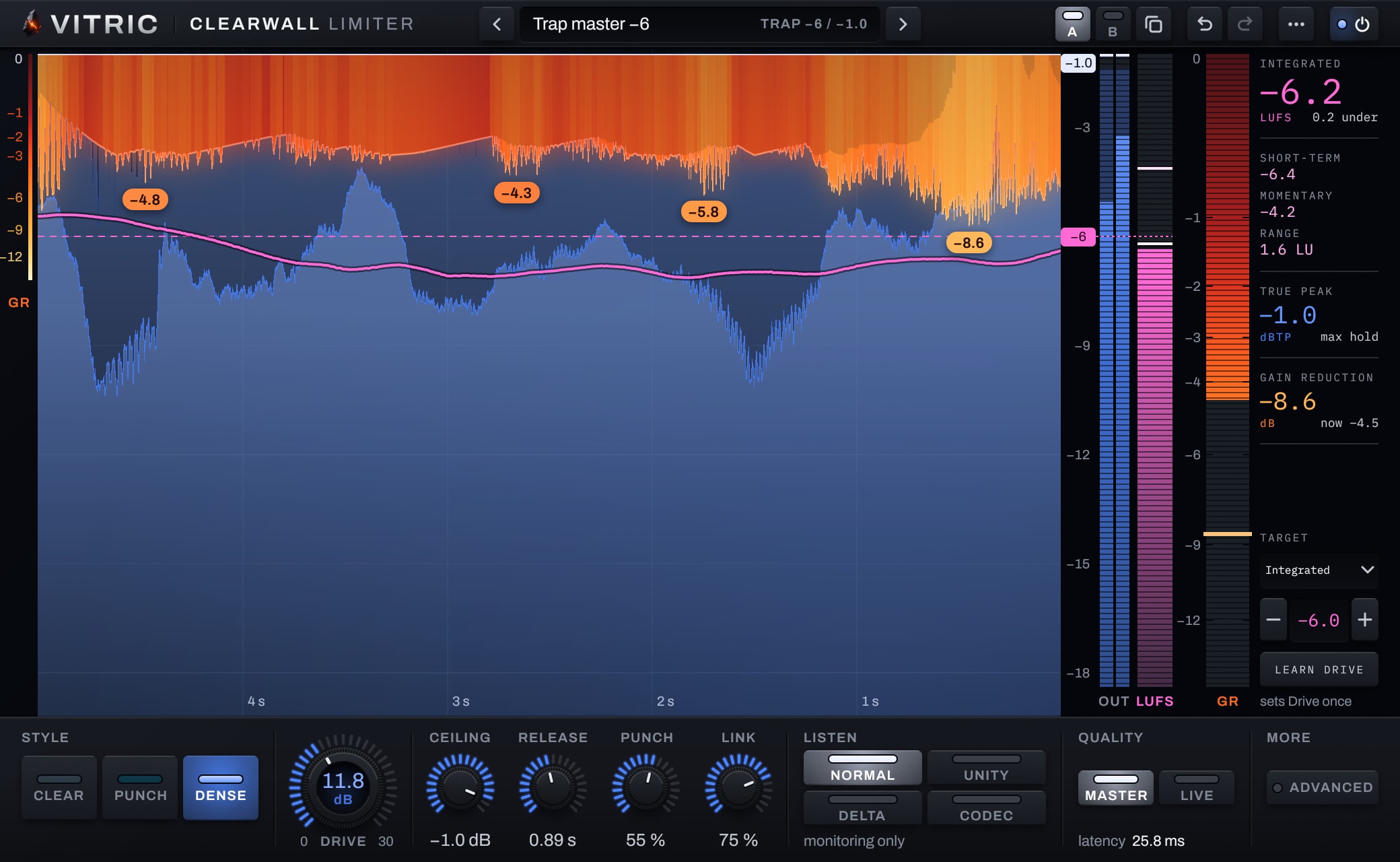
In Dense, once the steady gain reduction passes 3 dB, the hit clip's gate opens as well, so more of the work moves into the clipper, except where the bass dominates. The result we measured: on 16 test mixes pushed to -6 LUFS integrated, Dense moved the bass share (20 to 120 Hz) by -0.41 dB, and by -0.51 dB at -5 LUFS, the median of the 16. Every one of those mixes reached -6 and -5 LUFS in every style, and at full Drive every mix reached between -4.9 and -3.5 LUFS.
| Style | What the clip stage does | Presets that use it |
|---|---|---|
| Clear | Only the tips of hits; the rest goes to a smooth gain | Streaming -14, Acoustic -12, Lo-fi -11, Transparent -10, Spoken word -16 |
| Punch | The first milliseconds of each drum hit; the bass has its own, higher clip | Club -8 (the default), Trap -7, Hip-hop -8, Pop -8, Rock -8, Boom bap -9, R&B -9 |
| Dense | Past 3 dB of steady reduction, more work moves to the clipper, except where the bass dominates | Trap -6, EDM -6, EDM -5 |
If you want the trade-off between the two tools in general terms, our limiter vs clipper guide walks through what each one does to a waveform.
The ceiling: an 8x detector, then a verify stage
A digital file stores samples, but your converter plays a continuous wave drawn through them, and that wave can rise between two samples higher than either one. A meter that reads only the samples can show -1 dBFS on a master whose reconstructed peak is above it. That is why Clearwall's ceiling is set in dBTP, true peak, from -12 to 0. The true peak vs sample peak guide covers the background.
The detector that drives the gain is a streaming 8x true-peak estimator: three linear-phase half-band stages (2x, then 4x, then 8x) followed by a three-point parabolic refinement between the oversampled points. On a 20 kHz sine at 44.1 kHz it reads within 0.0032 dB of the true peak. After the gain stages and containment, a separate verify stage checks the actual output once more before it leaves the plugin. Dither, when you use it, comes after the limiter, and the ceiling still holds after it.
We check the ceiling with a measurement four times finer than the detector: a 32x true-peak reading of the finished output. On 16 test mixes at -8 LUFS, the worst reading over the ceiling was 0.0012 dB in Master quality and 0.0000 dB in Live. Across six sample rates from 44.1 to 192 kHz, six mixes, all three styles and both qualities (216 renders), the worst was 0.0003 dB.
Two edge cases took work. A file that starts at full level on its very first sample let up to 0.10 dB through in earlier engine builds; the shipped engine holds it. And a file that stops dead at full level holds only if its tail is rendered: a limiter that looks ahead is always a little behind the input, so the last moments of the output come after the input has ended. In our test, full-scale DC cut off at the input's length ended at -0.907 dBTP against a -1.0 ceiling. Clearwall reports its tail to your host, so let the host render it.
Learn Drive sets the level once, then gets out of the way
Set a Target in integrated LUFS, short-term maximum or PLR (peak to loudness ratio). Play the loudest part of the song and press Learn Drive. It listens in 4-second windows (8 seconds for a short-term maximum target), usually two to five of them, sets Drive once and stops. If the target is out of reach, it keeps the closest Drive it measured and the display says so: closest Drive kept.
It never rides the gain, and that is deliberate. Drive is the loudness decision for the whole master. If a process moved it continuously, it would turn the verse up and the chorus down, and the shape of the song would be decided by an automatic gain rider rather than by the mix. With one fixed Drive, the difference between sections that you built in the mix survives the master; the only thing moving over time is the limiter's own gain reduction, which you can watch on the curtain. The print is also repeatable: the same Drive gives the same output every time.
Two consequences follow. Drive can't turn a mix down, so a target is reachable only when the mix starts quieter than it. And loading a preset never moves Drive, so browsing presets never jumps your level. Learn Drive is a measurement that sets one control. It doesn't master the song for you.
Unity and Delta: judging without the loudness bias
In a quick A/B, the louder version usually sounds better, which is exactly why limiter comparisons go wrong. Unity turns the output down to the input's loudness, so a heavier setting has to win on tone, punch and depth, not on level.
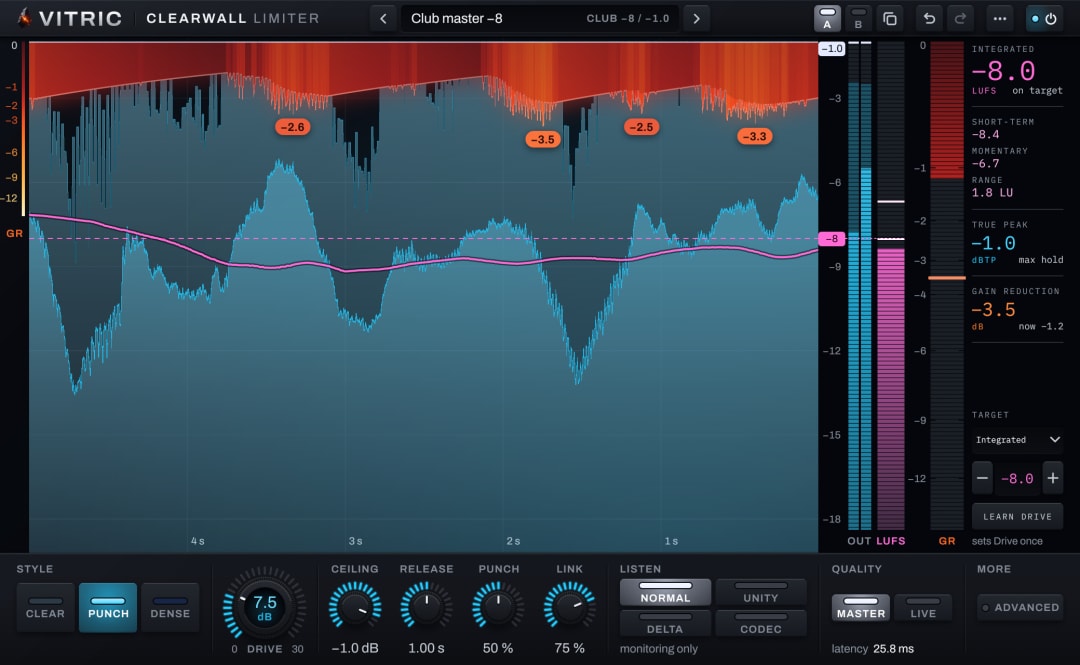
It matches measured loudness rather than subtracting the Drive, and the two are not the same number. In the frame below, Drive is at 7.5 dB, and Unity turns the output down by 6.2 dB to match the input. Limiting took back some of the peaks that Drive raised, so the master rose less in loudness than the Drive setting suggests. Turning it down by the full 7.5 dB would leave the limited version quieter than the input: a bias in the other direction.
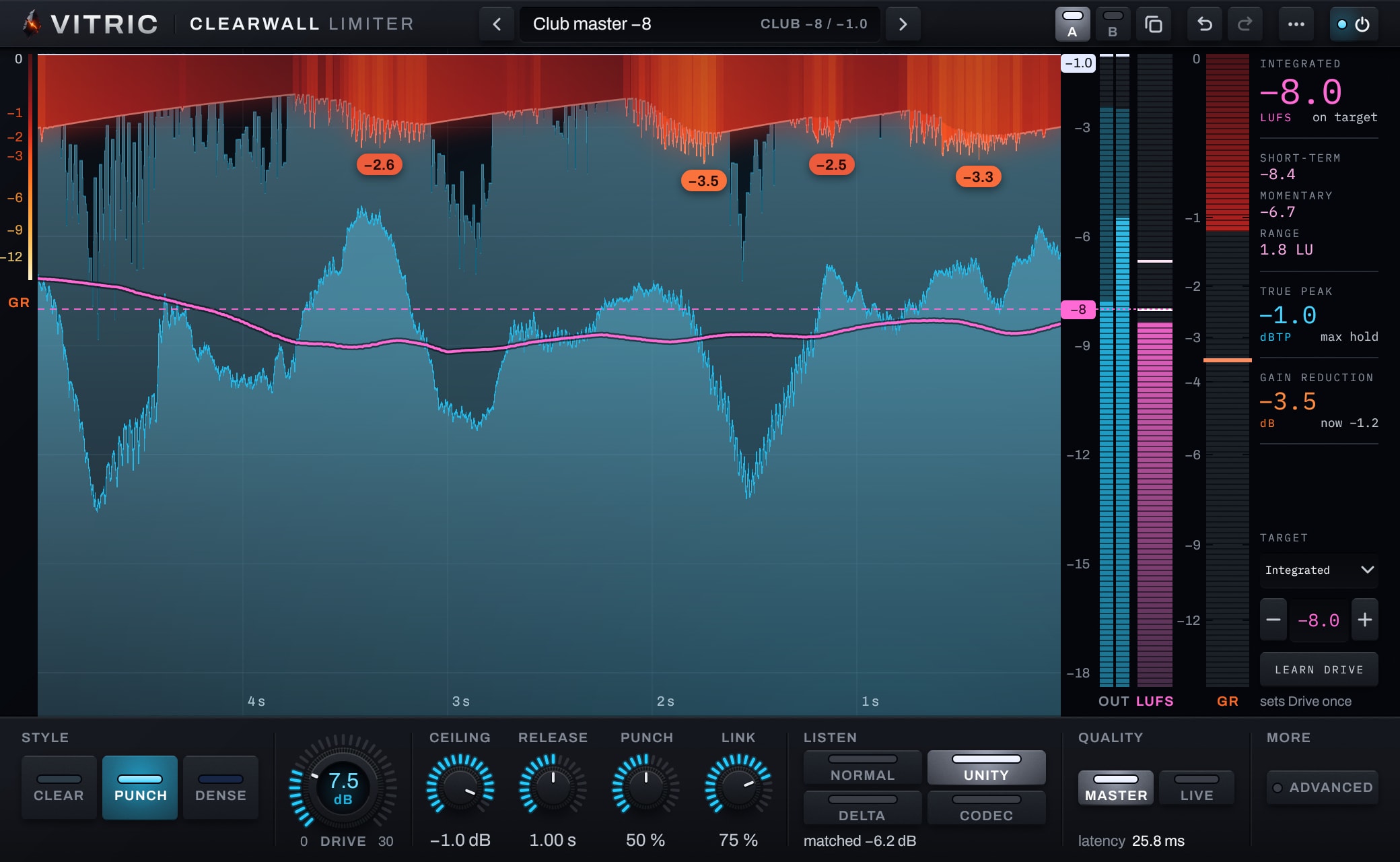
Delta plays the delayed input minus the output scaled back down by Drive: exactly what the limiter took away. Silence means it is taking nothing. Listen for what is in it. Short ticks at the front of drum hits are the peaks you asked it to take. If you can hear the body of the kick, the tone of the bass or the words of the vocal in Delta, the master is giving away more than its peaks.
Codec, on macOS, plays the output through an AAC 256 kbps encode and decode, 0.15 to 0.2 seconds late, so you can hear what a streaming encode does to a loud master. Lossy codecs add peaks when they decode, and the opt-in Codec margin holds the ceiling 1 dB lower while the short-term loudness is above -14 LUFS (fading in from -16). Measured at -8 LUFS over four mixes and five codecs, it moved the median decoded true peak from -0.09 to -0.95 dBTP. It is off by default because it costs 1 dB more limiting, and it does not make every codec safe: low-bitrate codecs can still decode over 0 dBTP on dense mixes.
All of the Listen modes are for monitoring. An offline bounce always prints the normal output; a real-time bounce or recording captures what you hear.
Here is the same 16 seconds of a beat, first as it went into Clearwall, then through the Punch style at its defaults with Drive set to reach -8 LUFS against a -1.0 dBTP ceiling. The printed master read -7.99 LUFS integrated and -1.01 dBTP. It was then turned down by one fixed gain to the input's loudness, the way Unity works, so what changes between the two clips is the limiting, not the level.
Input: the beat before Clearwall
Clearwall, Punch at -8 LUFS, matched to the input's loudness
Master and Live
Master runs every stage, with a fixed latency of 1,237 samples (25.8 ms at 48 kHz) reported to your host for delay compensation. Live is for playing or recording through the master bus: 410 samples, 8.5 ms at 48 kHz, and under 10 ms at every standard rate from 44.1 kHz. To get there it leaves out the bass band path and the 20 kHz containment, caps Attack at 1 ms, and holds the ceiling 0.05 dB lower, so a -1.0 ceiling reads -1.1. Print the final master in Master, with Contain, the 20 kHz containment, left on as it is by default.
| Sample rate | Master | Live |
|---|---|---|
| 44.1 kHz | 26.9 ms | 9.0 ms |
| 48 kHz | 25.8 ms | 8.5 ms |
| 88.2 kHz | 22.6 ms | 6.2 ms |
| 96 kHz | 22.4 ms | 5.9 ms |
| 176.4 kHz | 21.2 ms | 4.7 ms |
| 192 kHz | 21.1 ms | 4.6 ms |
The sound doesn't change with the rate either. At a fixed Drive, the loudness at every rate from 44.1 to 192 kHz came out within 0.035 LU of the 48 kHz render.
What you hear is what prints
The plugin's engine also runs as a command-line renderer, and the two agree exactly: the VST3 renders bit-identically to the engine in all three styles, 0 of 950,400 samples different. The engine's 630 reference renders produce identical hashes on macOS (Apple silicon), Linux and Windows. The bounce is the sound you heard in the session.
The same rule runs through the smaller parts. Bypass plays the input delayed by the plugin's latency, with a 10 ms crossfade, so toggling it never shifts your timing, and the meters keep reading while it is bypassed. The loudness meters follow ITU-R BS.1770 and are checked against the EBU Tech 3341 and 3342 test signals for integrated, short-term and momentary loudness, true peak and loudness range.
Where to start
- Put Clearwall last on the master bus.
- Pick a preset by where you want to land: Streaming master -14 or Transparent master -10 in Clear, Club master -8 in Punch, EDM master -6 in Dense. Each one sets a -1.0 dBTP ceiling and a target, and none of them moves Drive.
- Loop the loudest section, press Learn Drive, then fine-tune by ear.
- Switch to Unity and compare against bypass. Then check Delta for anything that isn't a peak.
- For a streaming release, try Codec margin and listen through Codec on macOS.
- Export, and measure the file you will deliver with the loudness and true-peak meter.
The Clearwall manual covers every control, the meters and all 15 presets. Clearwall Limiter runs as AU, VST3 and AAX on macOS and as VST3, AAX and a standalone app on Windows, with a free 3-day trial.