JournalRelease notes
Release notes: Burnish Vocal Chain 1.2
Burnish 1.2 can learn your voice from a take, MATCH now does what it says, factory chains play as authored, and the de-esser, tracker, delay and switches are fixed. Songs saved in earlier versions keep their sound.
Burnish 1.2 is a free update for everyone who owns Burnish, KVR buyers included: the same installer, and your key keeps working. Download it from Downloads. Projects saved in earlier versions keep their original sound.
Burnish can now learn your voice
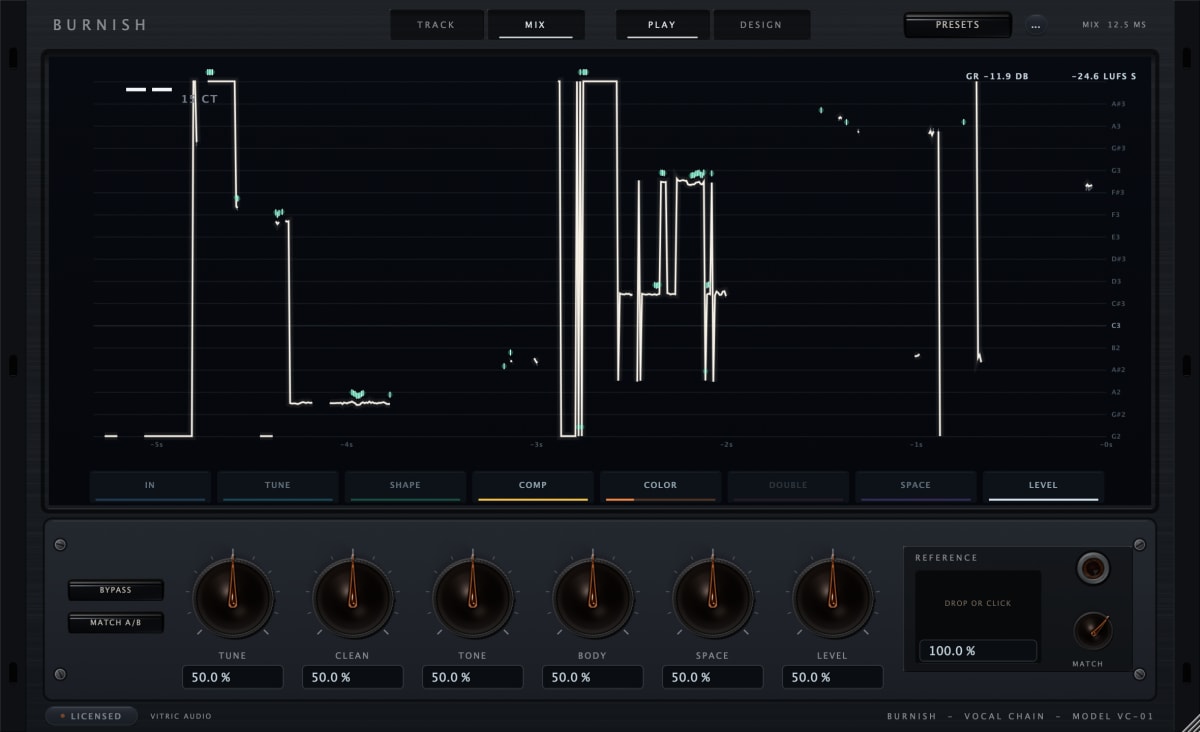
Press LEARN in the reference dock and play your take through the track. Burnish listens for about ten seconds of singing, measures your voice as it comes in and as it leaves the chain, and fits the reference to that measurement. It needs at least four seconds of voice and stops by itself after 45 seconds. Press LEARN again to cancel. Your audio is not stored or saved; only the measurements go into the project.
Before this, a reference could not see your voice at all, so the tone move was a fixed template. With a measured take, 35 of 36 test cases (nine takes against four references) end closer to the reference, and none end worse. That is a measurement on our own ruler, not a promise that one voice will sound like another.
If you load a reference and do not press LEARN, Burnish now says NO TAKE MEASURED and only moves tuning style and space. It does not pretend to match your tone.
MATCH does what it says
- The same MATCH value gives the same chain, however you got there.
- MATCH 0 gives back the chain you had before the fit, including the reverb and the tune path.
- A factory chain plays exactly as authored. All 66 used to be overwritten with the same template (a 3.9 dB low shelf, a presence cut, eased compressors) the moment you picked one.
- The nine hard-tune chains stay on the Classic path.
- The 12 Learn chains turn on one stage each and no longer switch on three EQ bands behind your back.
- A reference file now has to contain a voice. Noise, a tone or a drum loop is refused with a message, and your chain stays as it was. A file under 3 seconds says it needs 3 seconds of sound.
- A full mix moves tone only, and only after LEARN. Its tuning and reverb are the band's, not the singer's.
- The dock now says COULD NOT READ or NEEDS 3 S OF SOUND when a file fails, instead of spinning on ANALYZING.
- M4A, AAC and CAF files work as references on the Mac.
Picking a chain no longer changes your session
- A pick keeps TRACK or MIX, host bypass and MATCH A/B. It used to flip a tracking session to MIX (4 samples to 600 samples of latency) and un-bypass the plugin.
- Stepping through chains during playback no longer clicks. The output dips to the level-matched dry for about 35 ms and fades the new chain in.
- Learn 01 and Learn 12 keep the safety limiter on. Learn 12 used to reach +7.7 dBFS on a hot vocal.
- Reopening a saved session shows the reasoning lines again, the right preset name, and no phantom reference.
Sound fixes that apply to every song
- The de-esser now reduces esses. Through 1.1.11 it boosted 5 to 12 kHz in sibilant frames by up to about 2 dB while its meter showed a cut. On our test takes, sibilant frames now come down 1 to 4 dB at the default amount.
- De-harsh no longer dulls the first second of a phrase after a pause.
- Shape and Compress now give bit-identical audio at any buffer size (checked at 64, 512 and 4096 samples).
- Delay feedback can no longer run away. A high Feedback with Tone at either end used to climb past full scale and then fall silent. It now decays.
- High notes track correctly. Notes above about 550 Hz at 44.1 and 48 kHz used to be heard an octave low, and Natural added an octave-down growl under them.
- Natural now plays your vowels at its reported 12.5 ms instead of drifting several milliseconds early or late.
- Hard tune (Classic) no longer replays a fragment of the vowel at the end of a note.
- With every note switched off, the tuner passes your voice through instead of pulling it to one note. Switching a note off releases it at once.
- Throat works at Correction 0 on the Natural path.
- Stage switches, the high-pass, the gate, EQ bands, compressors, saturation, air, the doubler, reverb, the limiter and its ceiling now fade instead of stepping. On a steady vowel at 32-sample blocks each switch reads a few dB or less over the high-frequency floor. In 1.1.11 some switches read more than 30 dB over it.
- Delay time, Pre-Delay, widths and Formant moves glide without clicks. Reverb and the doubler no longer play ghosts of old audio when you switch them back on.
- Ping-pong bounces left, right, left on the division you chose.
- Anti-phase stereo input is now processed like mono instead of being ignored by the gate, compressor and effects sends.
- A host reset (stop, locate, bounce start) now clears reverb, delay and rider state, and a reset instance sounds like a new one.
- The tail length Burnish reports to your DAW is correct (4.9 s at defaults, up to 24 s for a long hall), so hosts stop cutting tails early.
- Loading a reference no longer risks a crash when you close the window mid-analysis, and closing a project during an analysis no longer freezes the window.
- Windows: Design view no longer comes up empty on displays with no vertical-sync output, and the fast FFT used on the Mac is now used on Windows as well.
Sound changes in new songs only
Sessions saved by 1.1.11 or earlier keep their original sound for the settings below. New instances, new chain picks and new saves use the 1.2 sound. You never get a silent upgrade.
- The input high-pass now sits at the frequency it shows. At 80 it used to be 12 dB down at 80 Hz and thinned the voice up to about 300 Hz. The default chain on our test takes gains 1.6 to 4.1 dB between 80 and 160 Hz.
- Breath control only ducks breath-like sounds between phrases. Consonants and soft notes are left alone (they used to lose 1 to 4 dB), and SENS now works in the direction it is labelled.
- Reverb Decay is the time you read. A 1.6 s plate used to ring for about 4.5 s; it now measures 1.55 to 1.71 s in all six spaces.
- Ducking is relative to your voice. Duck at 1 takes about 12 to 14 dB off a reverb and 7 to 9 dB off a delay whether you recorded hot or quiet. It used to be 4 dB or less on a quiet take.
- The rider lands on its target. Through 1.1.11 a target of -18 delivered about -15 LUFS on a real meter. It now delivers -18, and it rides quiet takes it used to skip.
- Compressor attack and release are the times shown. MANUAL 10 ms and 400 ms used to measure 28 ms and 104 ms. The sidechain high-pass sits at its readout.
- The six PLAY macros keep moving above 12 o'clock. TUNE tightens correction all the way up, and CLEAN also scales Breath and Cleanup.
- A one-sided stereo input (a mic on input 1 of a stereo track) plays centred.
- A new instance plays at full level from its first sample instead of fading in over 20 ms.
Smaller things
- The host shows readable values and units: 4.0:1, 80 Hz, 12.0 kHz, 1.6 s, -18.0 LUFS. Typing 12 kHz, 0.5 s or natural into a host now works.
- A knob that cannot act says why on its plate (TOP / OFF, LOW / CUT, THROAT / CLASSIC) and keeps its value. Touching an EQ band's gain switches the band on.
- Double-clicking a station tile switches every processor in that station and a second double-click brings them back.
- The note keyboard shows exactly which notes the tuner will use.
- Space now starts and stops your DAW even when a Burnish control has focus. Use Enter to operate a control.
- Hovering a macro says 50 % is neutral. Several tooltips now use the units the readout shows.
- The PRESETS plate shows a preset's target as PRESET TARGET, not as a reference you loaded.
- Idle windows no longer repaint, and the trace no longer replays a phrase sung minutes ago when you reopen the window.
Numbers
- CPU at defaults, 48 kHz with 128-sample blocks, Apple Silicon: about 1.7 % of one core (1.6 to 1.7 % across the release runs; 1.1.11 measured 1.7 to 1.9 % beside it).
- A bypassed instance still runs the whole chain, so BYPASS and MATCH A/B stay latency-aligned. It costs about what an active one does.
- Latency: Track 4 samples (0.08 ms at 48 kHz). Mix with Natural 12.5 ms, plus 5 ms with the gate on.
- Saved sessions: 1.2 projects open in 1.1.11 with all 131 parameters intact. 1.1.11 projects open in 1.2 with their original sound.
Good to know
- Burnish is a lead-vocal chain. On a mono track in Cubase, Nuendo or Studio One the track stays mono after the plugin, so the doubler and ping-pong width collapse. Use a stereo track for width.
- Colour aliasing at the highest Present drive is unchanged. We built a fix, measured it on real vocals and it made the top octave worse, so it did not ship.
- The limiter is a sample-peak limiter with its ceiling in dBFS. It is not a true-peak limiter, and the output trim sits after it.
The Burnish manual covers every control. Burnish Vocal Chain runs as AU, VST3 and AAX on macOS and as VST3 and AAX on Windows, with a free 3-day trial.