What is a de-esser?
A de-esser reduces harsh s and sh sounds only when they occur. Learn how detection, threshold and range work, and where to put one in a vocal chain.
A de-esser is a dynamics processor that reduces sibilance: the sharp s, sh and z sounds that can jump out of a vocal. It listens for energy in a chosen frequency region and turns the sound down while the offending consonant happens. Between those events, the vocal should keep its brightness and articulation.
What does a de-esser do?
A static high-frequency EQ cut lowers every sound in that region: vowels, breaths and detail as well as esses. A de-esser makes the reduction conditional. When the detector hears a sibilant event it requests attenuation; when the event ends the gain recovers.
That makes it useful after compression or brightening EQ has brought consonants forward, and on a recording that was sharp at the microphone. It does not repair clipping, remove room echo or replace a pop filter for plosives. The companion guide to what sibilance is covers the voice, microphone and recording choices behind the problem.
How does the sidechain detect an ess?
The sidechain is a listening path used to decide how much gain reduction to apply. It is usually fed internally by the same vocal, so de-essing does not require another track routed into a sidechain input. Filtering this listening path focuses the detector on the high-frequency band where the consonants stand out.
A basic detector compares the band's level with a threshold. Other designs also compare it with the level or spectral balance of the surrounding voice. A relative threshold can follow a performance that gets louder in the chorus. Either way, a bright vowel should not automatically be treated as an ess.
The detection band and the reduction band are different ideas. The first decides when to act; the second describes which frequencies get quieter. Some designs connect them closely. Others listen to a narrow band but reduce a broader region or the entire signal.
Split-band vs wideband de-essing
| Approach | What gets reduced | What to listen for |
|---|---|---|
| Split-band | The selected high-frequency region; the lower region passes through | Esses soften while the body stays steady; too much makes the top sound dull |
| Wideband | The whole signal, triggered by the sibilance detector | The event keeps its spectral balance; too much creates an audible dip in the word |
Try split-band when the hiss needs less treble but the body of the voice should stay put. Try wideband when lowering the whole event sounds more natural than reshaping it. Neither is always cleaner. Listen to the consonant and the vowel immediately after it, rather than choosing whichever mode shows less gain reduction.
A dynamic EQ band can do a related job with a bell or shelf. It is useful when the problem is a narrow harsh spot. A de-esser's dedicated detection and audition controls can make repeated vocal consonants easier to manage.
How do you set frequency, threshold and range?
Frequency: where to listen
Loop a phrase with several esses and some clean vowels. Start listening around 5 to 9 kHz for a sharp s; a sh may need attention lower down, around 3 to 5 kHz. These ranges overlap and vary with the voice and microphone. Use a band-listen function if available, and return to the full signal before deciding on the setting.
Threshold: when to act
Lower an absolute threshold until the harsh consonants trigger reduction while ordinary syllables mostly pass. There is no useful universal dBFS threshold: changing the input gain changes how much the detector sees. Recheck quiet lines and loud sections, or use a relative threshold when the de-esser offers one.
Range: how far it may go
Range caps the maximum reduction; it does not set how often the detector triggers. Start with a 3 or 4 dB cap and listen for the esses to sit level with the phrase. A single extreme syllable may need clip gain rather than a deeper setting that dulls every other word. An Amount control may set a target balance instead of acting like a conventional compressor threshold, so check its definition.
Timing: how the reduction follows the event
Attack must catch the leading edge of the hiss, and release should recover before the next vowel loses detail. Start from the de-esser's default timing. If the initial s still spits, try a faster response; if the next syllable stays dull, shorten recovery. If the sound flutters, slow it down. Timing labels and available controls differ between designs.
Where does it go in a vocal chain?
A practical starting order is clip gain, corrective EQ, compression, brightening EQ, then de-essing before the reverb and delay sends. This lets the de-esser hear the tonal balance you will actually send into the effects. A long reverb tail can spread a sharp ess across the gap after the word.
If the raw esses are driving unwanted gain reduction in the main compressor, put a gentle de-esser before it instead. If later EQ or saturation brings them forward again, a second light pass can help. Check the combined effect: two stages removing 3 dB at the same moment can still overdo the word. Revisit both after changing the upstream EQ or compressor.
How do you avoid lisping and dullness?
- Keep the consonant. The aim is a believable s, not its disappearance. Lower the range or amount if the singer seems to change pronunciation.
- Check the removed signal. Hiss is expected; strong vowel tone suggests you are taking useful vocal detail. Revisit the band, threshold and recovery time.
- Do not tune only in solo. A vocal that sounds soft alone can disappear behind cymbals. Make the final decision with the mix playing at a comfortable level.
- Check the backing vocals. Several small esses arriving at different times can make a stack hiss. Edit obvious timing problems and audition gentle processing on the group.
Set up Chamfer De-Esser on a vocal
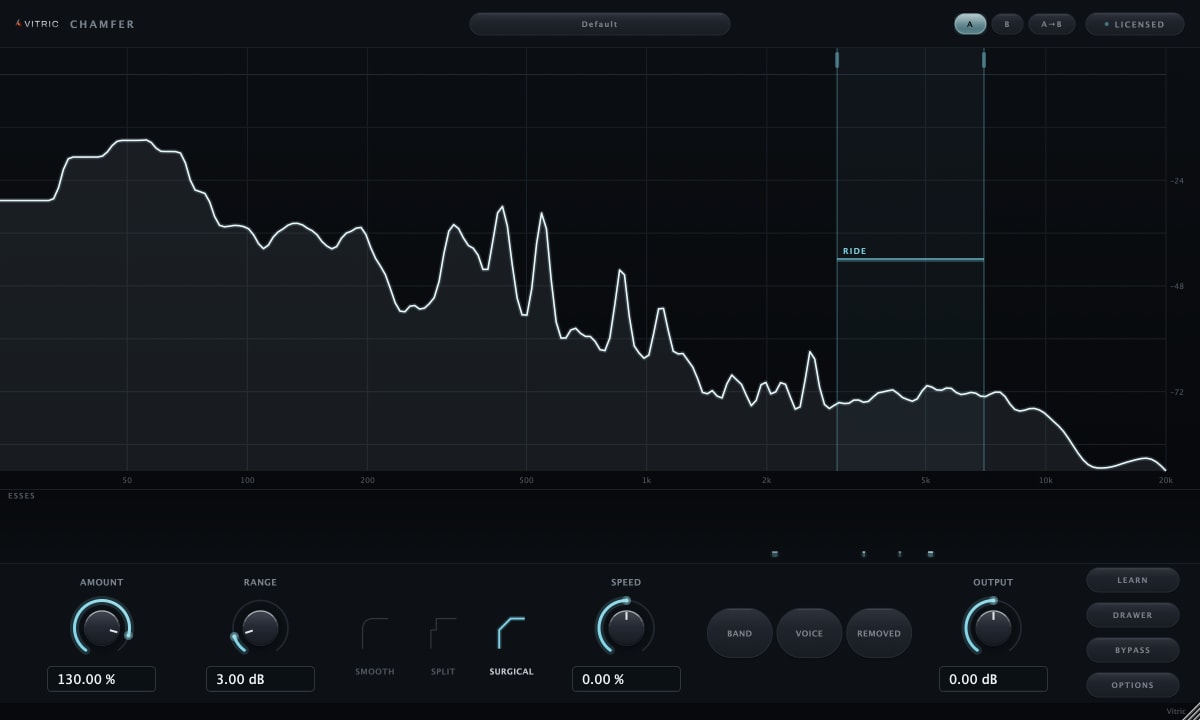
Vitric's Chamfer De-Esser has a Relative threshold that follows the performance level. Play a representative phrase with several esses, then press LEARN to place the detection band, calibrate the relative threshold and suggest an Amount. Adjust Amount for the ess-to-body balance, and lower Range from its 6 dB default if you want a gentler cap.
Its Smooth, Split and Surgical styles shape the reduction differently. Band lets you hear the detection region, Voice plays the input outside that band, and Removed plays what processing takes away. Return Listen to Off to judge the whole vocal. For recording, Live reports zero plugin latency; Precise reports 191 samples. Surgical uses the Split path in Live, so compare again when changing latency mode. The Chamfer manual explains the controls and their mode-specific behavior.