Wavetable, analog and sample synths: what's the difference?
Compare wavetable, analog-style and sample synthesis. Build bass, plucks and pads for hip-hop, trap and R&B, then use modulation to make them move.
Wavetable, analog-style and sample synths start with different sound sources. A wavetable oscillator moves through stored waveform shapes. An analog-style oscillator generates shapes such as saws and pulses. A sample oscillator plays a recording. Filters, envelopes and modulation shape what happens next.
Does VST tell you what kind of synth it is?
No. When browsing VST plugin synths, separate the plugin format from the synthesis method. VST describes how a plugin connects to a compatible host. It does not tell you whether the instrument uses wavetables, samples or modeled analog oscillators. An audio-effect plugin can use that format too.
Likewise, an analog-style software synth runs digital code. It is not a physical analog circuit inside the computer. The term describes the oscillator and signal-path approach it models. Hardware analog synthesis uses electrical oscillators and circuits; a plugin can recreate aspects of their behavior with computation.
How do the three sources compare?
| Source | Starting material | Useful for | First edit to try |
|---|---|---|---|
| Analog-style | Sine, triangle, saw or pulse waves | Sub bass, rounded leads, filtered chords | Filter cutoff and its envelope |
| Wavetable | A table of short waveform frames | Moving bass tones, changing pads, sharp plucks | Table position and modulation depth |
| Sample | A recorded sound | Vocal textures, recorded attacks, found-sound keys | Start point, pitch and amplitude envelope |
These are useful tendencies, not genre boundaries. Wavetables can make a plain sub, analog-style oscillators can make an evolving pad, and a sample can be a single simple waveform. The source is only one part of the patch.
What is analog-style synthesis good at?
A subtractive patch starts with a waveform, removes some of its spectrum with a filter, and shapes its level over time. A saw contains a rich series of harmonics. A pulse has a different balance that changes with pulse width. A sine contains only the fundamental, so a low-pass filter has little to remove until its cutoff reaches that frequency.
For an 808-like trap bass, begin with a sine or triangle, use a fast amplitude attack and set decay to fit the bass rhythm. Lower sustain for notes that fade while held; raise it if the line needs to hold its level. Leave a short release so note endings do not stop abruptly. Audition a brief downward pitch envelope for an initial knock.
For rounded R&B chords, try a saw with a low-pass filter. Begin with a 10 to 30 ms amplitude attack and a 200 to 500 ms release, then adjust for the gaps in the part. A small filter-envelope movement can bring the chord forward at the start and let it settle behind the vocal. Listen before adding detuned layers: more oscillators also mean more low-mid energy.
What makes a wavetable synth different?
A wavetable is a collection of waveform frames, often each representing one cycle. The oscillator repeats a frame at the played pitch, and its position control selects or blends between frames. Moving that position changes the harmonic shape without necessarily changing the note.
That is different from playing through a whole recording. A slow table scan can turn a smooth tone into a hollow or bright one during a held note. The result depends on the table: adjacent frames may change subtly or make a dramatic jump. Listen through the table before choosing the modulation range.
For a trap pluck, pick a bright frame and use a short amplitude decay with little sustain. Route an envelope to table position so the attack starts brighter and the tail settles into a simpler tone. Start with roughly 100 to 300 ms of decay, then shorten it if the pattern crowds the hi-hats or vocal.
For an R&B pad, try a slow LFO moving a small distance around one table position. Use a softer attack and a longer release than the pluck. A wide scan can make every chord sound like several different patches; a narrow scan often supplies enough movement underneath a singer.
What is a sample synth good at?
Sample playback starts with recorded audio rather than a continuously generated oscillator shape. A breath, struck object or keyboard note already contains a changing attack and spectrum. That detail can be difficult to build from a few simple waves.
In ordinary resampled playback, playing higher notes speeds the recording up and makes it shorter; lower notes slow it down and make it longer. Pitch-preserving time stretching is a separate capability. Do not assume every sample synth offers it, multiple velocity layers or a separate recording for every key.
For a hip-hop key sound, record a short struck object or use a recording you have permission to use. Set its start just before the useful attack, tune its root note, and shape the tail with the amplitude envelope. Moving the start past the transient gives a softer sound, but can also remove the part that made the recording interesting.
For a breathy R&B pad, loop a stable section of a vocal texture and soften the amplitude attack. Listen for a click at the loop boundary. A crossfade can soften the join, but a changing pitch or noisy loop may still sound uneven. Choose the loop by ear across the notes you intend to play.
How does modulation make a patch move?
Modulation connects a changing source to a sound parameter, the destination, with a depth that controls how much it moves. For example, an envelope can lower a filter cutoff after each note starts, while an LFO can open and close it repeatedly during a held chord.
- Envelope: a shape triggered by a note. Attack sets its rise, decay moves toward the sustain level, and release describes the fade after note-off. Sustain is a level, not a duration.
- LFO: a low-frequency oscillator used as a repeating control signal. Route it to pitch for vibrato, level for tremolo or cutoff for repeated changes in brightness.
- Velocity: the force of the played note can control level, brightness or another assigned target. A softer key press need not produce only a quieter copy.
- Macro: one performance control can move several destinations with different depths. Its effect depends on the routes assigned in the patch.
Set the destination's base value first, then add a small depth. An LFO around a useful cutoff can add movement; a large depth may close the filter so far that notes vanish. Change one route at a time and play a phrase, including short notes, long notes and different velocities.
How can you combine the sources in Kiln?
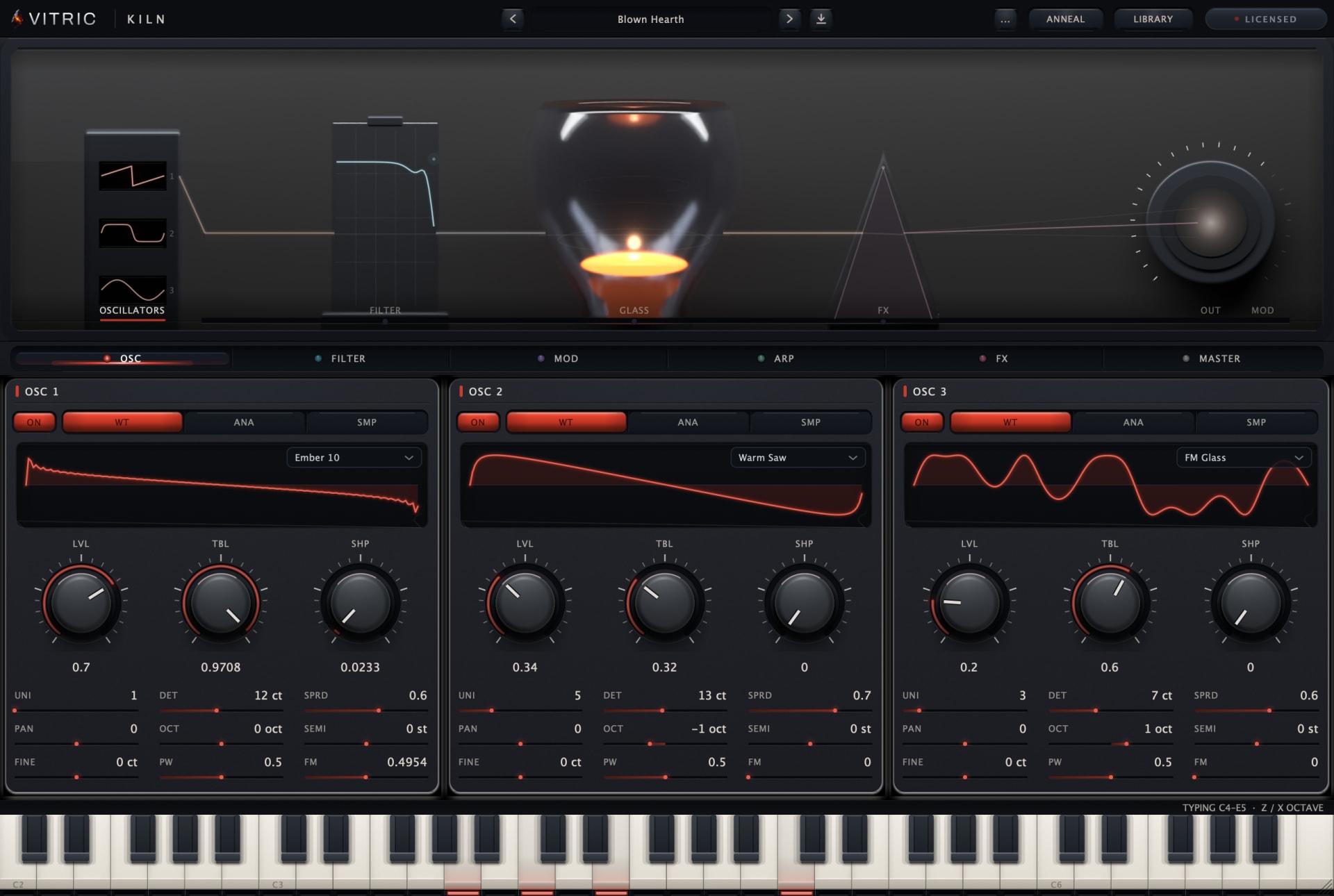
Kiln Synthesizer has three oscillator slots, each selectable as WT, ANA or SMP. WT uses TBL to scan a wavetable. ANA uses SHP to move through sine, triangle, saw and pulse, with PW for pulse width in the pulse region. SMP loads a WAV, AIFF or FLAC recording and provides start, loop, crossfade and reverse controls.
- Build the main voice first. In OSC, choose one slot and one source. Set its level and play the actual bass line or chords before adding layers.
- Add a distinct job. Pair an ANA bass with a quiet WT layer for upper harmonics, or pair an SMP attack with an ANA body. Lower each slot's LVL as needed when combining them.
- Shape the result. Use FILTER to adjust tone. In MOD, choose a source, destination and a small DEPTH. Inspect existing routes in a loaded preset before replacing one.
- Check the layer in the mix. Mute the extra source and compare. Keep it if it adds definition or useful motion; remove it if it only adds level.
Kiln's modulation matrix has 48 routes, with four envelopes, four LFOs and four macros among its sources. SMP plays one sample per oscillator slot. The Kiln manual explains the controls, sample storage and routing in detail.
For patches to take apart, the Obsidian preset pack for Kiln focuses on hip-hop, trap and R&B. Load a sound, inspect its oscillator choices and modulation routes, then change one part. Hearing what disappears when you disable a route is often the quickest way to understand what that route contributes.