Forge Compressor: the manual
Installation, activation, the four circuit modes, sidechain routing and session recipes for Forge Compressor. The complete v1.0 reference.
Forge Compressor is a character compressor with four separate circuit behaviours in one unit: FET, Opto, Tube and Clean. They are not presets on a shared engine. Each mode has its own detection topology, ballistics and saturation, built against the 1176, LA-2A and CL 1B workflows plus a transparent modern design. Switch modes and the whole machine re-lights.
This manual covers installation and licensing, a tour of the controls, four session recipes, and a reference for choosing modes. For the theory behind why the feedback-detecting modes feel the way they do, see the guides on the guides index.
Overview
Every mode runs at zero samples of added latency, so Forge sits anywhere: tracking chains, the mix bus, mastering. All four modes share a full sidechain kit (external input, high-pass filter, listen mode), a stereo link control from 0 to 100 percent with the detector following the louder channel, a mix control for parallel compression on the unit, and a click-free bypass crossfade. Attack and release read out in real milliseconds and microseconds per mode. Factory presets, full state recall and total automation are supported.
Formats: VST3, AU and AAX. Platforms: Windows 10 or later (64-bit) and macOS on both Intel and Apple Silicon, in any DAW that loads those formats.
Install and activate
Install the format your DAW uses and rescan plugins if your host asks for it. Licensing runs through the license panel inside the plugin, and every license works the same way: it is a signed file bound to a machine code.
The machine code
The license panel shows a machine code in the form VTM1-XXXX-XXXX-XXXX-XXXX. This code identifies the computer, not you, and it is what a license binds to. The panel can copy it for you.
Starting a trial
Every Vitric plugin has a free 14-day trial, full function, nothing held back. Request it at /license/trial on the site: pick the plugin, paste the machine code from the license panel, enter your email, and the trial license arrives by email bound to that machine. One trial per product per studio.
When the trial ends the plugin drops to demo mode: everything still works, with a short output mute every minute. Nothing is deleted. The plugin stays installed, your settings keep their state, and sessions that use it still open.
Activations and deactivation
A purchased license covers three machines at once. Machines that are online activate from inside the plugin. The license portal at /license on the site lists your activations, and you can deactivate a machine yourself at any time to free the slot for another one. No support ticket required for a routine machine swap.
Offline activation
Studio machines that never touch the internet activate through the portal from any other device. Enter your license key and the machine code the plugin shows on the offline machine, download the license file, carry it over, and load it in the plugin's license panel. The portal can also resend a lost key.
Interface tour
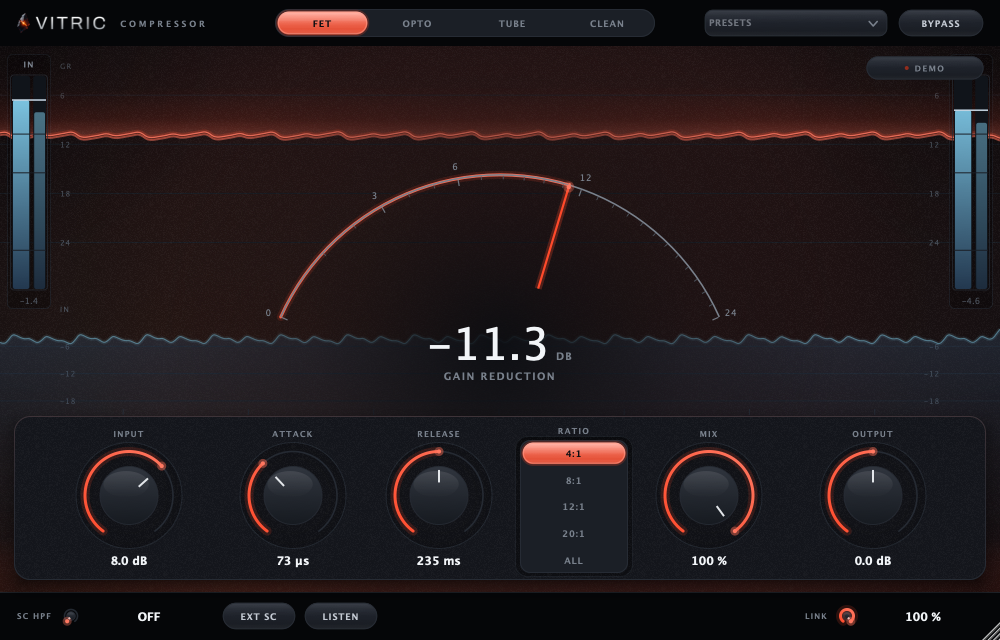
The unit is organized around the mode switch and a black glass gain reduction display. Selecting a mode changes the light, the available controls and the machine's behaviour.
- FET. The 1176 move. Attack reaches into the microseconds, the threshold is fixed and the input level drives the compression, and ratio is set with buttons from 4:1 to 20:1 plus ALL for the all-buttons-in sound. Detection is feedback style, reading the already-compressed signal, with program-dependent release. Asymmetric grit scales with how hard you drive it.
- Opto. An LA-2A style cell with two-stage release and light memory: the harder it works, the slower it lets go. Peak reduction drives the detector only, so the audio path stays clean while the gain rides feel played rather than processed. Second-harmonic warmth rounds the top.
- Tube. A CL 1B style wide soft knee that compresses long before the needle admits it, with biased-tanh harmonics and auto makeup gain.
- Clean. Feedforward detection with exact knee math, auto release, auto makeup and zero added colour. Textbook dynamics with nothing on top.
- Sidechain section. Switch between the internal detector and an external sidechain input, filter the detector with the sidechain high-pass, and use listen mode to hear exactly what the detector hears. Works in every DAW that routes a sidechain.
- Stereo link. Continuous from 0 to 100 percent. Linked detection follows the louder channel, so a hit on one side pulls both channels together instead of lurching the image.
- Mix. Wet/dry blend for parallel compression without a duplicate bus. Safe to automate, like every other control.
- Bypass. A click-free crossfade, so A/B decisions are about the compression, not the pop.
Workflows
Drum bus
FET at 4:1 with the attack backed off. The microsecond-capable attack stage, deliberately slowed, lets the transient through and then grabs the room behind it. For parallel crush, push into ALL and dial the result in on the mix knob instead of a parallel bus: full crush at the detector, proportion under one finger.
Lead vocal
Opto. The cell rides a vocal the way the classic does: fast enough to catch, slow enough to breathe, and because of the light memory it releases slower the harder the phrase pushes. Loud sections settle instead of pumping back up. If low-end plosives are driving the detector, raise the sidechain high-pass and confirm with listen mode.
Mix bus glue
Tube, aiming for 1 to 3 dB of gain reduction. The wide soft knee starts working before you can hear it working, so the record holds hands without pumping. Auto makeup keeps the level honest while you find the depth, which matters: louder always votes for itself in an A/B.
Mastering lid
Clean. Exact knee math and auto release keep a master controlled without leaving a fingerprint, and zero added latency means it sits anywhere in the chain. If the master needs tonal work rather than a lid, do that upstream with an EQ such as Bevel EQ and let Clean stay a pure dynamics stage.
Reference: which light to reach for
| Mode | Character | Detection | Reach for it on |
|---|---|---|---|
| FET | Fast, aggressive, gritty | Feedback, program-dependent release | Drum bus, parallel crush, bass |
| Opto | Slow, smooth, musical | Feedback, two-stage release with memory | Lead vocals, bass guitar, levelling |
| Tube | Warm, rounded, forgiving | Feedback, wide soft knee | Mix bus glue, keys, full mixes |
| Clean | Transparent, exact | Feedforward, exact knee math | Mastering, anything that must stay pure |
Colour follows the same split. Per-mode saturation sits after gain reduction: FET grit grows with drive, Tube and Opto add second-harmonic warmth, Clean adds nothing.
FAQ
Is the FET mode like an 1176?
It is built against that workflow: attack into the microseconds, a fixed threshold with the input driving the compression, ratio buttons, and an ALL mode for the all-buttons-in sound. Detection is feedback style with program-dependent release, which is where the hardware's character comes from.
What is the difference between the four modes?
They are four separate circuit behaviours, not one engine with presets. FET is fast and gritty, Opto rides slowly with release memory, Tube glues through a wide knee with warmth, and Clean is a transparent feedforward design. Each mode has its own detection, ballistics and saturation.
Does it add latency?
No. Every mode runs at zero samples of added latency, so it works anywhere: tracking chains, mix bus, mastering.
Can I sidechain it from another track?
Yes. It accepts an external sidechain in every DAW that routes one, with a sidechain high-pass filter and a listen mode so you can hear exactly what the detector hears.
What happens when my trial ends?
The plugin switches to demo mode: everything still works, with a short output mute every minute. Nothing is deleted and sessions that use it still open, so activating a full license picks up exactly where you left off.
Support
Questions, activation trouble, or a machine that will not free its slot: write to support@vitricaudio.com. Purchases carry a 30 day money back guarantee, so if Forge does not earn its insert in your sessions, say so and we refund it.